
v8ui floating windows

Hi,
is it possible to create a floating windows only with a v8ui object.
The idea is to see the v8ui in the m4l device and be able to zoom it in a floating window.
Ideally I don't want to duplicate the object in patcher for cpu consumption.
For now I'm embedding the v8ui object in a bpatcher using [pcontrol] to open a floating windows with the v8ui inside.
As [thispatcher] is not working with bpatcher (which is a big limitation) pcontrol is ok but not ideal.

I can spot two issues from what you say: v8ui works badly if you have multiple views of it at different sizes, and you cannot have a floating bpatcher window.
So what you could do instead is to have
one v8ui instance in the main patch for the "embedded" view
a second v8ui instance in a subpatcher ([p], not [bpatcher]) that you can open as a floating window
possibly disable drawing on the embeded v8ui when the floating window is opened.
If your v8ui not only displays stuff but is also critical for processing data, then you need to make sure that only one of them is processing data, and probably always the same, depending on the logic and amount of data.
A second solution that might actually be simpler to implement is to draw your mgraphics canvas into a jitter matrix that you could then display either in a jit.pwindow (embedded version) or a floating jit.window. See this patch to know how to go from mgraphics to matrix.
You could even use v8 instead of v8ui for this (mgraphics would still work).
ok - your answer confirmed me what I was suspecting.
I have to found the best solution.
Maybe I'll split the device between graphic and data ...
For now it's "ok"
MGraphics is too far from where I am in the development
Does that mean that you'll tackle the UI drawing part later on, or that you are using sketch or something else for now?
Maybe I'll split the device between graphic and data
This might be the best bet in the long term. Doing so will force you to format data in a way that is easily transferable from one Max object to another (probably as a dict or array depending on the nature of your data).
Also, I don't know if it matters in your case, but v8 objects don't run in the scheduler thread like most other Max objects, which means that if timing accuracy is critical, you might want to process your data outside of v8 anyway.
But if timing is not critical, then the simplest method might still be to rely on only one v8 for data processing + drawing, pass the image as a matrix that you'll draw to a [jit.pwindow] or [jit.window]. Main caveat would be if you need interactions. With v8ui you can use the very convenient onidle() , onclick(), onscroll(), ondrag(), etc. But if you rely on jitter objects for drawing, then you'll be left with their right outlet output giving you the mouse position and click state on hover, and work from that.
This might be the best bet in the long term. Doing so will force you to format data in a way that is easily transferable from one Max object to another (probably as a dict or array depending on the nature of your data).
I thought I could do that but the graphic and note generation are intricate.
I don't need a "perfect" timing, not at an audio level.
The v8ui is parsing data and graphics is only the visualisation no interaction.
Does that mean that you'll tackle the UI drawing part later on, or that you are using sketch or something else for now?
sorry I mixed up to things, I'm using Mgraphics for the UI that work perfectly fine for my device !
I only wish that we could resize a floating window, to get a wider view of the graphic elements.
But the limitation at only patcher and not bpatcher is a shame.
Ok, I thought the idea of having an extra floating view of a v8ui was cool, so I gave it a go, starting from the default v8ui template.
How it works:
Define a floating_view attribute, defining if we want to use the extra view in a floating window
Create a
new JitterObject("jit.window")Instead of the default
mgraphicscontext, we draw on a custom one (here calledctx) set to the size of the mgraphics canvas if floating_view disabled, or to twice the jit.window size if floating_view enabled (we double the size to get better results in hidpi screen, although you can disable that in the code)At the end of
paint(), we draw our context into anew Image(), we pass that image to a matrix and send it to the jit.window, and we resize it to draw it in the v8ui as well
This is all you need, although I added a few extra:
Force the jit.window to always be square (just like the default v8ui template, so that both views always have the same aspect ratio, which makes it easier to draw the output in both)
Pass mouse interactions from
jit.window(obtained throughJitterListener) to ondrag(), onclick() to preserve interactions in the floating window.
All my additions to the original code have comments starting with // ***
Feel free to chime in here if you struggle to adapt the logic to your own code!
I only wish that we could resize a floating window, to get a wider view of the graphic elements.
Not sure what you mean here. Unless explicitly constrained, you can definitely resize a floating window.

Maybe a tip about this:
When I open a copy, the floating window starts showing error with jit_matrix
that's an amazing contribution ! thanks you TFL
This all I needed, rescaling / resizing ....
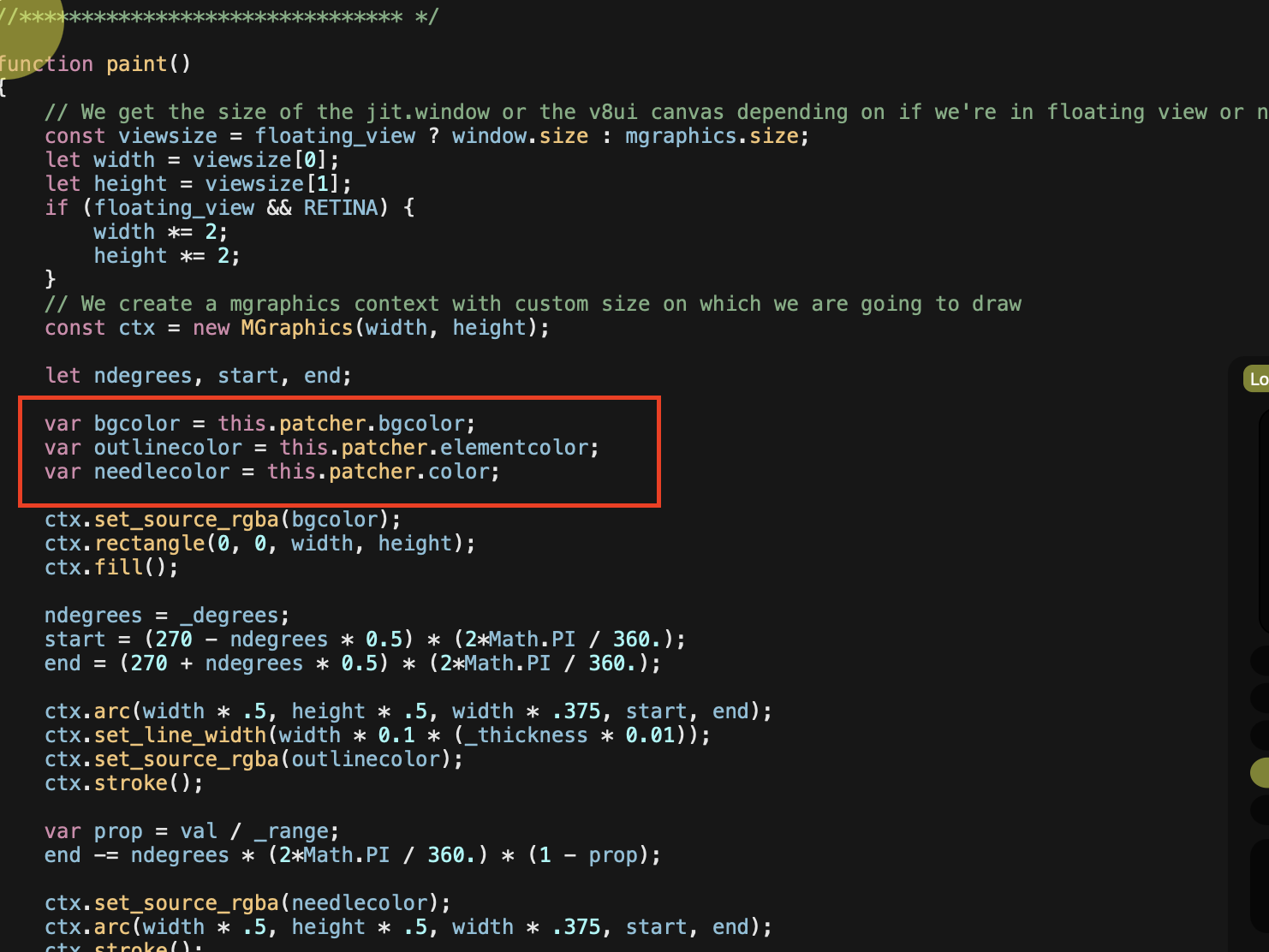
Also. I don't know much about mgraphics- how do I send message to these var?
They not showing up in attributes.
When I open a copy, the floating window starts showing error with jit_matrix
Ah, I forgot to clean some debug code which was outputing the jit_matrix from the outlet. I updated the patch in my previous post.
that's an amazing contribution ! thanks you TFL
This all I needed, rescaling / resizing ....
I'm glad it helped!
I'm glad it helped!
Sooo much !
Also. I don't know much about mgraphics- how do I send message to these var?
They not showing up in attributes.
The template code checks the patchers colors, I guess it's a little trick to match the current theme color, but you might indeed prefer to set those colors manually from the patch.
For simple var variables, they need to be declared in the global scope (not just in paint() like it is the case currently), and then you can set them by sending messages like setprop bgcolor 0.2 0.2 0.2 1 , but it won't cause the object to redraw automatically, so not so good for visual-related variables.
If you want to see them in the object inspector or [attrui], then you need to declare them as attributes using declareattribute().
For a color, it could typically look like such (add this in the global scope and remove var bgcolor = this.patcher.bgcolor; from paint()):
var bgcolor = [0.2, 0.2, 0.2, 1];
declareattribute("bgcolor", {embed: 1, style: "rgba", label: "Background Color", category: "Appearance"});
The category: "Appearance" part makes the attribute to appear under the "Appearance" section of the object's inspector, at the top.
For a color, it could typically look like such...Indeed. Got it! Thanks!
For those who are chomping at the bit about this (no, only me! chomp chomp)
Here is some 'click logic'
one click under 300ms open floating window
hold longer than 300ms and turn original dial (no popup)
(have to click on original dial to close popup window)
@WIL: you can do all that into the v8ui code directly!
The additions:
const doubleClickDebounce = 300; // in ms
const singleClickTsk = new Task(toggleFloatingView);

function toggleFloatingView(){
    setFloating(!floating_view);
}

// ...rest of the code

function onclick() {
    singleClickTsk.schedule(doubleClickDebounce);
    // ...rest of the code
}

function ondrag() {
    if (singleClickTsk.running) singleClickTsk.cancel();
    // ...rest of the code
}

function ondbclick() {
    if (singleClickTsk.running) singleClickTsk.cancel();
    // ...rest of the code
}

function notifydeleted() {
    if (singleClickTsk) singleClickTsk.freepeer();
    // ...rest of the code
}
A few explanation:
When you click on the [v8ui] (or [jit.window], although that's something we might want to prevent from happening), the singleClickTsk Task gets scheduled to run in 300ms (the value of doubleClickDebounce). If a ondrag() or ondoubleclick() event gets triggered in the meantime, we cancel that scheduled singleClickTsk. Otherwise, if nothing happens in the next 300ms (ie. you hold your click without dragging), then it triggers toggleFloatingView() . The behavior is a bit different than in your patch, but I found it a bit more practical (you can perform double clicks to reset the value without toggling the floating view twice).
Regarding the interaction itself, I'm not sure if it's the best idea, there is definitely room for improvement.
EDIT: when you toggle the floating view this way, the [attrui] for floating_view doesn't update itself, it's a known issue. If you lock/unlock the patch it should update.
When you click on the [v8ui] (or [jit.window], although that's something we might want to prevent from happening),I kind of like that you can close and open from both - maybe give an option -
I will be adapting most of my controls to use on screen mirroring when I can afford a new iPad - I don't think all the tiny controls I have jammed into a single device will be big enough for finger (and provided that new Apple OS functions as advertised - and that finger touch click actually works in screen mirroring.)
so I want to try the most comfortable and practical solutions - I can test this with Apple Pencil and start designing sliders and different dial types and sizes and screen placement based on this template. See what feels best.
Thanks!
wow this so cool !
I was able to integrate it to my patch quiet easily !
a limitation that I discovered.
If you select another track, the visualisation stop his animation.
I'm trying to find a solution ...
Ah yes, it's even probably the case as soon as the v8ui isn't visible on the screen.
You can probably tackle that purely in code by storing the computer time of each redraw, and if the delay is too long then the object isn't auto-redrawing anymore and then you can run a Task to do it. If the delay gets too small then the auto redraw is running again and you can stop the task.
With patching you could do something like [active]>[!- 1]>[qmetro 33]>"force_redraw">[v8ui] and force_redraw would be a function that calls mgraphics.redraw() only if floating view is enabled.
I'll try something in a day or two.
Ah yes, it's even probably the case as soon as the v8ui isn't visible on the screen.
exactly, if the device is not visible in the live view, the v8ui stop his animation.
I'll try the force_redraw.
I'll keep you in touch !
@ZEROVALUE, it turns out to be a quite nasty issue, since there is no easy way to know if an object is visible on screen. All solutions I can think of would produce unnecessary redraws.
I don't know how your code is structured, by what you could do for now is simply to call paint() instead of mgraphics.redraw()every time your object changes its state and needs to be redrawn. This will update the floating view as expected, with the only drawback being that you'll probably end up drawing the object twice as much as required when it is visible on screen.
Another not-so-elegant approach but maybe the most versatile and straightforward to implement is a Task calling paint() every 33ms, and in paint() prevent from redrawing if last redraw was too soon. Things to add in the code :
function setFloating(v) {
    // rest of the code

    if (floating_view) {
        autoDrawTsk.repeat();
    } else {
        autoDrawTsk.cancel();
    }
}

let last_drawn = max.time;
let autoDrawTsk = new Task(paint);
autoDrawTsk.interval = 33;

function force_redraw() {
        paint();
}

function paint() {
    let now = max.time;
    if (now - last_drawn < 33) return; // prevents redrawing if last was too recent
    // rest of the code
}

function notifydeleted() {
    if (autoDrawTsk) autoDrawTsk.freepeer();
    // rest of the code
}
EDIT: actually the solution above works but produces a mgraphics: no jgraphics context because you're not supposed to call paint() by yourself. I'm investigating what other options could work.
indeed the graphic is generated continuously independently to the data. But it's an important aspect of the patch.
Maybe it's a cycling side to update the v8ui object to avoid this "issue" too
Maybe it's a cycling side to update the v8ui object to avoid this "issue" too
If you're talking about mgraphics.redraw() not working when an object if off-screen, it is actually a feature. paint() is purposefully not called when the object is fully off-screen since in 99.9% of the cases it would just be waisted resources.
That's why paint() should be used only to draw visuals and not to compute data (in case data need to be computed and sent to other objects).
The problem is either not having a way to force mgraphics.redraw() to execute regardless of object visibility, or to call paint() without error message.
Okay, with the help of Joshua from C74, here is a new version that properly updates the floating view even when the v8ui object is off-screen.
The trick is to move you drawing to a separate paintoffrscreen() function that also draws the floating view, and use paint() only for replicating the result into the v8ui object. paintoffrscreen() needs to be called instead of mgraphics.redraw() when the objects internal state changes.
For now the only caveat I see for this method is that the drawing still occurs if the objects internal state changes even though nothing is visible from it (object is off-screen and the floating view disabled).
I also caped the size of the floating window so that it doesn't get smaller than the v8ui object, which prevents the latter from being pixelated when the floating view was smaller. We could instead compare both sizes and use the biggest one, but I assumed a floating view was meant to be at least as big as the built-in one, hence this approach.
Hi. don't think this helps with off screen situation
but I was playing around with "Pinky" -> (the non-personal free google chat bot)
and came up with some additions
this is vertical slider with overlayed text label and float (0.-1), color attrui, popup size multiplier , text size, text offset x/y
just for fun!
here is separate for horizontal
fixed presentation mode horizontal
initial size of vertatcai is still wrong
//
I will add text to the dial similar to live dial
//
maybe take on a mutislider -
@WIL if you want to mimick vanilla Max objects as jsui/v8ui, or even use them directly with your own custom painting put as a jspainterfile, you can use this repo as a starting point.
It's a compilation of jspainter files reproducing many Max UI objects (including [slider], [multislider], [live.dial]). [live.slider] is not part of it but I could probably implement it without too much difficulties, if you're into sliders with text.
This made me want to try if I could get a floating view of a vanilla object by abusing their jspainterfile. Turns out you can.
Download this jspainter file, save the patch next to it, click the jspainterfile message and you should be good.
This is a very quick and rough attempt, not as refined as the v8ui above in this thread. No mouse interaction (although you could maybe re-implement them from scratch for some objects), no redraw when the object is offscreen (since you can only rely).
This is a silly idea.
Just for fun.
Ok I struggle a bit for implement the TFL's solution to resolve the stuck graphic animation when not displaying the device.
I have to use an LLM for that one.
But : It works fine. (at least I guess - made some stress tests)
One more time Thank you TFL you rock ! !
You're very welcome, and again shout-outs to @joshuakitclayton for helping me out on this!
Shout-outs to @joshuakitclayton !!