
Abletonlive.aaf V2.1 , Import and Export aaf files to and from Ableton live .

Abletonlive.aaf V2.1 is Out
Export Ableton Live Sessions to AAF for Any DAW or NLE
Hi everyone,
Version 2.1 of Abletonlive.aaf is now available, and it does the thing most of you asked for after v2.0: it goes the other way.
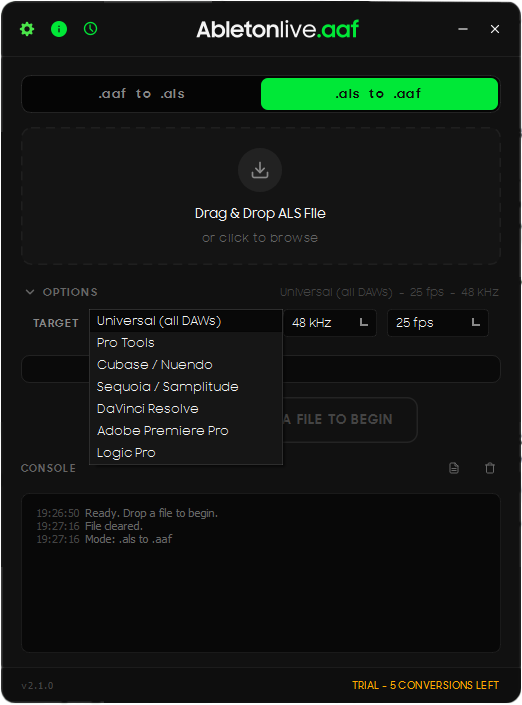
Up to now the app only converted AAF into Ableton Live Sets. Great if you were receiving work, no help at all if you were the one sending it. v2.1 adds ALS to AAF export -- take your Live arrangement and send it to Pro Tools, Cubase, Logic, Resolve, Premiere or Sequoia. That was the "coming next" item on my last post, and it is now here.
New in v2.1:
- Ableton Live Set to AAF export, with seven targets
- Each AAF is written in that application's own dialect, not one generic file
- Target selector, plus timeline frame rate and sample rate
- Batch conversion in both directions
- Audio packaging choice -- copied to a samples folder beside the AAF, or embedded in one self-contained file
- Start offset -- shift a whole arrangement later by bars or seconds on import to Live
- Time-stretch detection -- warped clips are named so you can consolidate them in Live first
- AIFF and AIFF-C source support
- Exported filenames carry target, sample rate and frame rate, so one session exported for four DAWs stops overwriting itself
- Pre-flight now flags MIDI tracks and tracks with effects, which AAF cannot carry
- Redesigned settings panel with every option in one place
Export targets:
- Avid Pro Tools
- Steinberg Cubase / Nuendo
- Magix Sequoia / Samplitude
- DaVinci Resolve
- Adobe Premiere Pro
- Apple Logic Pro
- Universal, for anything else that reads AAF
All six were tested by importing the exported AAF into the actual application. That turned out to be most of the work -- each one wants the timeline, clip gain and media references expressed differently, and files that looked structurally perfect still landed wrong until they were checked for real.
What it transfers (Live to AAF):
- Clip positions and lengths, sample-accurate
- Clip gain
- Volume automation
- Tempo and time signature
- Your choice of frame rate and sample rate
Worth knowing: every export is bound by what that vendor's AAF implementation actually supports. AAF is not one universal format, it is a spec each application implements its own slice of, so what survives the trip depends on the destination as much as on the file. Fades and crossfades are the clearest example, and they are left out rather than exported into something that shifts your clip positions around. The app reports what it could not carry on every conversion, so you are never guessing.
Fixes in v2.1:
- Clips played the wrong section of audio in Pro Tools and Sequoia
- Sample rate mismatch caused Cubase to reject the import
- Clips landed early in DaVinci Resolve
- Clip gain appeared as an automation lane in Sequoia and Logic Pro
- Export failed at 96 kHz and above
- Logic Pro AAF files were analysed as empty
- Pro Tools and Logic Pro are now identified correctly by name
- Exported AAFs no longer reference Ableton's library folder, so they open on any machine
AAF to Ableton Live still does everything it did:
- Audio clip placement with accurate timing
- Volume automation, clip gain, fades and crossfades, markers
- Tempo and time signature
- MXF audio auto-converted to WAV
- DaVinci Resolve stereo tracks split into L/R channels
Requirements:
- Ableton Live 10 or later
- Windows 10/11 or macOS 13+
Free update for existing users -- lifetime updates as always. You can try 5 free conversions before purchasing a lifetime license ($59.99).
Download and more info: https://abletonliveaaf.shop/
Happy to answer any questions. If you have a session that does not convert cleanly I would genuinely like to see it -- nearly every fix above came from someone sending me a file that broke it.