
Circular looper overdub with record~ always resets to beginning

Hi everyone,
I'm building a circular looper in Max using buffer~ / groove~ / record~.
Everything works except the overdub behavior: when I activate overdub, record~ always restarts writing from the beginning of the buffer instead of following the current playhead position of groove~.
I understand this is the native behavior of record~ when it receives an int 1 on inlet 0. The toggle driving the overdub is connected directly to record~ inlet 0, which causes the reset.
I've tried:
Removing the toggle record connection and using gate~ to control the audio signal instead
Using poke~ with the sync output of groove~ multiplied by the buffer size in samples
Neither approach worked correctly in my setup.
The gate~ approach still has issues, and the poke~ approach introduced other problems.
The patch is a stereo looper with blend control (sound-on-sound style), tape noise via gen~, and wow/flutter. I'm attaching a screenshot.
The question: what is the correct, reliable way to overdub into a buffer~ following the exact playhead position of groove~, without resetting the write position on activation?
This is the pathc
Any working example or approach would be hugely appreciated. Thanks!

take a look at patch I posted Mar 24, 2026, 10:49 AM
you can easilly extend it to stereo
or use groove~ as clock master, with few dissadvantages
compared to count~ poke~ index combo.
Thank you as always, I’ve adapted it into a stereo version:)
It works fairly well in my case, with a 48k sample rate and a vector size of 512, which I adjusted in the latency section. However, I still sometimes notice a kind of micro-delay shift in the sound. I’ve tried different resolutions, but the problem seems to persist.
I made a short video of two tracks layered on Bandcamp, captured from my ADC, and you can notice how the first source seems to have a slightly anomalous playback in terms of timbre.
sorry, but I have no time for watching videos.
upload your patch, I am willing to look at it
What is that dial in samplecount path supposed to do ?
you should leave count~ together with latency compensation exactly as it is
in original patch.
Which vector size are you mentioning ?
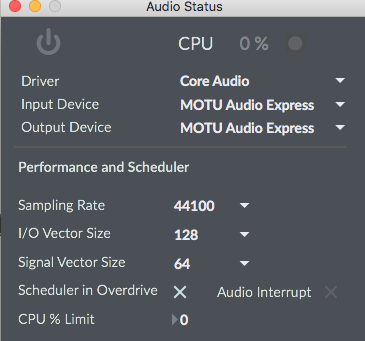
latency should be properly measured for given
audio settings.
this is clean stereo looper:
If you want to vary playback speed, then one could use rate~ and wave for example,
but that is another thing.
Thank you, the looper patch makes it clear. I'll remove the samplecount path and rely on latency compensation as in your version. Appreciated.
can you measure real latency ?
Otherwise it does not really help.
there is or was latency tester patch somewherer in max examples or extras,
I don't know as I delete all that tutorials and similar stuff.
here is a variant of what I suggested,
you can blend normal and varispeed as you want maybe in a single 4 2 matrix~
Thanks for the variant! I can't really explain why, but with this version the micro-delay I was hearing before is gone, and it sounds timbrally much better probably something in the buffer handling makes the difference.
The one thing that doesn't seem to work for me is variable speed in this version it doesn't respond as expected.
thanks
I think you wanted differents speed control,
sync off, and no reverse.
But I will add reverse just in case ...
here is modified patch.
You might want to scale your speed input to rate factor.
I can't add that not knowing the details about range of speed you want.
now normal playback and varispeed playback have own volume control,
last matrix is there just to mute output where needed.
One could do all that using a single matrix~ as well.
varispeed playback is out of sync with normal one,
I would not know how to deal with that myself, also
in terms of overdubbing, but that's what you wanted,
or at least what I understood from the patch you posted.
Thank you for your time and help. The buffer fills correctly (meters show signal), but playback produces no audio. The index~ reads the buffer but nothing comes out of the final matrix~ to dac~. Any idea what I'm missing?
No idea.
if meters at main matrix~ show signal then you have
not set dac~ outputs correctly.
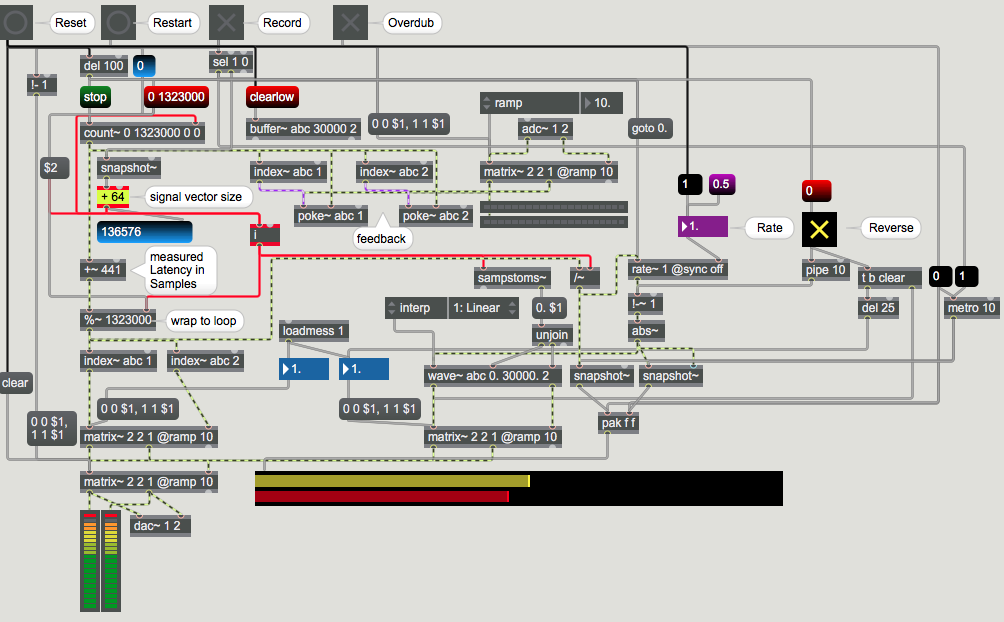
I added reverse toggle init ...