
Live Looping in 2026 - Object suggestions for a novice

Hi all,
I am attempting to create a live audio looper device for my personal use. Ideally this looper has provisions for:
one button operation, i.e., recording audio and instantly playing it back in a loop without intermediate actions by the user
sample-accurate timing of recording (and overdubbing) and playback
sync, for multiple loopers in parallel, and
2ch buffers
I have explored the following objects/externals with mixed results:
karma~ - a lot of people mentioned this one, but it lacks provisions for sync and frankly I could never coax an artifact-free recording/overdub from it.
rez~ - mostly works for what I need except it lacks some features such as resetting the play/rec position when stopped. This is a blocker for me given my use case.
softcut~ - clean sounding loops and playback but not sample accurate, and only supports 1ch buffers.
Eric Lyon's Potpurri (el.sarec~) w/ groove~ - showing promise, wonderful documentation, but I don't see a way of recording in a loop. So the initial record -> playback action is fine, but overdubbing is problematic given there is no sample-accurate way of looping the record head from the end of the buffer to the beginning. I'm probably missing something here.
Live looping seems to be a rather ubiquitous performance technique these days. I am a novice with MaxMSP, so I feel like I'm probably missing some obvious solution to my problem (as is often the case with Max!)
Can anyone suggest some reading material and/or example patchers and/or objects to explore? I have read mention of the xsample~ externals, so I plan on having a look at those.
Thanks!

you can do all that with plain max objects.
easiest part is getting audio record and playback to work,
most work is to get arround loop states and logic arround it.
Thanks for chiming in. I've seen your contributions to the various looping threads and they have been very helpful!
Which "plain max objects" would you suggest I look into? I have seen mention of poke~ and index~ but have yet to dive into them. Any others?
Thanks in advance!
P.S. are you the "SOURCE AUDIO" responsible for the pedals? Love your work if so.

this book will be released for free soon
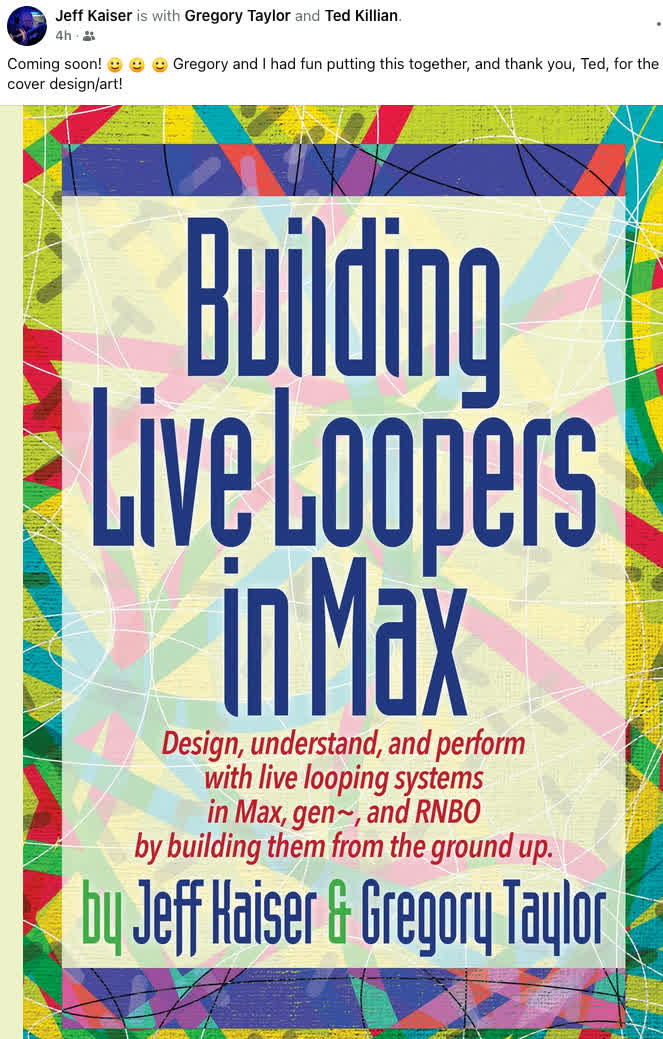
Thanks for that, I had a look at Jeff K's website and I believe a version of this text is available for free there.
I did read it over and worked through the examples . That said, I did not dig into the gen~ stuff because I am limited to Max4Live where the gen~ environment is not included. His MSP Looper examples unfortunately do not take into account sample-accurate control. They were a great entry point into the concept of recording into a buffer and playing it back though.
Came across this tutorial and have worked through it:
It has illuminated one way of achieving sample accurate looping use vanilla MSP objects, namely poke~ and index~ driven by a count~. I quite like the simplicity and can already imagine how I could implement overdubbing, and perhaps even some rudimentary de-clicking. However, I do not see any way I can control the rate or direction of the count~ and thus the playback (a la varispeed.) And in googling that I am learning index~ is not really suitable for such a task anyway, given the lack of interpolation.
I'm thinking playback using another object (like play~) is necessary here, but this necessitates the use of phasor~ which really does my head in... scaling it, using it to dynamically loop only a portion of the buffer, and so on, confuses me greatly.
If anyone has any suggestions on where to direct my research it would be greatly appreciated. The hard part about MaxMSP is that it is so flexible it is difficult to know where to even start!
EDIT: the more I google the more I realize this is all very well-trodden ground. Thanks in advance for your patience with my skill level!

yes, that´s how it is: index~ based solutions are superb - as long as you do not need to change pitch.
the floating point equivalent to count~/index~ would be line~/play~.
objects like play~, groove~ or wave~ perform a value interpolation for you already internally in the object.
to learn (and to transform the count/index stuff you already have to a "float version"), start with play~.
no, I am not associated with the pedals company.
it just happened that they picked same name as my nickname here...
I was involved in development of hardware loopers from early days of looping,
and developed many max based looping devices in last decades.
If I can suggest, first list all you want from a looper.
that will route you to objects that could satisfy your needs
without gen~ objects.
something like reversed, speed changed overdubbing
in synced multitrack looping ...
as soon as you want that, you are in a trouble.
interpolation, out of sync etc etc
I was never interested in that, just plain , clean looping
with as many synced tracks of different lengths, undo, redo and so on.
synced polyrhythmic delays and such things.
in one or the other way you will hit the wall if you want both.
None of looping objects you mentioned satisfied very basic looping
needs for me, like latency compensated overdubbing,
crossfaded loop start-end and synced multiple tracks.
without that it simply does not work for serious live looping.
.......
sample count needed for index or poke can be converted from range
or miliseconds outlet of other objects using mstosamps~ for example.
......
I used xsample~ buffer based recording and playback objects quite often
becasue they offered sample based sync between play/recording heads
and made construction easier then having to use several max objects
for same task.
there are updated versions, help files are really outdated ...
p.s.
if you find solutions based on that book:
maybe you can port it to rnbo~ and compile your own external(s)
Thank you both for your insights!
@roman
I was having a look at play~ last night and can immediately see how it is more appropriate for playback where a rate change is required. However, it is hard to wrap my head around what will be necessary in order to have a playback "head" and record "head" (currently driven by count~ into poke~) that remain in sync with one another when play~ is employed. It's easy with a count~ driven patch since the count~ controls both "heads" simultaneously. But since play~ expects milliseconds and count~ outputs samples, I either need to do a unit conversion (which apparently is error-prone due to rounding) or find an alternative method of sync'ing the "heads."
It would seem my predecessors conclude that using phasor~ is the most appropriate clocking method. But that raises some questions in my novice brain:
would I need to substitute poke~ for another buffer writing object, considering poke expects a sample index, and not a 0-1 signal? I suppose there's a way (with math) to convert that 0-1 to samples if the sample rate is known...
many example patches I've looked at employ some kind of math on the phasor~ output presumably for this reason, but the values used in the math are not obvious to me. For example, many people include [+~ 0.5] and I have no idea why.
there's also the use of trunc~ whose purpose is not obvious to me.
phasor~ seems to be a free running thing, whereas a clock (or tape transport) can start, stop, pause, and be reset. I'm sure there's logic that can be built to allow for this kind of behaviour. Perhaps sample and holds?
on the bright side, perhaps a phasor~ driven approach will allow for an easier time recording in a loop.
Right now, with count~ and poke~ I'm doing some hacky edge~ detection to restart poke as the counter~ loops back to 0. It doesn't sound great.
(I know these are not exactly "new" obstacles; most other people going down this path wind up at the same place. I'm personally more inclined to solve the issues independently rather than simply borrowing others' solutions, for education's sake.)
@source audio:
Thanks for your insights. It is reassuring to know that some of the obstacles I'm facing (conceptual or otherwise) are in fact fundamental to the objects available to us in MaxMSP, and not entirely a consequence of my inexperience. I think we have similar requirements for what we want from a looper, particularly artifact-free, distortion-free operation. Unfortunately, the features you've identified as problematic are also features I would like. I'm not looking for anything crazy in terms of buffer manipulations mind you, but I do need:
the ability to press a button, start playing, press the button again and have immediate looping playback.
the ability to then overdub upon this loop, in perfect sync with what I'm hearing
the ability to change the playback rate/direction...
and then overdub more material that plays back at the rate it was performed, like a tape machine.
the ability to sync between multiple loopers
less important, but would be nice, is undo/redo
As you say, it might be a bit of a tall order using what is available to us in MaxMSP. Thanks for suggesting xsample~ - it was on my radar and I will direct my attention toward it next.
Apologies for the long post; it is helpful for me to write this stuff down so I can identify what needs to be attacked next.
Thank you!
You are absolutely right to postulate on all options,
because it could become very time consuming to develop something in wrong direction.
my advice: DO NOT USE PHASOR.
overdubbing in other then original speed
will require either karma~ or gen/rnbo work.
all the rest can be done easily.
well, if you know exactly what and how you want to
manage multilooper tracks, their dependencies etc
if you slow down one looper then others must follow,
to stay in sync.
Another thing is - how is that going to work in Live ?
you want to completely ignore Live's transport ?
Do not use phasor~, duly noted, hehe.
karma~ was the target of my initial explorations, but I could not coax artifact-free recording out of it when used within Live. Not to mention there's no provisions for sync (by design.)
I will dig into xsample~ this evening, which will undoubtedly illuminate more gaps in knowledge that need filling.
As for how it will work within Live, yes, I want to completely ignore Live's transport for this looper. That is actually the motivation behind this entire experiment-- needing a looper that does not respond to the transport.
And speaking of which, I actually quite like Live's built in Looper device and use it extensively (although it isn't perfectly artifact-free). The ultimate goal would be to build something like the Looper device in terms of functionality, but that is not bound to Live's transport.
Thanks again. I'm sure I'll be back with more questions!
I went back to Jeff Kaiser's tutorials on loopers, this time also reading the section on his gen~ based patches, despite not having access to gen~ myself. Very informative stuff. It also gave me a new appreciation for what goes into creating an artifact-free, varispeed looper; I had no idea how complex it can get! It's given me some new ideas to explore.
@source audio: I meant to ask you, if you recommend against using phasor~ as a master sync, what would you recommend in its place?
Been digging into xsample~ this evening. It seems like a nice set of tools for the task at hand. Focusing currently on xrecord~ and xgroove~ (because I want varispeed.)
It is not immediately obvious to me how I should work to sync record and play heads. The head position out of both xrecord~ and xplay~ are signals (representing sample address in my current case) yet they expect float numbers as inputs if one wishes to specify a position for the head.
Is snapshot~ a viable way of converting the signal to a float without introducing sampling error (e.g., clicks?)
Currently I am feeding the position of the record head directly to the "end point" position input on xgroove~ so that when I stop recording the end point of xgroove~'s loop should be exactly where i stopped recording, thus representing "the same" region in both xrecord~ and xgroove~.
I feel like this is a misinformed approach. Is it?
you need to check all options for units in xsample.
varispeed overdub will not work I guess,
but I never tried that as no interest.
but you can combine karma with xsample and plain max objects etc.
@source audio,
Thanks again for the continued support. I'm having a look at the options for units in xsample~ and xgroove~ and while we have a few options - samples, buffer size, ms, s - they are all formatted as float numbers, whereas the positional info that xrecord~ and xgroove~ (and xplay~) output is formatted as a signal. This necessitates some kind of format translation in order to have xrecord~ and xgroove~ infom one another of their "head" position. (At least I think it does...)
So my question is what is the most viable way to translate the signal to a float, while maintaining sample accuracy?
Currently I am employing sah~ and snapshot~ to "capture" the positional info when the recording is stopped, and thus representing the loop size.
What do you think?
you should not use signal <> data conversion for audio sync tasks.
your main and only problem is overdub/playback with varispeed and direction.
I can't make more suggestions without detailed infos about relation
between master and synced loop tracks.
@source audio
Thanks for confirming. I suspected signal <> data conversion was not a good approach.
To elaborate/clarify... my question pertained to exactly the problem of overdub/playback. Using objects like xsample~ or groove~, I cannot see how to sync the record head to the playhead for overdub tasks, i.e., punching in new material (record head) in sync with what you're hearing (playback head). Sync output from these objects is a signal (0 -> 1) whereas the inputs of these objects to specify a location of the record/playhead is a float number. Thus I am at a loss as to how to make sure the record object starts recording at the moment in the buffer that I am hearing. How would you approach the problem of having the record and play heads in sync during overdub duties?
To me, this is the beauty of the master clock driven approach to the looper, be it count~ or phasor~ or whatever -- the heads are always in sync. Most likely there is some approach here that I am as of yet unaware of.
As for relation between master and sync'd tracks, I'm not even thinking about that yet since I haven't even figured out a way to overdub with varispeed-compatible objects.
I've also gone back and read Jeff Kaiser's loopers in gen~ tutorial and it illuminated some other techniques that could be employed for this purpose. Still trying to wrap my head around what Graham W. has done in his GenExpr example in said tutorial.
I also came across this old thread: https://cycling74.com/forums/sample-and-loop
Andrew Benson makes a beautifully simple looper using gen~ which sheds light on the approach of using an accumulator [+=] and modulo [%] for creating the "master clock" from which all future playback and overdub actions are driven. This approach makes a lot of sense in my brain.
Anyway, thinking out loud here for any future newbies (like myself) who come across this thread.
for example xrecord~ is overdubing in itself, depending on signal inlet that
mixes new input to allready recorded.
sync signal outlet controls xplay~ or index~ .
to start recording clear buffer, reset loop points, hit record, fade input,
to stop recording get current position and feed it to loop end inlet,
fade input out , enable overdub , disable overdub after crossfade time.
that adjusts loop length.
to get latency right you feed sync signal (sample count) to +~ and %~
to listen latency compensated.
but again, xsample objects will not give you varispeed.
and varispeed won't let you sync loop tracks, unless they are all same length
and follow same speed.
but again, xsample objects will not give you varispeed.
I think this is the crux of the issue. All of the steps you've outlined above make perfect sense to me, and I could whip something up easily I think, that is, if I use xplay~/index~ or some other buffer read object that accepts a signal input for sync purposes. I would seem that then if I want to create something in the MSP environment, I need to choose either sample-accurate sync, or varispeed functions -- we can't have both.
I need to delve into the gen~ environment stuff because it would seem that one can have both sample accurate sync (of record and play heads) and varispeed functionality in there.
More reading/research/experimentation to come. Thanks for the help, @source audio.

I am a big fan of Karma, which is a dynamic-length, varispeed looper/sampler external for Max, created by Rodrigo Costanzo. I believe the karma package is available in the package manager.
https://rodrigoconstanzo.com/2015/05/karma/
@anthony
Thanks for the suggestion. I mentioned karma~ in my original post as being the first thing I investigated.
Unfortunately it does not behave well in the M4L environment; lots of clicks and artifacts. It also does not have any concessions for sync'ing up with other loops. I read this is by design.
And thus I started on the path to attempt to learn how to make my own looper!
My apologies, I did not read the full message. But I would like to add another suggestion...
Catch is a simple monophonic performance sampler that allows live audio to be captured for instant playback and manipulation. This instrument was designed for performance.
https://www.novelmusic.org/m4l/catch
just out of curiosity I tested karma in live 11.3.26.
128 samples buffer. only 1 track with test looper inserted.
no artifacts or clicks .
also synced few other tracks using poke~ / index~ combo.
no problem, but all tracks follow same sync outlet of karma~
Thank you both for the suggestions.
@source audio, thanks for investigating on my behalf. I will go back and try again, but in Live 12 (on Windows) I could not get artifact free performance. I think recording the initial loop was okay, but then every overdub - whether there was an input or not - resulted in strange clunks and dropouts. I'll go back and check it out again. I could try it on Mac to see if there's a difference.
In the meantime I am going to continue digging into gen~. It seems like a great environment for creating a looper (for someone who doesn't know C/C++ that is.) The tutorials have also been great at exploring some techniques that are equally applicable to Max and MSP.

In the meantime I am going to continue digging into gen~
☝️as the person who wrote the initial version of code(in C) to help Rodrigo Constanzo implement his beautiful vision and design of karma~(and having had trouble implementing my own sample-accurately-synced version of a looper, 'rez~', mostly due to life-stuff that makes me hone down more on visual environs rather than coding ones because my mind can handle those better than 'coding' when under great stress), this would be my personal advice. To that end, and furthermore, i'd highly recommend getting into the 'GO' book to learn gen~ at as advanced or intermediate a level as you'd prefer.
Thanks Raja, I appreciate your perspective. And thanks for the book suggestion; I will definitely check it out!
In the interest of keeping the thread updated for other novices from the future, I'm happy to report that gen~ has allowed for a very elegant solution to my personal looper challenge. I'm sure everything (or mostly everything) I'm doing in my gen~ patch can be done in Max/MSP, but there's a beautiful simplicity apparent when doing it in gen~.
Firstly, working through these tutorials - https://cycling74.com/tutorials/gen~-for-beginners-part-1-a-place-to-start - along with digging into the reference, help file, and example patches for gen~ was super helpful in getting my head wrapped around working at the sample-level as opposed to the data (messages) level of Max. Opening up a blank patch and experimenting with different operators and inputs in isolation was also an important step.
Once I got a bit more comfortable with a basic set of operators I deemed useful for the task at hand, I used Andrew Benson's example in his first post here - https://cycling74.com/forums/sample-and-loop - as the basis of my looper. There's lots of other patches posted in that thread but they all seemed buggy in their own way. One of them was especially problematic, and made me quickly realize that working at the sample level comes with some dangers to your ears/speakers. Namely, it is very easy to blast 0dbFS audio out of the output. A sample of value 1. is all it takes! So be careful.
Andrew B's patch is centred around an accumulator [+= ], and a modulo [% ] in a feedback loop to construct a ramp of values to be used as your sample index which feeds, in my case, [poke ], [peek ], and, for overdub duties, [splat ]. This elegantly solves the problem of "how does one only loop a portion of the buffer? and how does one define that portion (loop) dynamically with the initial recording?" Accumulators and modulos are new to me, but I can see how powerful they are.
The nice thing - for my brain anyway - is that after you capture your original loop, the modulo feedback loop output (essentially just a cycling ramp) can be treated as entirely separate from the sampling/playback tasks. If you want to change direction, change the rate, start, stop, etc, of your playback (or overdubbing) you can do it all by acting up the modulo output with simple math and logic. I'm not asking an external or pre-existing object to do this, and so the process becomes more transparent, and more flexible because of it.
[splat ] handles the question of interpolated overdubbing with varispeed. It's built for this task it would seem.
Currently I have cooked up a stereo (2ch) sample-accurate, varispeed-able, overdubbing looper, with sync outputs, and a basic control UI and logic. The next features I want to develop will likely be challenging...
undo/redo - I will try and do this by alternating between two buffers for each successive write (and read) task
"feedback" control - a la Frippertronics. Should be easy by having a separate overdub process with no input, and a control on the overdub level (thus overdubbing silence at whatever ratio you want, controlling the time of the fade-out)
declicking - the interpolating operators do a pretty good job of this already. I think I will need to add some kind of fade in/out on the audio input when writing the first loop, which uses [poke ]. Maybe I could just use [splat ] for the first loop as well.
sync - since the final use-case of this looper is a M4L device and I want to run a bunch of them in parallel and sync them, I need a way of broadcasting (with as little latency as possible) the sync outputs of my "master" looper. Send~/receive~ is not supported for sending signals between separate device instances. I had a couple ideas already:
take the sync signal(s) out of the gen~ patch and use the Audio Routes externals to send that signal to the other "following" looper devices.
write the sync signal(s) to a constantly running, circular buffer, and then read the same buffer in the "following" looper devices
If anyone has any advice re: point #4 above, I'm all ears. In the meantime I will keep cracking on!
Not had as much time to attack this over the past couple weeks. What time I did manage to dedicate to it I spent ironing out kinks in the control layer. I wanted to get the looper in its current state up and running (from a performance point of view) so that I could identify what needs to be tackled next in order to get to a stable, good-sounding state.
And based on these tests, clicks when recording the initial loop and when punching in with overdubs are the top priority to be addressed.
I can conceptualize ways to attack the overdub clicks - a simple fade in and fade out applied to the signal when starting and ending the write pass should do the trick. More challenging is the initial loop, especially if the initial loop is something like a drone with no clear start or end, and which requires a seamless transition point (i.e., crossfade.)
I don't want to try and create a crossfade from within the bounds of the loop - that would change the overall length of the loop (by sacrificing a bit of the end in order to fade it into the beginning for example.) This will cause problems for my use case as I like to "bounce" ideas between loopers and the overall lengths need to be preserved.
I'm considering trying to capture 50-100ms of sound after I press the button to end the initial recording to use as crossfade material. The length of the loop should still be defined by the button presses.
Does anyone have any suggestions for how to attack the crossfading conundrum? Reading materials?
I have explained that in several posts that you probably allready had a look at.
for both, recording and overdub, fadein and fadeout are all it needs.
in simplest form, you will have feedback (overdub) turned on all the time,
and only open and close input.
clear buffer before recording starts.
here is simplest looper that does that.
you can adjust ramp time for recording and overdub separately if you need.
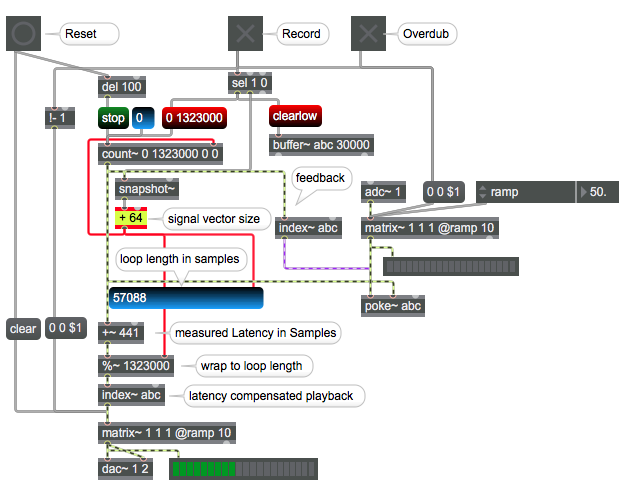
Thanks @source audio, I appreciate it. I will check it out when I next have a moment.
Thanks again @source audio, I had a closer look at your patch and it's given me some ideas for my own.
The main difference between my patch and the one you've just shared which makes adding fades/crossfades to the live input a bit more challenging (at least for my brain) is the fact that you're constantly running the index into poke and your controls open or close the audio inputs, and on my design, my audio inputs are always open (easy enough to change) and the index into poke (and splat in my case) is not always running. My controls are allowing (or not) the record head counter to feed the index into poke/splat. So, when I stop recording, I am also stopping any values going to the index of poke/splat. This is making a "tail" more challenging to capture. Whereas in your example, when you stop recording the index continues to run and you use the matrix~ object to add a fade out. Very simple!
I can think of some ways to get around this. Whether I do that, or whether I approach this from the audio side (as opposed to the index side) is another question...
you need fades on audio input, no matter how you deal with
feedback path, or control signal.
having audio input open all the time is not a choice for clickless recording
you need fades on audio input, no matter how you deal with
feedback path, or control signal.
having audio input open all the time is not a choice for clickless recording
Oh, totally understand that, hence why I mentioned it's easy to change that behavior.
Its the fact that I'm not constantly feeding the counter(s) into the index(es) that is bringing extra complication. I have some ideas though!
Thanks for continuing to talk this through with me. Super helpful!
Making progress...
In regards to adding fades to the recording and overdubbing passes, the challenge I was facing was how to continue recording the first pass (i.e., not overdubbing) after pressing the button to stop recording which - since I was following Andrew B's example that I linked in a previous post - serves the purpose of both setting the loop length and stopping the original recording pass simultaneously.
To get around this I decided to detach the initial pass record "head" from the loop length by running two accumulator+modulo pairs in parallel - the first sets the length when I disable recording, and on the second (the record head) I added a delay to the "record off" which allows the head to wrap around to the beginning of the loop for a number of samples I set. Now I have my data I can crossfade.
Then I quickly realized that simple ramps/slews are a lot more challenging to implement in gen~ vs MSP if you don't know how to code them manually, which I don't. I came across this thread - https://cycling74.com/forums/rampsmooth-in-gen - where Graham W. has shared some code that allows for linear slewing between 0 and 1. Just what I needed. Running that through some math (out = sin(in*pi/2)) gives me an equal power curve used to create my cross fades.
(although I am just realizing that the function for fade out is different for fade in... will need to fix that)
With my fades (mostly) working, I've been focusing my attention on creating an undo function. Happy to report that I have that mostly working as well, although it has forced me to get into some text-based gen coding.
In the interest of novices from the future, I'll report back with more progress.
Do you maybe overcomplicate this ?
audio input and loop handling is coming outside of gen.
if you apply fades in front of your gen~ looper, all is ok.
think about another thing:
you might one day want to start recording and end it with overdub,
or multiply, or set a bar length and continue recording quantized to that bar,
(start rec with record press, measure bar with record release and continue recording ...)
what when you make mistake after recording-while overdubbing/multiplying and want to cancel(undo) overdub/multiply and just keep initial recording ?
where are crossfades in that case ?
undo allways needs extra memory to keep previous state.
one could go with circular buffer or parallel buffer
to replace current buffer with previous state.
you need fast buffer copy function in case of parallel buffer
or lots of memory in case of circular buffer.
Do you maybe overcomplicate this ?
Almost certainly! This seems to be what separates experienced programmers and novice programmers (like myself.) The ability to think abstractly and find elegant and simple solutions is an elusive one to us newbies.
In my defence though, one of the goals for my looper project was/is to keep it as flexible and modular as possible so that I can build in new functionality later. And for that reason I started the design by isolating buffer length, loop length, initial record pass, overdubbing, and playback.
Is this the best idea? Probably not. But I'm committed to trying to make it work, even if it only ends up being an educational exercise.
you might one day want to start recording and end it with overdub,
Yes, this challenge is already on my to-do list. My design right now means that if I have overdub-after-record enabled (like Live's Looper Device) then it will record in double the very beginning of the loop, where the initial record pass is fading out, and the overdub pass is fading in. Theoretically I should be able to address this with some conditional offsetting of the overdub though. This is one of the benefits (which in my potential naivety I believe to be true) of having the rec head separated from the play and overdub heads-- I should be able to mess with one, without affecting the other.
or multiply, or set a bar length and continue recording quantized to that bar,
Multiplying the original recording shouldn't be a problem since the crossfade is baked into the data stored in the buffer. Although (if I understand correctly) you have a good point about adding new material at the end of the recorded buffer. That will be a problem. Noted.
what when you make mistake after recording-while overdubbing/multiplying and want to cancel(undo) overdub/multiply and just keep initial recording ?
where are crossfades in that case ?
undo allways needs extra memory to keep previous state.
one could go with circular buffer or parallel buffer
to replace current buffer with previous state.
you need fast buffer copy function in case of parallel buffer
or lots of memory in case of circular buffer.
All good points, and its what I've been working on at the moment.
The "crossfade" only happens on the initial record pass, not with overdubbing. If one wishes to undo that one can simply clear the buffer.
I decided to go the parallel buffer route for undo, inverting the phase and copying the buffer back into the original buffer to cancel out the last overdub pass. My first iteration did the copying/clearing in a single sample, which caused a CPU spike and an audible audio dropout. I've been working on what Graham W. referred to as the "lazy" approach of progressively copying/clearing the buffer in chunks (e.g., 32 samples in one processing sample) at a time, as demonstrated in this thread: https://cycling74.com/forums/gen~-looper-logicoverdub-question
This corrected the CPU spike, but now when I clear the "undo buffer" right before overdubbing, it's not fast enough and the clear function ends up clearing a portion of the new material being written. I have two ideas to correct that:
offset the start of the clear to coincide with the location of the overdub head when overdubbing is engaged. This should make sure that the "clear" pass does not collide with the incoming material being written, or
use 2 undo buffers (more memory!) and ping pong between those, writing to one while clearing the other.
A lot to digest for someone with my experience level, but I am enjoying the process. Thanks again for allow me to bounce ideas off you, @source audio.
undo/redo depends on concept.
if you use it to mask overdub layer(s),
then you need multiple parallel buffers, or circular one.
to only cancel recording or overdub is simpler.
while overdubbing, on undo I would refade input
and wipe overdub buffer, or paste it back phase inverted as you
allready do.
you do resize parallel buffer after initial recording , or ?
that makes memory and copy process lighter.
most difficult for me when making loopers was to make good GUI with all possible
states and options shown.
like if you use few buttons on the floor to control
multilooper, buttons need to adapt depending what is going on.
record start could offer :
normal record end & play
record end & break
record end & overdub start
record end & multiply start
restart recording
cancel recording
finish recording and start quantised recording into next loop track.
now after some of that happened we have again other options ...
P.S. maybe you should try rnbo for buffer copying if gen is too slow
you do resize parallel buffer after initial recording , or ?
that makes memory and copy process lighter.
Currently I am not doing any buffer resizing. But I suspect I will have to investigate this once I begin to implement a "multiply" feature. Added to the to-do list :)
most difficult for me when making loopers was to make good GUI with all possible
states and options shown.
Yes! I've spent a lot of time already on the control layer, and I suspect there's still some bugs in there. My approach for this was to create a "status" flag which I output from my gen patch. The flag is determined by a bit of genexpr code that basically watches the buffers and the record/play/overdub heads and outputs a number based on what is happening. I then use that status flag to enable/disable buttons - and control what they do - in the UI.
It is perhaps a bit of a "brute" force approach, as it requires I consider all possible use-cases and specifically code for it. It's working for now though! You've suggested a few functionalities I hadn't considered. Duly noted!
P.S. maybe you should try rnbo for buffer copying if gen is too slow
Gen is actually a bit too fast! It can clear an entire buffer in a single sample cycle, which of course creates a big CPU spike and audio dropouts. I had to put in a bit of work to figure out a way to slow down the copying and erasing. The suggestions from Graham W in the thread I linked are working well. I did have to add in some conditions to take into account direction of recording, and wrapping the length of the loop as opposed to length of the full buffer.
....
Returning to the "multiply" feature. I've been thinking of how I would implement this; likely with an iterative copy loop similar to how I am copying the undo buffer into the main buffer. However, there is one issue I cannot seem to resolve, and that is how to resize the buffer at will.
I know that one can - outside of gen~ - simply send a resize X message to the buffer~ object. This is problematic though because it wipes the contents of the buffer, and also creates a CPU spike. There doesn't seem to be any way to resize a buffer without erasing its contents.
This means I will have to create a very large starting buffer if I wish to accommodate near-unlimited multiplying.
Is there another approach to this?
I would move all loop logic outside of gen.
Also buffer copying.
you need 20mb RAM for 1 minute stereo loop.
what would be your maximal possible loop length ?
if one wants to undo only mistakes while recording,
overdubbing or multiplying, only one
undo buffer is needed for all loops.
Thanks, definitely some things to consider.
I'm putting the multiply/divide feature on the back burner for now, as I am trying to get to the bottom of some very subtle clicks that are being introduced at the loop point.
I cannot for the life of me figure out why a constant, simple signal is generating a click at the loop point. Theoretically the signal should be seamless from the last sample to the first (zero) sample.
Even with interpolation (using both splat and wave) there is a very minor click. I have no idea where it is coming from!
My gut instinct is telling me it is coming from the way I am capturing the "length" with an accumulator, and then looping that "length" with a modulo + history.
A very simplified version of what I mean:
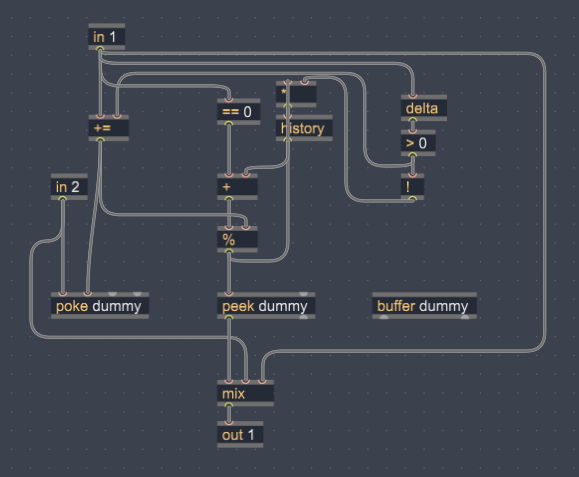
When in1 = 1, the accumulator will start running. When in1 = 0 the accumulator stops accumulating and stores its value (i.e., length). Using basically a +1 through a history operator on one side of the modulo, and the "length" on the other side of the modulo, it will count up and wrap around.
It's range ends up being 0 -> length-1. I'm wondering if because it never hits "length" a click is being created.
But then I thought the interpolated read operator (in this case wave) would fix that. It doesn't.
If you want me to look at your patch then upload working version.
Including all that is in the play.
Again, I would not go with gen to make looping logic.
use only the part that helps you with the varispeed.
Even with traditional max objects
poke~ kills current sample if sample count if stopped.
current sample is at last seen index,
it rewrites it with input, which by no means can match original recorded sample.
one uses different options to solve it, like for example switching to -1 sig
or placing poke~ sample index outside of loop range when recording stops.
in case of continuous feedback with input control,
as in my example, that problem does not happen.
.....
to loop copy:
gen is not fast enough and at same time easy on CPU.
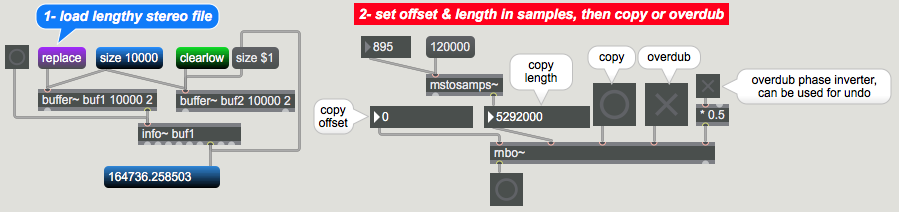
try peek poke in rnbo, done just as if it were normal max objects.
here one stereo example:
.......
I don't use gen or rnbo but dedicated external for buffer copying.
standalones with gen or rnbo
need much more resources and size then plain max.
but you can make externals out of rnbo
which then operate without need of rnbo package, node.js etc
Thanks a lot for the advice, source audio.
poke~ sample index outside of loop range when recording stops.
This has been my approach for controlling the writing into the buffers.
However the clicking I'm noticing at the moment is not correlated to the starting/stopping of recording or playback-- it is specifically the transition from the last written sample to the first sample (index=0) written that is causing an issue.
For example, if I have a range of values looping with a modulo+history (or a wrap for that matter) feeding the sample index of a poke or splat (in the case of gen and interpolation) and write continuously to a buffer, there will be a click at the loop point. No starting or stopping, no cross fading, just a continuous, constant (and simple, in the case of this test) signal. I cannot think of a reason why this would create a click. The material is not discontinuous, the values feeding the sample index should be sample accurate.
Could this be a bug?
I've tried both samples and phase (0-1) as the format for sample index. Both behave the same.
I'm going to try a few more things to reproduce the issue before I share my patch here, as its getting quite complex. I really appreciate the offer.
After a little bit of experimentation, I think I've found the source of the issue. I created the simplest patch possible to test this out:
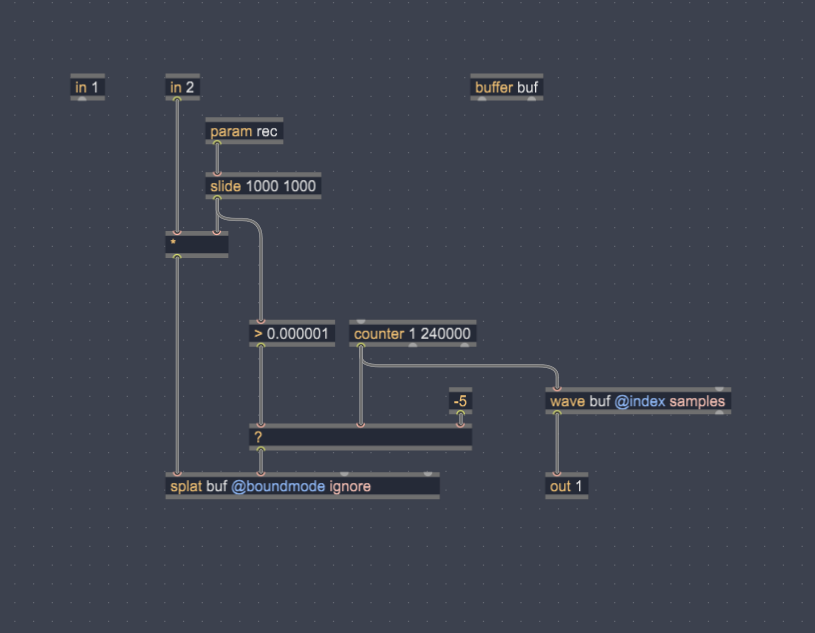
A counter continuously runs, feeding the sample index of both the splat (writing, when rec>0) and wave (reading, always). When rec=1 it fades in the audio input (in2) to the input of splat.
When I use splat there is a click at the loop point. When I put poke in its place, there is no click. Seems like a bug to me. Or maybe it is a limitation of the linear interpolation built into splat, as that seems to be the only different between it and poke.
Will pose this question to the gen~ forum.
I posted reply in other forum topic.
I saw there you are windows user ?
Maybe you have interest in buffer copying external I use on mac,
based on el.buffet from lyon putpourri.
different to original, it uses samples, does not crash ,
and can add one buffer to the end of another and so make buffer
multiply or extend (resize) without wiping it...
If yes, I could compile it for windows when I get time.