
Convert Note On velocity = 0 → true Note Off max device

Hi everyone 👋
I don’t really have a background in programming, but I really appreciate this community and all the amazing work people do here 🙌🍺
I’m having some issues with my MIDI setup involving a few older MIDI synths.
I’m currently working mainly with Ableton Live 11. I’m a long-time Cubase user, and lately I’ve also been enjoying Bitwig quite a lot.
When I send a simple melody from Ableton to my MIDI-fied Polivoks and also to my Elka Synthex, I get stuck notes when I press Stop.
For a long time I thought this was a hardware issue with the synths themselves. However, a few days ago I tested the exact same MIDI material in Cubase and Bitwig, and the synths stop cleanly there no stuck notes at all.
After digging into it a bit more, I realized that Ableton does not use “true” MIDI Note Off messages, but instead uses the newer implementation of Note On with velocity = 0 to indicate Note Off.
It seems that some older synths don’t fully handle this behavior, which may explain the stuck notes.
We came up with the idea of creating a Max for Live MIDI device that would convert “Note On with velocity 0” into a true Note Off message.
ChatGPT helped generate some code for this, but I don’t really have any programming knowledge, and I wasn’t able to implement it successfully.
So I was hoping someone here could help either by explaining how to do this properly, or maybe even by coding a simple Max device that does exactly this.
Any help would be very much appreciated, and I’d also love to understand more about what’s going on under the hood.
Thanks a lot!
bst rgds
isaac sandman
"patcher": {
"fileversion": 1,
"rect": [0, 0, 600, 300],
"bgcolor": [0.93,0.93,0.93,1],
"boxes": [
{
"box": {
"maxclass": "notein",
"patching_rect": [50, 50, 60, 20],
"id": "notein1"
}
},
{
"box": {
"maxclass": "route",
"args": ["144","128"],
"patching_rect": [150, 50, 80, 20],
"id": "route1"
}
},
{
"box": {
"maxclass": "split",
"args": ["1","127"],
"patching_rect": [250, 50, 60, 20],
"id": "split1"
}
},
{
"box": {
"maxclass": "noteout",
"patching_rect": [350, 50, 60, 20],
"id": "noteout1"
}
},
{
"box": {
"maxclass": "button",
"patching_rect": [50, 150, 20, 20],
"id": "button1"
}
},
{
"box": {
"maxclass": "ctlout",
"args": ["123","0"],
"patching_rect": [150, 150, 80, 20],
"id": "ctlout1"
}
}
],
"lines": [
{"patchline": {"source": "notein1", "sourceoutput": 0, "destination": "route1", "destinationinput": 0}},
{"patchline": {"source": "route1", "sourceoutput": 0, "destination": "split1", "destinationinput": 0}},
{"patchline": {"source": "split1", "sourceoutput": 0, "destination": "noteout1", "destinationinput": 0}},
{"patchline": {"source": "split1", "sourceoutput": 1, "destination": "noteout1", "destinationinput": 0}},
{"patchline": {"source": "route1", "sourceoutput": 1, "destination": "noteout1", "destinationinput": 0}},
{"patchline": {"source": "button1", "sourceoutput": 0, "destination": "ctlout1", "destinationinput": 0}}
]
}
}

AFAIK, even if you send true note-off out of M4L, Live's midi tracks will always auto-convert them to note-on vel 0.
You'd have to use Max standalone to send true note-off.

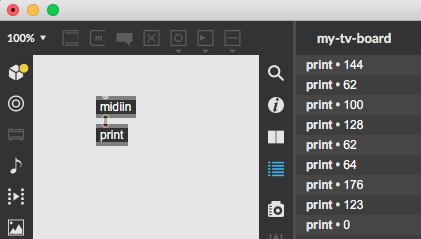
It is opposite, live 11 sends note off with release velocity
and on transport stop all notes off CC
if your synths support that you should have no stuck notes.
this is capture of one note clip and stop transport from Live 11
to max 8 via IAC Buss
you can try imp.midi externals to send midi directly as well