
getting file names into Coll

I want to make a patcher (made as part of a Project) that I can use on another computer that makes a list of audio files in Coll so that they can be dynamically loaded while the patchers is running. Because it needs to run on another computer (from the one I'm working on) I want to use relative paths. So I put my files in a media folder in the Project folder and if I already know the file name the relative path works fine - for loading into splay for example. However if I don't now the file names and I can't load the names into Coll manually (because its an installation not a live performance) there should be an easy way to do this but I can't find one. The Folder object needs an absolute path and I could use java scripting and workout path conversions - get the absolute path then convert to relative paths but that complicated when your transferring to another computer. There should b a much easier way to make a list in coll. Any ideas?

Does something like this solve your issue?
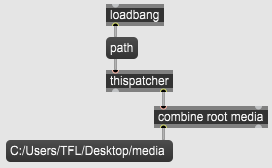
well it does thanks but thats an absolute path (which will work and I'm happy for the the suggestion) but what I'm trying to work out is why I can't list files with a relative path. For example using the folder object with a path relative to the project folder (which you can't do btw). Other objects like sfplay~ can find files with a relative path - should there not be an object or method for finding files and listing them using a relative reference?
Whats the point of having a relative file reference if you can't use it for listing file names?
I don't really know why [folder] only works with absolute paths while (most?) other objects can deal with relative paths, this might be due to design concerns, but it shouldn't be too much of a concern as there is many ways to make your way around that.
You can also try to play with [absolutepath] and [relativepath].
I guess the design concept behind that idea is that most objects can work with files within the Max search path in the Max preferences (or in the patcher root folder, or in the project folder and its subdirectories), but [folder] is more dedicated to work with folders from anywhere in the computer. And additionally you'll more likely have several folders in your search path with the same name (say, "patchers", or "media") than files.