
How to use regexpr and some general problems with quotation marks in [text]

I have found out how to spot a certain word in a text file (code) loaded into a collection. With spotting the word, I can also determine the line it is in. Now, this is how the line looks like, for example:
<string name="description" value="This is some Text!" wide="true"/>I found this line of the code by looking for the word description, and now I wan to be able to extract the text in parentheses ("This is some Text!"). How would I do that in Max8

I don't think this line will look the same after validation in a coll. Some quotation marks will be removed or moved. In general you need to tell the regexp what's before and after your target part

e.g. this extracts the part between value= and a space that is followed by something that is followed by = which is the next tag, assuming there's always another tag following the value tag.
Thank you! However, I just noticed I have another problem before I could only begin sorting things out with regexp ...
I get my code into Max with the [text] object. With [read] I get the code into the object, but when I extract a line of that code into max, all quotation marks get messed up.
This is how a line looks like in the [text] object:
<string name="description" value="This is some Text!" wide="true"/>And this is how it looks like in the console connected to the first [text] outlet (I removed 'set' in the beginning) with the line command:
<string name=description "value=This is some Text!" wide=true/>As you can see, some of the quotation marks are missing, others are moved. Why does Max do that? And is there a better way to process the code into max unchanged?
Ok, I have now solved the problem by using [filein] instead of [text]. This way I can store all the written code as numbers in the collection any convert those to text where it is needed. But this way I will probably not need [regexp] as much as I am no longer searching within text but numbers.

you could have solved it using text with slight modification
in the patch, but filein is better in other ways.
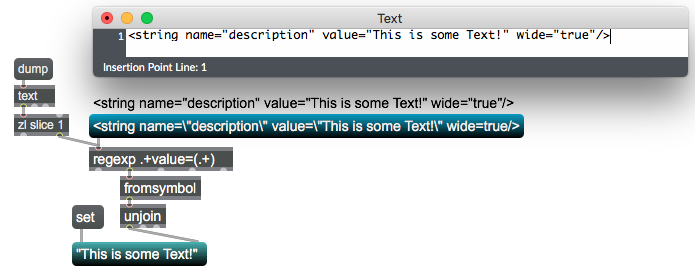
Thank you! However, I am afraid this only works as intended for the blue message box in your example. When I dump the text from the message box I get 'This'.
The problem seems to be, [text] does not even output its content in the correct (or rather my desired) form of unchanged syntax. It drops quotation marks though its outlets, which are present when you double-click the object. The only way to forward these in max seems by using back-slashes in the text form.
As I cannot even modify the way the text gets read in, I cannot make it work [text], but with [filein] I can, as it gets the exact text in - just in the form of numbers.
I do not really get why [text] acts like that ...
for me text object does output that line
correctly, but output needs to go straight to regexp, otherwise quotas get reordered

I've tested your patch on a Windows PC running Max 8.5.4 and it works perfectly!
Ok, then this must be really macOS-related. Otherwise, I wouldn't know why my [text]-object would behave differently ...
@ Cycling '74: could you guys jump in?
if you try this ?
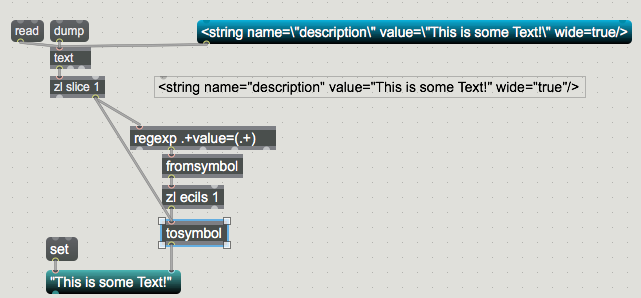
Well, that would of course give me the desired result for exactly this situation. But it would defy the purpose of my patch, which is getting an unchanged text from the text-object an analyzing it after certain criteria (amongst other things finding certain words within quotation marks). Just adding the quotations is not really what I need.
But as I said: with the filein-object it does work as intended! Every quotation mark there is a 32 and with the match object I can find it an therefore filter words that are in quotation marks. From those words I can also filter out specific ones, because a word is nothing else than a specific list of number. It would be a bit more convenient to work with text, but unfortunately the text object does not seem to work properly for me - maybe for macOS …
I just found out, on my m1 MacBook Air the patch works indeed as intended! So, it seems the only machine that has the problem is an intel Mac. Well, a Hackintosh, actually. But that shouldn't make any difference here, should it?