How to obtain help context menu with ALT+Click on object (like for zl object) ?

Hi all,
In zl objects, when ALT+click on them, a context menu appears with two help file names. I'd like the same for the objects we develop. Does anyone know if there is a way to achieve the same behaviour in the Max API?
Thanks!
Riccardo

I've heard the best way to do this is to organize your stuff into a package:
https://cycling74.com/tutorials/package-authoring-an-introduction
...by creating a package folder structure as described there, max will be able to find the helpfile from referring to the object's similarly named '.maxhelp' file, from within the associated 'help' subfolder.
hi, what I was asking wasn’t how to open an object’s help, but how to get a pop-up menu that lets you choose which helppatch to open in a list, as with ZL objects (e.g. zl.join).
Thanks anyway!

OP isn't talking about creating simple help files, they're talking about having this menu giving multiple options when alt+clicking some objects (like zl and mc objects):
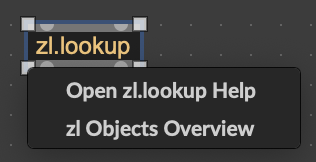
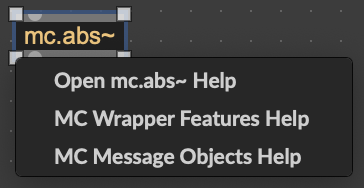
It made me curious, and I think I found how it's made. The answer lies in C74/init/mc-helpconfig.txt for mc objects, and for zl object in C74/init/zl-helpconfig.txt (in the Max resources folder).
So first of all, to reproduce the same behavior, your custom object need to be into a package (check out the tutorial posted by 👽!t W∆s ∆lienz!👽).
In your package folder, you need an `init` folder with a .txt file. Its name can be anything as far as I know. You'll need to fill that file with two kind of messages:
max classnamehelpcategory mc.abs~ mcwrap;
max categoryhelp mcwrap mcwrapper-group "MC Wrapper Features Help";
classnamehelpcategory defines a help category for a given object. Here, the category mcwrap is assigned to the object mc.abs~.
And categoryhelp defines which message is shown when alt+clicking objects of a given category, and which maxhelp file to open when clicking this message. Here, all objects in the category mcwrap will show a "MC Wrapper Features Help" entry which, when clicked, will open mcwrapper-group.maxhelp.
As you can see in the screenshot above, one object can have multiple categories. That's the case for mc.abs~ : if you look closely into mc-helpconfig.txt, you'll find another line with max classnamehelpcategory mc.abs~ mcmess; and another line defining the mcmess category: max categoryhelp mcmess mc_message_objects "MC Message Objects Help";
Finally, I didn't do more tests but I assume the maxhelp files referenced in the categoryhelp messages must be in a help folder living in your package folder, typically next to the regular help file for your object, which should have the same name as the object, and which will open when you click `Open <object_name> Help`.
One thing I noticed though is that this technic doesn't seem to work on objects declared with the define message.
EDIT: I forgot to mention, after saving the txt file in the init folder, you need to restart Max for it to take effect.
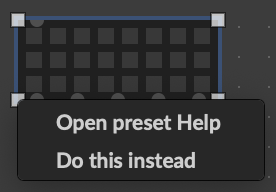
You can also add stuff on existing objects that are not necessarily in your package.
For example I added the two following lines in the init file of a package I have:
max classnamehelpcategory preset joke;
max categoryhelp joke coll "Do this instead";
And after restarting Max, I get this when alt+clicking `preset`: