
jit.gl.text 3d rendering resolution

Hello,
With the patch below, I get a pretty poor picture compared to, here, Text Edit. See attached picture.
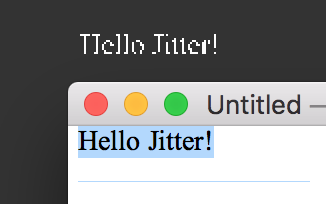
I'm no GL specialist, would someone point me in the right direction to improve the rendering?

fsaa = 1 on jit.window
but I agree that the font rendering is jaggy.
I sometimes raster the font through a jit.gl.node capture=1

also @high_res 1 on your jit.gl.render if you're on a retina display

SPA - Can you give an example of how you raster the font through jit.gl.node. I am still not very comfortable with that object. Would love to see how it is used in this case, and also wonder why it would improve raster quality of the fonts. Thanks!
ChristopherO
Thanks Rob, I was missing @high_res 1, indeed. That makes quite a difference!
Also thanks SPA, fsaa can help a little when used with a render with high_res 1 (but fsaa on for the whole window doesn't suit any application).