
Jit.ui.number, Four decimals

Hello!
I am having some fun with the Jit.ui objects, and would hope to see more Uis in the future.
1- Why does the jit.ui.number object have four decimal values? I have been searching for any way to reduce it to two. And this exta setting would be greatly appreciated
2- I wish I that I could place the UIs in 3d Space, (similarly to 3d Objects)
let me know if any of the two things I mentioned are possilbe at the moment!
Cheers,
M

in case jit.ui.number has an option to set displayed float precision,
it should be available as info in it's help file and reference.
Hey Source Audio,
I just went through the Help File and reference again, and i still cannot find what this parameter or artibute is called. also i tried every option that is in the help file, and was not able to reduce the size.
Cheers,

I think Source Audio meant that if jit.ui.number has such an attribute, you could find it in the object reference or help file.
Sadly I don't think there is such attribute, but it's worth asking Federico Foderaro (if he sees that message) to implement it.
I don't use Max 9,
bur if one looks for that object within it's package - it is java script,
and one can also find
val.toFixed(4) which sets number of decimal places.
for example at the bottom of
jit_gl_ui_number_glObjects.js
UI_2D_Number.prototype.setNumberTextValue = function(val) {this.glObjects.glObjs.valueLabel.text(val.toFixed(4));If I were in a need to use this with only 2
I would either duplicate, rename etc my own sub-version, or then mod it all together.
Or add function that allows selection of decimalplaces.

Hello!
I think this value has been set in Max 9.1.4 to 2 decimals indeed.
There is also a "precision" attribute documented in the "number_attributes" tab of the help file for jit.ui.number, which lets you set the precision to INT or FLOAT.
But indeed an attribute to manually set the number of decimals would be good, I'll work on it.
And also yes, as Source Audio says, the whole object is based on MFI js code, so you can freely open it and modify it, even with the help of some LLM.
I find it strange to use term precision for type int or float.
Either it displays what it receives, so int 23 would end as 23
or if input is float 23.123456
then precision could trim it down to int if precision is 0
or to 23.12 if it is set to 2.

Then what about Max objects - int/float?
why not just one object [number] that can have precision 0 for 23. or precision 4 for 23.1234 set with attr or inspector?
with added feature when set to 0 (check box) the . disappears - 23. = 23
folks have long time been dealing / struggling with the length of decimals in float
would be very easy and convenient to have just ONE object - everyone gets used to it after a while
(maybe call it [pNum], keep int and float for a while - for the resistance!)
Max int/float has more attributes then that,
binary, midi, hex
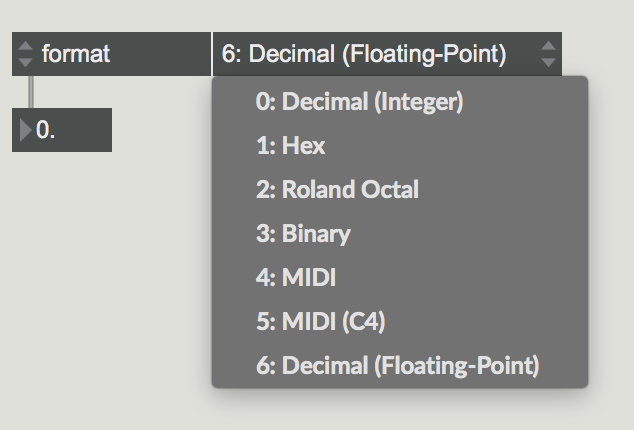

or do not use [flonum] for your GUI.
number and flonum also meant to output numbers. for midi notes that is great. but for flonum (or the jit and live derivates) it would mean you display something else than what is actually stored.
I uderstand that gl.number anyway as display only, unless I missunderstand it.
if it is so, then it could input and display symbols
something like sprintf symout %03d or %0.3f
for leading zeros and decimal places.
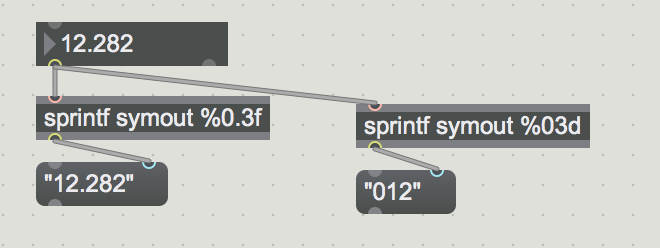
Hey all, thanks for all your answers! Now, I'm happy with the two decimal option in 9.1.4!
since i am using it to display milliseconds, I would be happy with the support of an Integer version (or most of the options of flonum including midi notes etc...).
Now, I wish that I could control the jit.ui.button (with a bang) outside of the jit.world.
Will keep looking but thanks for the help!
since i am using it to display milliseconds, I would be happy with the support of an Integer version
As Federico said above, there is the precisionattribute that lets you switch between int and float (with two decimals) modes.
Now, I wish that I could control the jit.ui.button (with a bang) outside of the jit.world
There is no such function but it can quickly be hacked around. Find the original jit_gl_ui_button.js (you can use Max File browser for this, or double-click a [jit.ui.button] and save the code it opened), make a copy next to your patch (or somewhere else in your search path), and add the following code at the end of the file:
function bang() {
    uiObj.childClick();
    let unclickTask = new Task(unclick);
    unclickTask.schedule(200);
}
function unclick() {
    uiObj.childUnclick();
    arguments.callee.task.freepeer();
}
Maybe Federico can point out a more appropriate way to do this.