
launchbrowser, but choose specific application?

Hello! 2 questions I'm hoping someone can answer..
1) Can the launchbrowser command be used in conjunction with any other code to choose which application to use besides the system default? I want to open some URL's in Safari, and others in Chrome.
2) Can max quit an application in OS X?
Thanks!

using shell and osascript, both can be done.
for example to quit Preview.app :
killall Preview
launch location :
osascript -e 'tell application \"Firefox\"' -e 'activate' -e 'open location \"https://stackoverflow.com\"' -e 'end tell'
Great that works! I had to install the external shell~ object https://cycling74.com/tools/bernstein-shell/
Thank you.
One thing I'm having a problem with... If I want to have Firefox in your above example open a HTML file on my computer, not a URL on the web, how would I code that? Putting the pathname in place of the url doesn't work.
osascript -e 'tell application \"Firefox\"' -e 'activate' -e 'open \"/Users/Mac/Desktop/Stack Overflow.html\"' -e 'end tell'
just to make sure : path must be slash based.
like :
/Volumes/Hd-2/example 1.jpg
or
/Documents/Examples/Read me first.html
works, thank you!
A problem I'm having now is the killall command isn't quitting Firefox. Works for Safari though...
try typing that in terminal to see error
or enable stderr in shell
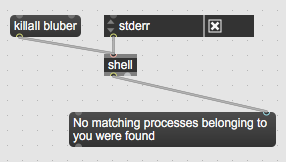
either is Firefox run as root, or it is named differently
Yeah, strange, in Terminal it's giving me the "No matching processes belonging to you were found". I also tried "Firefox.app". No dice. Is there a way to find out the real name?
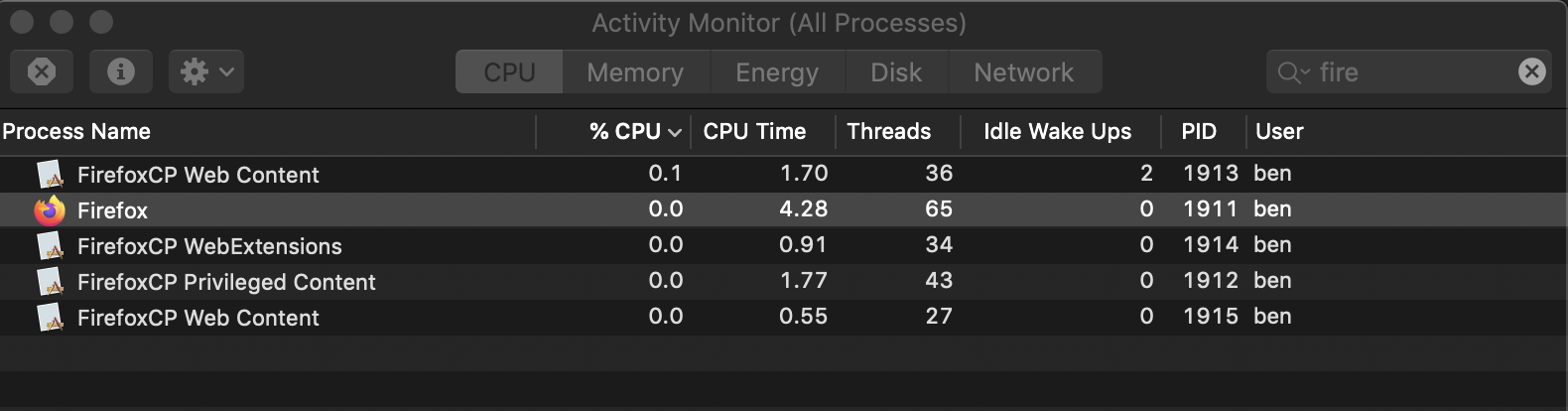
have a look in Activity Monitor.
It will show exact name as well if it s run as you - user.
If this becomes problematic, one could use osascript to tell app to quit
kill -9 [pid] works. (the PID is found by checking the application in Activity Monitor). Would still prefer to run by app name, so the patch can work on another machine.
So should just be "Firefox" right?
Or how to I use osascript to tell app to quit?
Really appreciate the help!
OK so using all lowercase "killall firefox" works. And it seems you can only use one "Shell" object in max. When I had two, it doesn't work on the second. Wild!
osascript -e 'tell application \"Firefox\"' -e 'quit' -e 'end tell'
Probably the problem is all that Firefox extensions
yeah oascript way of quitting works much more consistently. Thanks a million.
there is one difference - telling app to quit will bring
dialog asking if one wants to store changes to unsaved document if such is open.
killall quits app not asking anything.
that is a crucial difference, but at least in my use here, should be fine. Thanks!