
LCD-object size

Hello,
For a Steve Reich/Brian Eno-style multiple tape player, I want to display the waveform played by each sfplay object in the patch.
I’ve managed to display the waveform using a piece of code I copied from a patch I found online. In that code, the LCD object has a specific size. I can set the LCD object to the correct size, but then the waveform no longer displays correctly. I’ve tried adjusting all sorts of things in the patch, but I can’t seem to get the result I want.
I would like to set the LCD object’s width to 190 pixels and its height to 45 pixels.
I’ve attached the base patch for the LCD object.
Can anyone help me with this problem?
Best regards,
Jeroen

like this?
Hey Wil,
The dimensions are correct, but when I play a file, I don't see a waveform on the LCD display.
Hey Wil,
I just took another look at your patch.
When I change the colors of the line or the background of the LCD object, the colors “scroll” from right to left on the LCD. So this is working correctly.
What isn’t working is the display of the waveform that’s currently playing.
The LCD only displays a solid line. When I change the line’s color, the line scrolls from right to left, so the time-based display is working.
I’ve tried experimenting with the settings on the LCD object, but I’m stuck.
I hope you know what’s “wrong.”
Thanks in advance for helping me figure out a solution.
Best regards, Jeroen
well - LCD is depreciated in Max8/9. So I only fixed the box size in your code. I didn't look at how the waveform is being displayed. If I get a chance I will look.
I will also look into using v8ui for this - it is javascript and I am working with it now, but Pinky (every single AI possible ) is struggling badly with v8ui. And honestly I will never know how to write the kind of javascript that I want to use. I don't like AI at all - could write book about everything I learned in the past 2 weeks that is wrong with it. Jeez what a nightmare. But I have gotten some good results as well - just sooooooo many things it cannot do efficiently... It can definitely write code when its not on serious drugs or having complete amnesia.
For now I recommend live.scope. Connect it to any audio signal and see what it is doing.

Here it is:
Updated values are in the red boxes. I also added a [live.scope~] for the comparison.
Another problem was this:
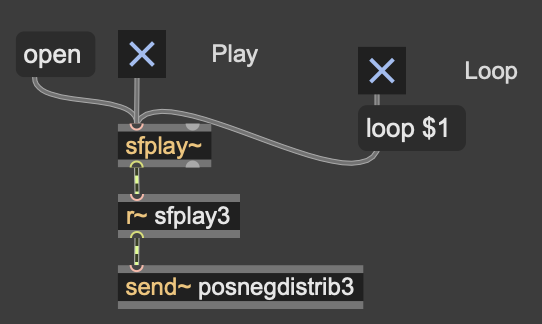
Audio from [sfplay~] isn't going anywhere as the inlet of [r~] is just to set the destination name. you want to connect [sfplay~] to the [send~] directly instead.
I don't know where this [r~ sfplay3] comes from, but it is not necessary (and was causing problem) in this very example.
@ WIL
@TFL
Thank you both so much for helping me find a solution. It turns out that “live.scope” is the best and simplest solution I can get. So I’ve learned a whole lot again!!
“live.scope” will be working overtime in my next patches ;-) I’m pretty much a visual person, haha.
What a luxury to have such a wealth of knowledge on this forum, with so many people willing to share it and sacrifice some of their time to help others. What a community! Once again, my sincere thanks.
Best regards,
Jeroen