
Solved - v8ui - Touch Control for Slider and Dial

... or I just don't know
working from this thread
I went ahead and made a couple custom sliders to satisfy my work environment (thanks TFL for the 'touch' idea)
here is a short video demo
My questioned contained in this example patch (along with 2 .js files)
I cannot seem to get script to load into v8ui - currently only copy/paste works for me
Help file says (compile name_of_new.js) but that doesn't seem to work

In your patch if I send compile horizontal_t_slider.js or compile vertical_t_slider.js to any v8ui it works as expected. Alternatively you can use read .
Side note: instead of [phasor~] + [snapshot~], you could just use a Task() starting when click happens (onclick()), and stopping when click is released (you can get click release from ondrag(x, y, but) when but == 0 ).
Thanks. I don’t know why when I use compile nothing happens.
I’ll fiddle with it more.
//
Maybe I have a phasor phetish :)
But yes internalized all of it will be great.
I will probably experiment touch with 40% left/bottom scroll down, 20% middle popup, 40% right/top scroll up. For those cases where I need the large popup window.
Another advice, did you know about onpointerdown() and other onpointer events? They have the advantage of letting you know if the pointer is from the mouse, touch, or pen (last two requiring a touch screen and a Windows computer). This way you can preserve the usual slider interaction for the mouse, while having your custom touch behavior.
compile seems to be working after close and reload the patch
//
here are touch sliders -internal calculations, no phasor~
edit: added touch area moves as crossbar (slider) moves- so click below crossbar always goes down, click above crossbar always goes up!
//
as far is mouse vs finger vs pencil - so that mouse scrolls normally while a desktop and changes to pencil/finger at pad - I only have Apple
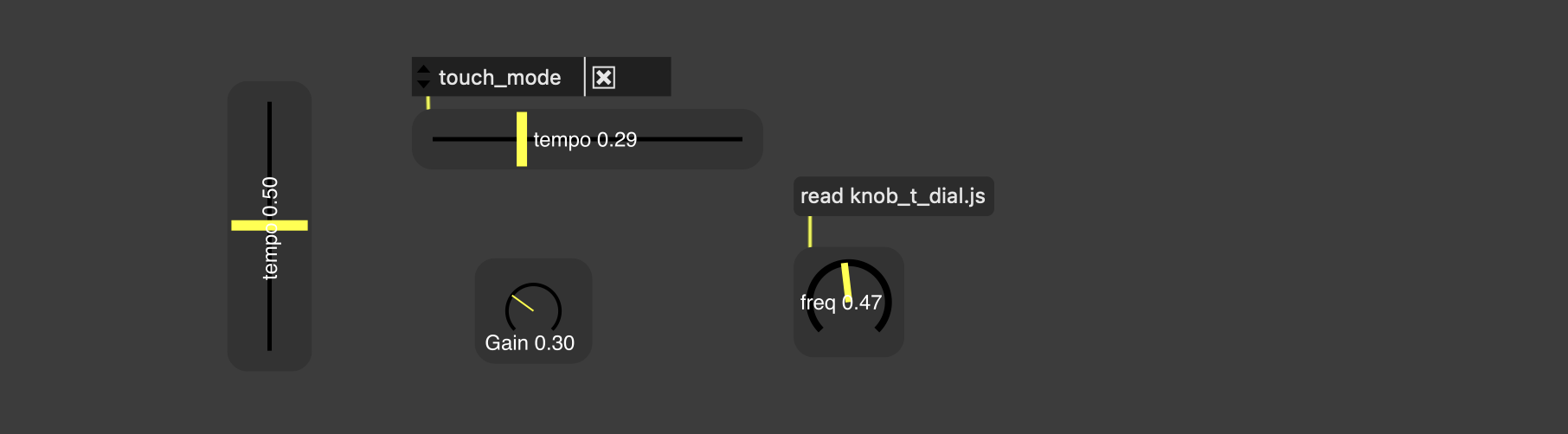
***updated again -> ALL settings save when saving/closing/opening patches
knob_t_dial.js :
added - 'max' number setting along with int/float and number of decimals places
mode : "classic 225" "classic 360" and "continuous 360"
dial_y and dial_scale - to move and resize dial to fit text below or above
Please test these and send input
here is example of touch mode dial and sliders
not fancy or glamorous - just functional
Please test these and send input
[...]
not fancy or glamorous - just functional
Honestly I find this "touch mode" interaction very unpractical: every time you want to move a slider or knob transforms into one of these reflex minigames where you need to get the timing and physics right to release your click at the right time. If you fail at reaching the desired value, you're good to do the same process but in opposite direction. I believe there is a reason why I never saw this kind of interaction in a functional UI.
This, plus: the touch behavior is inconsistent between the knob and the slider (you kinda need to learn their own rules), the fader wrapping around itself (going from 1. to 0. and vice versa) can be a very bad idea depending on what you control with it (imagine fading out the master volume and BOOM you went too far and it goes from 0. to 1.), the knob feels buggy when you go back and forth in the same drag (sometimes it just stops for no reason), and very slow mouse movements on the slider gives quite unpredictable results
What would seem more usable is the following:
on click: nothing happens
start dragging left/right (or down/up maybe), and the slider/knob value start to change. The further away you get from the initial clicked point, the faster it goes.
This way, no matter where you click in the slider/knob, the interaction will be the same. No risk at going in the wrong direction. And you control the speed, which allows for much more precise changes.
But what remains the best for me is controls not relying on any kind of speed. Just absolute positioning instead. You click where you want the fader/slider to be, and it goes there, either immediately or with some kind interpolation if needed. Your controls are too small for that? Then make them bigger. I'm thinking about interfaces made with TouchOSC or Open Stage Control, where it's not rare to see faders being as long as a third of of the screen, and knobs a few centimeters wide. Touch-based and mouse-based interactions have very different constraints/advantages, and I find it very hard to make an interface that works for both.
This said, overall it looks like you are definitely going in the right direction, you just need to find the sweet spot between the two approaches, and there's a lot of room for improvement on that regard!
Thanks for a proper assessment and all the tips'
Yes I should not have left the wrap around 0-1 in the slider
Yes putting option for a "stopper" at mouse position
Yes you have to get used to both slider and dial operation logic 'rules' - different than normal dial and slider- Since this is just prototyping, there is not yet a help file/ --> for the dial I wrote to touch on the rail -> either side of the crossbar changes direction. Very easy once learned, but treating a dial like a slider might be odd for some to get used to.
//
Ok. I think about different touch and drag. But that seems like extra work in live performance :) But might be necessary - (thought bubble below)
First I test this for a while in real practice/
//
However:
Can change touch speed for micro-adjustments
...though bubble -> If I can't make controls bigger, then I am thinking I just need a touch/click event that opens a popup window with controls to adjust or change attrui's on the fly - without taking up any screen space when not needed. long press 2 seconds 'ish or small button to open the objects control window. (Ah, but I cannot use a long press event if dial and slider are changing on click - back to your suggestions!)
Yeah sweet spot. I don't know if there is such a concept except in our minds. Seems like a dynamic event.