
Max HDR playback/support, issues: HDR BT.2020/Rec. 2020 playback vs. SDR BT.709/Rec. 709 playback:

Hi,
This is also for the Max Internal Dev team.
I am working on a realtime broadcast video interface with Max 8.65, far already but.... do keep on hitting a wall repeatedly with the ability of Max to playback of HDR videos, both in Win10 and Mac OS 15.0.1.
HDR on internal displays and external screens (LG C1 OLEDs) looks extremely washed out, do not play normally.
1) MAC: On Mac side I have a fully pumped Macbook Pro 16" M1 Max, 64gb Ram, 4tb, latest Sequoia 15.0.1, capable of playing back HDR in its internal HidPi screen, can not play HDR in Max clearly. Same issues were with Ventura and Sonoma also.
But: The same exact HD and 4K UHD HDR files, with hev1 to hvc1 tag injection fix done in FFMPEG to play HDR in Quicktime, play back beautifully in Quicktime, looking extremely bright, with high contrast. Not in Max, in the patch they rather look extremely washed out, even compared to the regular SDR, systematically.
2) WIN 10 Workstation: Same happens also in a Win 10 Max patch. HP Z8, NVidia RTX6000, machine will be updated to Windows 11 this friday, and I will try again, but doubt it will make a difference.
--
I have been researching this quite thoroughly and widely, including checking on: Various matters relating to Apple´s internal HidPI monitor resolutions, abilities, using external monitors, adapter HDMI 2.0+ ratings, HDMI EDID scanning and fixes (betterdisplay, switchresx), Macbook Pro HDR & power settings, power supply being plugged in during HDR playback, etc, and have been successfully using Dolby Mux/Demux tools and FFMPEG to switch hev1/hvc1 tags, to enable Mac OS/Quicktime to understand the HDR videos.
I am using Vizzie Viewr, Projectr and Moviefoldr elements, have been able to automate things quite nicely in general in the patch. I have utilized MP4/H265 files, have switched Max between vidll/qt engines, GL2/GLCore, tried lots of other things also to reductively troubleshoot etc. No matter what, I have not found a solution, or reason/cause.
Max simply appears to output HDR systematically to internal and external monitors in a more washed out look than even regular SDR files (Rec. 709/BT2020) compared to how brightly HDR files (Rec. 2020/BT2020) do play back in media players, Quicktime etc.
Unless I am mistaken, it appears that Max either does something to HDR (BT2020/Rec. 2020) standard videos, discarding the HDR information, or HDR playback is simply not something Max can handle, yet. Basic HDR & HDR10 would be great to get to work, while I would also love to get Technicolor, HLG and Dolby Vision material playing in Max without problems, fully understanding if wider HDR support of these proprietary formats is not there yet (or might not ever be), relating also to OS level and various add-ons (in Win10 side being HEVC, Dolby Vision extensions, Dolby Access) also.
It would be great to hear whether others have had similar issues, and whether Rob & Co/Cycling74 might have clear input on the status of HDR/SDR support. I would love to use Max in the project, have all other elements working very well already, video sync, GUI etc.
I did just find this... not sure whether there are some tricks one should do to the source videos to be able to fix the video so that it actually looks like HDR (I see YUV in at least few of the test videos):
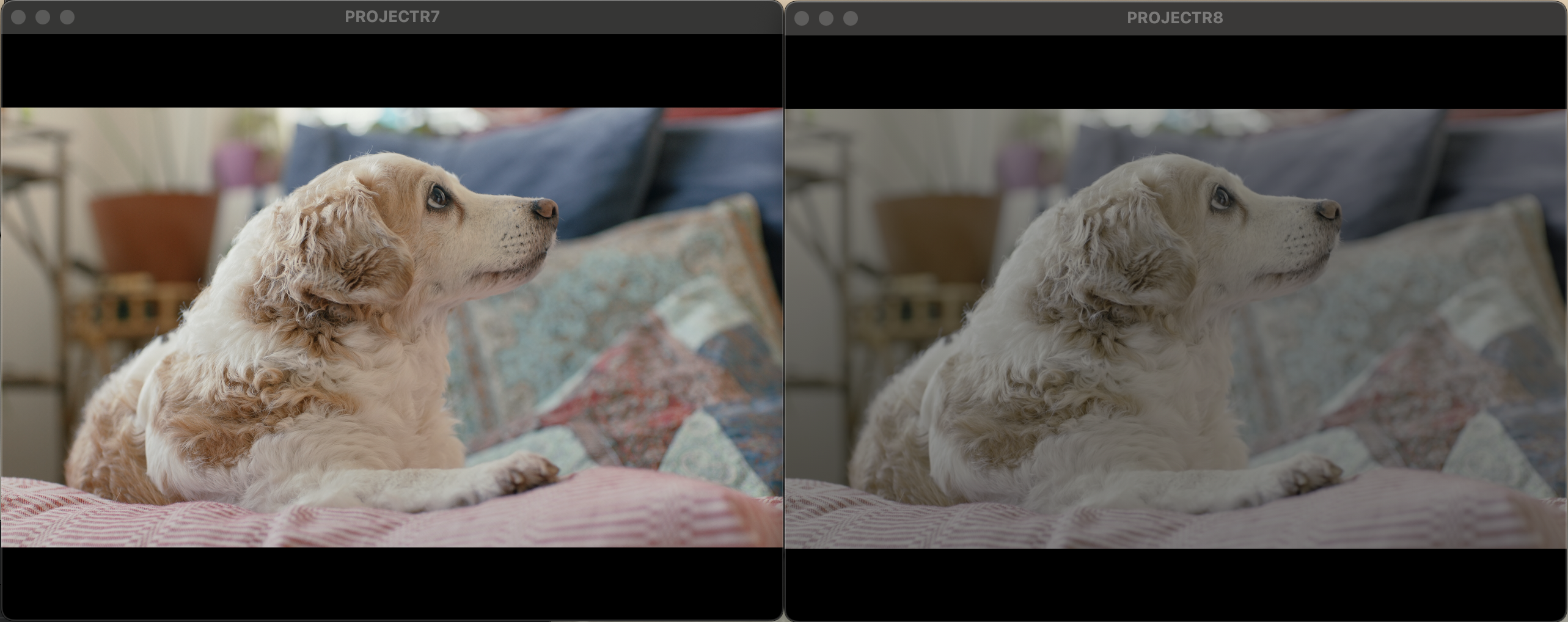
Ps, Below are two screenshots, showing the different between Mac OS Quicktime and Max (The Quicktime HDR was actually way brighter and better looking on the screen, the screenshot appears a bit washed out, but still HDR on Quicktime looks better than in Max, and SDR on Max looks better than HDR on Max).
Much appreciating any advice/info on the matter.
Best regards,
Marko, Helsinki


I had the same problem 6 month ago
it was really driving me nuts
here are some answers in my link
*** I think I solved it by literally wiping my Mac and reinstall FCP - render the videos again
definitely use .hap file for all movie playback in max
not sure might be Mac only
Hi Wil,
Thank you majorly, checked the links out, checking out HAP, have used it earlier with media servers etc, but.. the codec is not showing up in Mac after install. Will troubleshoot/retry. Centrally, as the project relates to reference/comparison of video qualities, not merely to how good the image looks like, I should try to get the HDR10 looking as perfect, close to what it should look like in an LG C1 OLED display.. I have to check on the FCP matters, not sure if I can... wipe my Mac at this stage, too full of workfiles, machine learning.. My gut feeling is that the matter is something else, since... My Quicktime plays the HDR now perfectly (after tweaking the HVC1 flag of the initial test files).. but, Max.. can not play. I have to see if I have to do something with the color space, tables etc, but even that can not be just "towards the correct", has to be accurate.. :).
I will definitely update if I get it working.
Best,
Marko
Update:
Just saw this earlier, related thread:
Cycling74 internal team:
Q: Could you comment on the matter, if you have any advice and centrally, on whether utilizing Max to play back modern HDR/HDR10 material into external HDR compliant monitors (BT2020/Rec. 2020) is possible, without the colorspace being mixed up/washed.. ?
(I can massage the video formats, codecs, containers, HDR flags in metadata etc naturally however needed, if there are some tricks).
For background: The project here in Helsinki is with the Finnish Government Broadcast Company YLE, in their experimental Sandbox video lab. The aim is to utilize Max to decide on future 4K UHD/HDR broadcast standards... for the entire country. :), folks love what Max can do, but their color specialists also require accurate HDR representation. Would be lovely to be able to use Max, not the most usual project possibly. A bit timely challenge.
Thank you in advance for your kind assistance with the matter.
All the best,
Marko