
MIDI Controlled Live Patching w/ matrix~

Hello,
I have looked through the forum and can't seem to find what I need, though I have a feeling I'm not asking the 'right' question yet.
I want to be able to do this:
Press and hold a MIDI note. The MIDI note # will be used as the first number in a 3 number list.
While still holding that first number, I press a second MIDI note. This MIDI note # will then be used as a 2nd number in the same 3 number list.
Upon pressing the 2nd number a number "1" is generated as the 3rd number in the list. At this moment, the list is sent to a matrix~, opening a channel.
Repeat exact same thing but this time a "0" is generated as the 3rd number in the list, closing the matrix~ channel.
The part I am struggling with is how to keep track of lists. For example, after pressing MIDI notes 1 + 2, I have opened a particular channel in the matrix~, I will go on to open several more channels. At any time, I need to be able to press 1 + 2 again, and close that channel, which means I must be keeping track of all the specific channels I've opened and closed. I can't figure out how to do this. I've brought the patch as far as I can and need some advice for the next step.

Is the first MIDI note you press always the same?
If not, can you press for example 45 + 56 then 45 + 32?
Anyway, to keep track of the channels you've opened, you can use [coll], especially if you can combine each first note with only one other note. But I feel like using a matrix would work well too, with any case, like so:
You have a [jit.matrix 1 char 100 100]
Once two notes are pressed (like 45 + 56), check the cell (45,56), using the message "getcell 45 56" (you get the result from the [jit.matrix] rightmost outlet)
If the cell has value 0, set it to 1 using "setcell 45 56 val 1"
If the cell has value 1, set it to 0 with "setcell 45 56 val 0"
That's it. This way you can store any combination of two notes for any note from 0 to 99.
Hi, thanks for your reply!
Do you have any advice for how I could patch this so that when I press, say, 32 and 44 it inputs a value 1 into the jit.matrix, and then I press 32 and 44 again, and it inptus a value of 0 into the jit.matrix? I want to be able to do this by only touching my MIDI device. No mouse or additional messages.

Once two notes are pressed (like 45 + 56), check the cell (45,56), using the message "getcell 45 56" (you get the result from the [jit.matrix] rightmost outlet)
If the cell has value 0, set it to 1 using "setcell 45 56 val 1"
If the cell has value 1, set it to 0 with "setcell 45 56 val 0"
Yes, I think he does!
Thanks for cutting and pasting what I clearly already did not understand.

Did TFL mean something like this ?
Yes, I believe so. I think I have a solution now. After TFL's response, the trouble I was having was figuring out how to get my "2 MIDI notes" packaged together into a list with this number shooting out the right outlet of the jit.matrix. This may seem simple, but for me was a real challenge haha!
I'll post the patch after work if anyone would be willing to advise whether there is a better way I could've achieved it.
Thanks
I came-up with this (edited) :
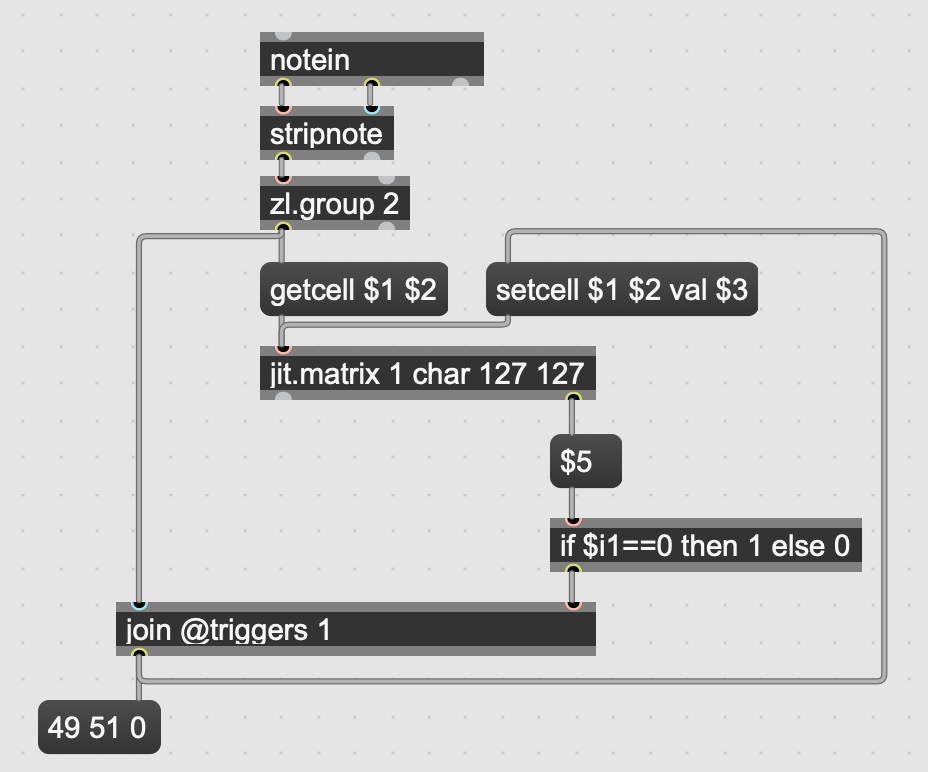

@ Sébastien
great solution !
I made a small enhancement....
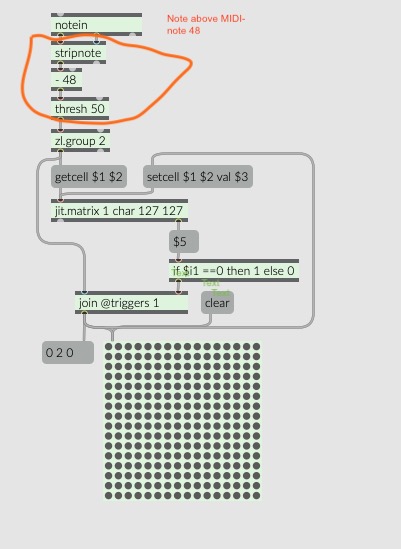
@Sebastien Gay: this is what I meant! But I guess Troy need more filtering after [notein], as in your case just pressing the same key down then up wil trigger an output from [zl.group 2]
@Klangschmied: Seems like you made a lot of assumptions without knowing Troy's real use case.
Maybe they are using MIDI notes below 48, in which case your -48 would point to non-existent, negative-index cells (and 127 is enough anyway to handle any MIDI note, so why substracting 48?)
Also, maybe they need to slowly push two notes, in which case the [thresh] messes things up.
Here is my suggestion mixed with op's first patch.
@ TFL
perfect solution!
@TFL : Correct. I don't use any real MIDI keyboard, so I always fail to consider the whole sequence of messages sent by those (note off messages for instance) :-(( .
Wouldn't adding [stripnote] after [notein] be sufficient, though ?
I edited my last post.
@Sebastien: stripnote helps, but there is still the case where the user could, by accident, press 3 keys instead of just two. The last pressed key would fill the [zl.group 2] with one unwanted value that will make all next pressed key somehow "unsynchronized". But to address that, Troys solution with poly seems bullet proof!