
Midiout, send sysex messages from Coll.

Hey everyone,
I'm trying to programs something quite simple, i have a dial knob that is connected to a coll text file (with sysex messages). When I turn the dial the output from coll is clearly the line corresponding with the dialnumber. So far so good, what i want to do now is output these lines to midiout. Whatever I try i can't seem to get midi out of it. No reaction whatsoever.
Also if i send out whatever to midiout for testing reasons nothing happens in Ableton, Am I missing something?
Kr,
Wim

I do this all the time so I know it works. Here is an example from my current project:
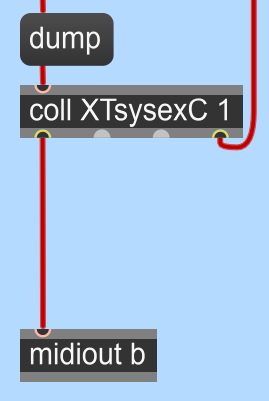
Are you sure that:
1) You are triggering the coll correctly to output the desired messages? - check by printing the output to the Console.
2) Are you sure that you have the SysEx messages formatted correctly? They must be in DECIMAL format and NOT hexadecimal format and so must begin with 240 and end with 247, not F0 and F7!
3) Have you remembered to assign a midi port to your midiout?
Would you mind sharing that code? Im using max for live. Not the fuklfullfull max version, could that be the reason the midiout is not working? I can't select a midi portportport...
I'm not using M4L but looking at a quick tutorial on YouTube, M4L clearly has midiin and midiout commands just the same. The only difference is that they don't use the port identifiers. Instead, they are defined by the M4L module that you are programming. Otherwise, it should all work the same.
I certainly don't mind sending you the module that I use for storing and sending my coll objects. It's actually functioning as a memory bank between two external applications (CuBase and an X-Mixer) that I control with multiple control desks (X-Touch and up to three X-Touch Extenders). The "memory" stores all the commands coming in from CuBase and the X-Mixer and then dumps all the stored commands into the X-Touch units when I switch between them. However, it is pretty complicated and the coll objects are maintained internally within the patch and not loaded from external files so I don't know if it will help you that much as the coll objects will appear to be empty!
Hey, Thank you for sharing!
Well, I've tested some more, so basically everything works as you can see in the printscreen, i turn the dial and the print out is working as it should. From the moment I turn that dial in Ableton the whole midi out just stops working, at first the others dials send out midi, but when I turn the first altered dial no more midi, also not from the other dials anymore... Midi just stops
*Update: when i open the device in Max standalone (I don't have a full license) It works, it sends out midi data as it should. So it just doesn't work in Ableton AAAAAAAAAA :)
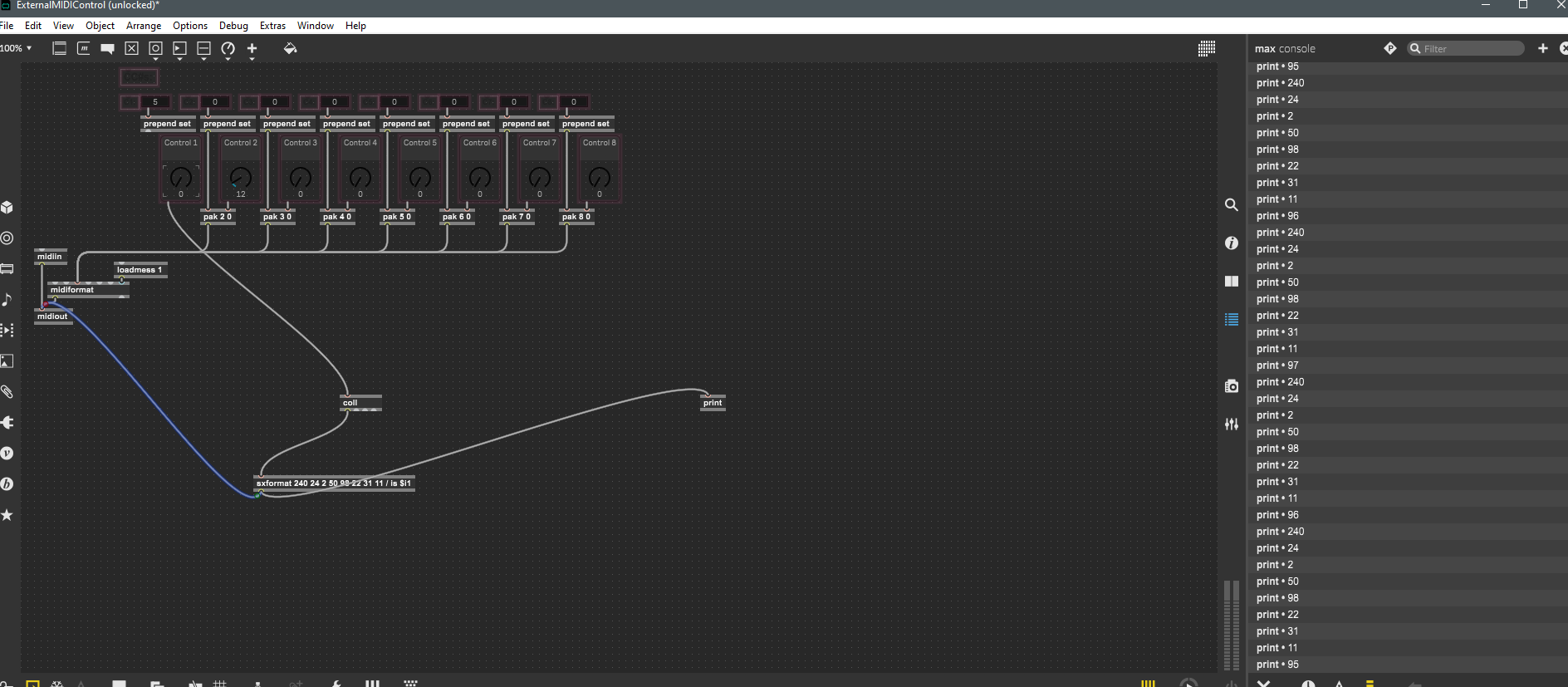
I've pasted my patch here, could you test if it stops on your system too? Really don't know what's wrong...
I think it's because you're missing the 247 ($F7) off the end of your sysex messages, so I suspect that's causing your midi flow to lock up whilst it waits for the end of the sysex frame. The sxformat object needs to be changed to:
sxformat 240 24 2 50 98 22 31 11 / is $i1 / 247
Hope that fixes it!
OMG that was it!!!!!!!!!!!!! YOU ROCK! And gladd I could provide a tip too :)
Glad it worked! My enthusiasm for using sxformat instead of prepend was short-lived as I remember now that $i1 can only insert a single byte and not a whole string of bytes! I also suspect that midiout in Max is a bit more tolerant of how it is fed than it is in M4L.
Well, I feed a whole string into sxformat from coll (a whole line) just into one inlet to sxformat.
Then if you say in sxformat for example $i1 $i2 $i3 ... it takes in every byte from the whole string :)
It takes in bytes from left to right, so in inlet 1 you can insert a whole string (but seperate the bytes with each their $) and then feed another variable into inlet 2, 3 etc :)
The problem I have is that Cubase sends out sysex messages that are all sorts of different lengths (from just a few bytes to 50 or more) and so I can't predict how many $i1 items I'm going to need. Anyway, prepend does the trick so, as they say, "If it ain't broke, don't fix it!"