
Multidimensional matrix from coll

Hi! I want to dump a coll into a matrix (possibly 8 dimensions but we'll stick to 2 for the exemple).
e.g. In my coll, I have symbols (first elements) ints (2nd elements) and ints (3rd elements)
Coll :
1, blue.wav 1432 322;
2, yellow.wav 235 2500;
3, red.wav 478 180;
4, cyan.wav 766 27;
5, magenta.wav 12 999;
The result should be a 5x5 (length of the coll) matrix with the symbols stored ascending on each axis.
Result
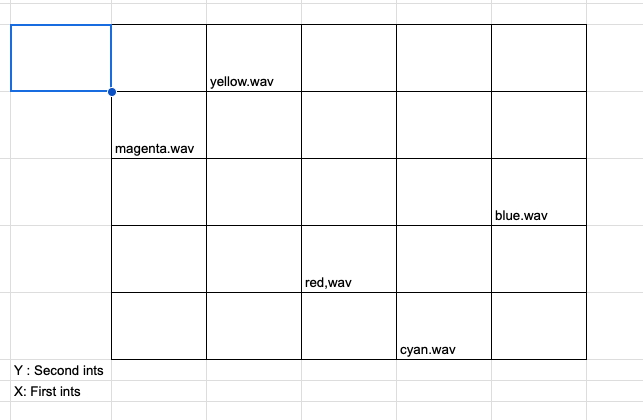
I hope i'm not so confusing :P
Thanks in advance!

Hi Loukas. Matrices in Jitter can be "char" (8-bit ints, 0-255), "long" (16-bit int), "float32" or "float64". It's not easy to store strings inside a matrix, unless you consider that each cell is a single ASCII character.
Do you really need to store that information in a matrix instead of a coll? What would be the use case and inherent advantage in doing so? Just curious.
I'm building a device that classifies loops based on different characteristics. Let's say i have 8 characteristics that are represented by 8 knobs, when i turn these knob, i want the device to be able to find the loops that are near this "crosspoint".
I will take a look at the Flucoma objects since someone made a tutorial video on how to make a 2d sound corpus... Maybe this will help me but I'm not sure to be able to achieve this 8 dimension matrix with this video...
I got a little closer to the goal!
(for the X axis)I sort from the second column (sort -1 1), renumber, and dump my coll.
Then i join the first column (the strings) with the number associated with data (second outlet from coll). This gives me The string name with the first axis coordinates.
I put this into a dict with the message replace $1::x $2 .
For each row I have (each dimension), i need to do these steps.
(E.g. for Y axis)
Sort from the third column (sort -1 2), renumber, dump.
Join first column with the number associated.
message replace $1::y $2
N.B. You can put a gate before each "replace" message and trigger the outputs so you just have to have multiple "replace" messages and not multiple duplicated objects.
Ok so I did succeed lol here is the patch : The graph won't look the same because the 0 0 point starts at the top left (which makes sens lol) and in my exemple I was starting in the bottom left.
Only problem, the sprintf's are giving me errors even tho it's working, do you know if it's possible to kind of quiet the sprintf, or any way of stoping the sprintf for giving me errors?
Thanks!