
Overlaying PNG images on jit.gl.movie

Hi all!
I am trying to make a device that plays movie clips and that the user can drop or load a png image with transparent background to be overlayed on top of the video. I found a simple way to do it using jit.matrix and a fpic object that reads the image, but I can´t move the image around or resize it. Another option I tried was using jit.gl.videoplane because I understand have more controls over textures, but can manage it to work. I load an image with an fpic and then into jit.gl.texture and then videoplane, and the only thing I can see is a black square on top of the playing movie clip. Any help would be appreciated

set depth_enable 0 and blend_enable 1 on your videoplane with the mask, and use the layer attribute to control draw order
I can see the image on top of the video, but in front of everything there is a black square. I check the other jit.gl.layer objects, if there is a redundant one, but there is only one for the main video, set to layer 0, and the one for the videoplane, set to layer 1. There is some text on top of the video as well, sent with the jit.gl.text object, which already display on top of the main video, and I tried to set it to a specific layer but it doesn´t seems that this object work that way.
seems to work fine over here. post your patch if you can't get it sorted out.
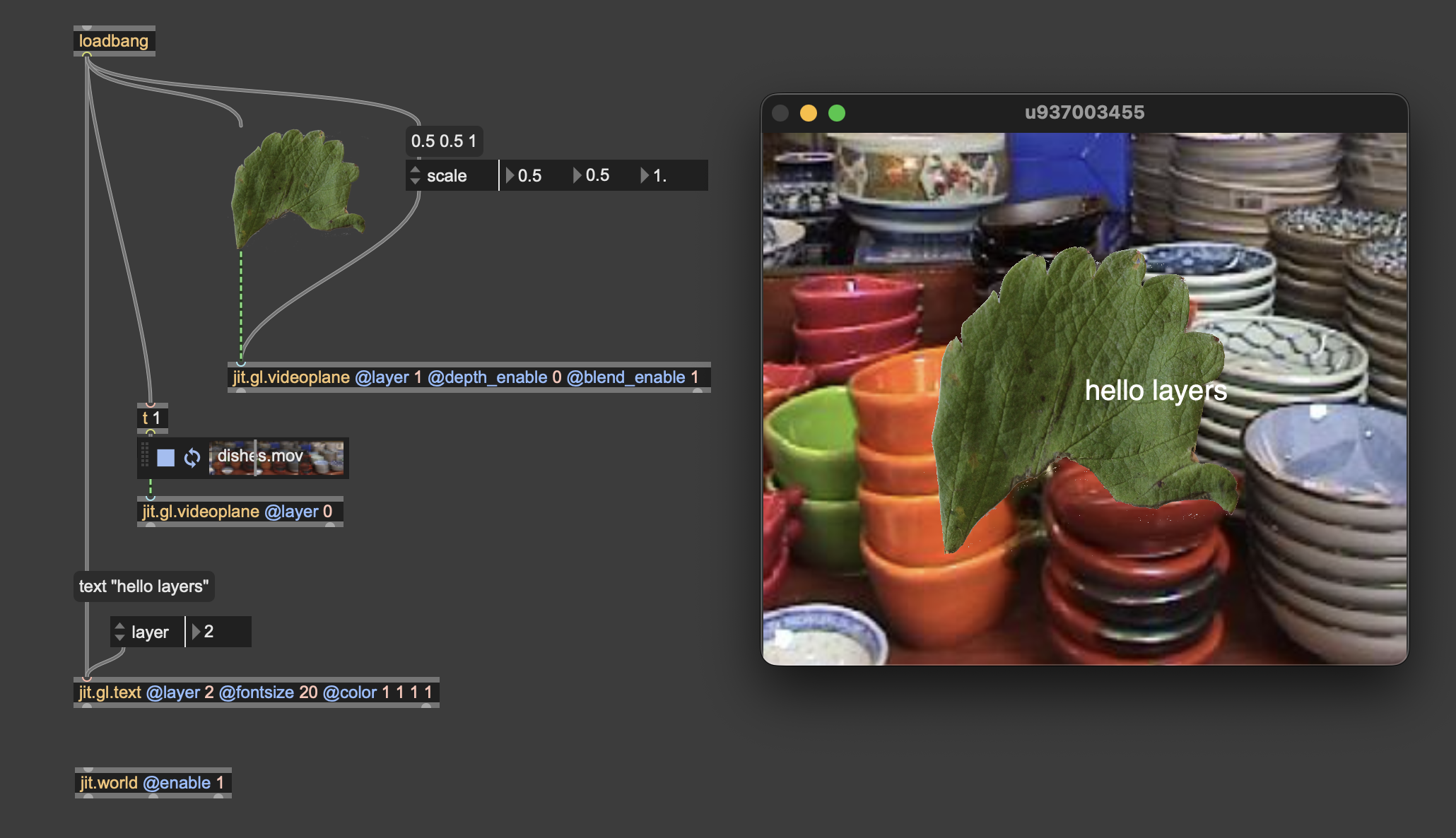
I was missing that videoplane object after the movie clip, so now it works. Now I have another issue, and that is that the jit.gl.text have the attribute to display text in 3 modes: 2d, 3d and outline, and when the mode is other than 2d, then the text goes to the back of the video, even if I set the layer to 2 or more. I have connected to the jit.gl.text a jit.gl.handle to be able interact with the text, and I tried to change the position of it to see if that could be the issue, but it's not. I guess it´s something to do with the text becoming 3d, but I am not sure if I can control what is display on top of what in this case. I would like that the text to be displayed on top of the main video even when the text is 3d or outline.
set depth_enable 0 on the videoplane
That was easy, thanks a lot