
phasor~ > function sequencer question

Hi, I'm pretty new to Max and enjoying it a lot but I've never been a programmer so there's a lot to wrap my head around. I am trying to build a step sequencer driven by tempo-locked phasor~, but I want the phasor shape to be "warped" by a function object, basically a tempo-synched complex modulation curve. I'm confident in my idea but I can't figure out how to make phasor~ drive the function, since it outputs a signal and function wants a float input. I imagine I need to use some sort of mediating buffer but I don't know enough to make that work. Any ideas, or examples I could look to? I haven't been able to find any. Thanks!

you can do many things with phasor~
or function
or both

shape~ is the object your looking for
@WIL thank you, I thought Edge might be part of the solution but I was using it wrong. This translation makes more sense now.
@STEVON thank you too, I had played with curve~ but missed shape~.
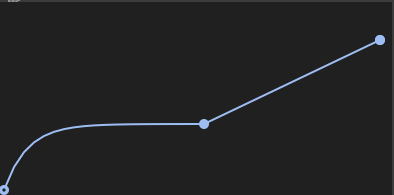
What I'm missing (and forgot to mention initially) is these approaches work great for modulation but I also want the function output to drive the shape of the "measure," so I can sort of time warp and displace my step sequencer triggers. I thought I only had to feed my function output to a subdiv~ but STEVON's example shows that my thinking was backwards, subdiv~ gives me smaller clones of the parent shape. Is there a way to use the function to warp my "clock" (kind of like a weird swing)? So the attached pic would initially squeeze the sequence to play back fast before gradually stretching back to normal by the end of the measure. I can sort of picture the structure but I don't really have the vocabulary to explain myself.
This is something I do all the time with audio clips in Live but I'm trying to apply it to a sequence for more real-time interactivity.

"Is there a way to use the function to warp my "clock" (kind of like a weird swing)?"
I think a shape to drive another shape will do that. Shapeception if you will :)
I was thinking along those lines, but I can't see how to derive the asymmetrically-subdivided bang/triggers from that configuration. Maybe I can use the output of shape~ or curve~ to modulate the phase offset of another phasor~, then when I subdiv~ that one to get triggers, the distance between divisions will be continually variable. Just thinking out loud over lunch, I will try this tonight!

swing~

Check out Philip Meyer's videos he's going deep into this kind of stuff as well, great resource: Bouncing Ball Rhythms in Max MSP

otherwise, where functions are not sufficient or too CPU consumptive, [lookup~] can be used to freely shape a normalized range.
@AERA, wow, I’ve been watching a million of Meyer’s videos because he seemed likely to have the answer, but I hadn’t found this one. Yes, that’s exactly what I needed. Ironically I was very close with my initial guess but I didn’t know about shape~, so that was the solution. Thanks, everybody!
@Peter Bajzek
Philipp Meyer is a great resource on sequecing
But with twist~ you can just edit one phasor curve element, if you actually want to use the function object to shape your sequence there are other ways too