
plugin wrapper bidirectional

Hey,
I ran into a problem while building a plugin wrapper with bidirectional communication.
Slider controlling the plugin works just fine. But the other way around is not working. I found this method in another wrapper i downloaded. Not working for me. Anyone has a clue how to do this and care to help? Cheers!
M
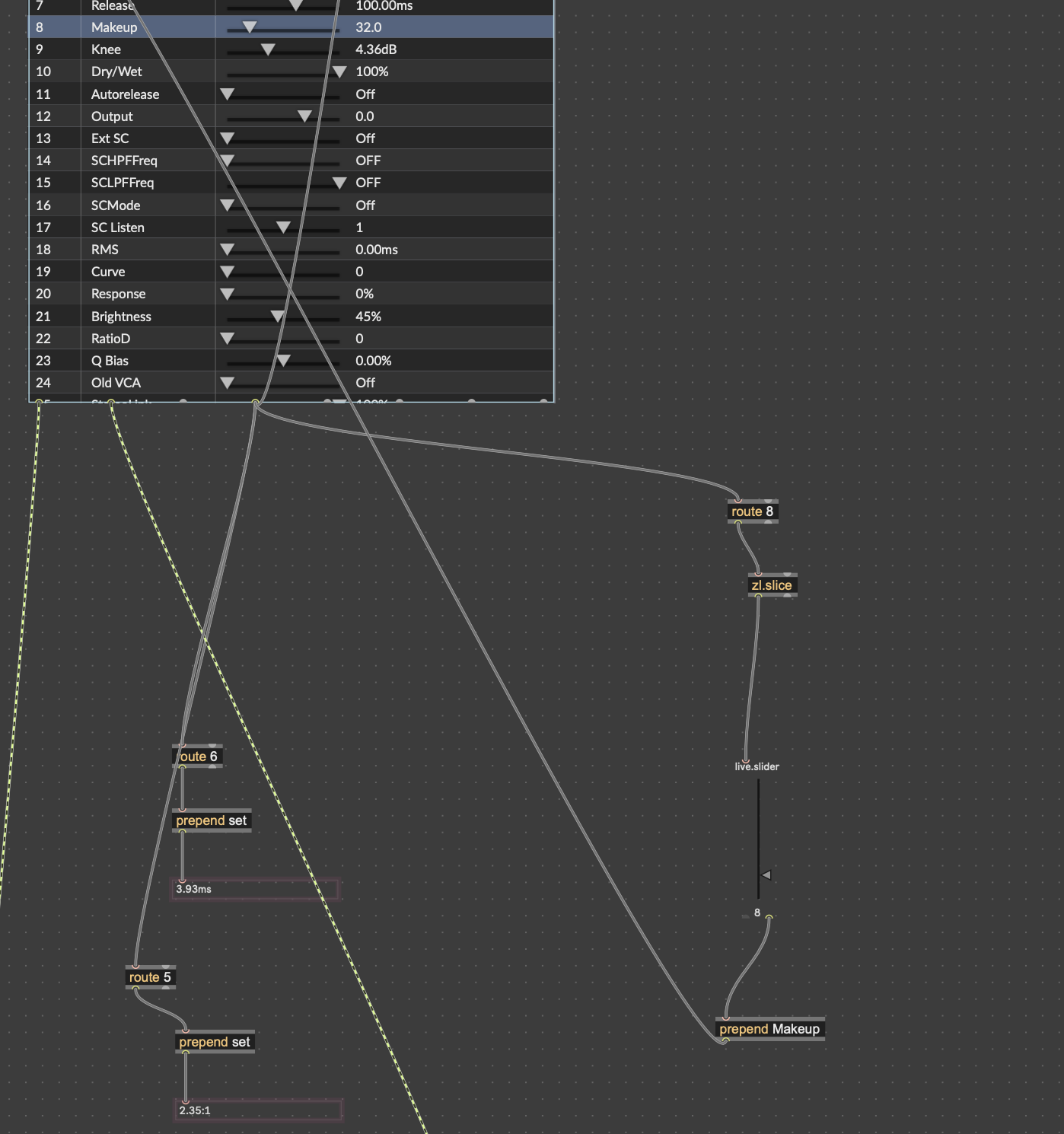

If something doesn't work, monitoring what comes out of your objects usually helps you finding what doesn't work 98% of the time. You could do that simply by attaching the right inlet of a message to your objects output, or a [print], and/or enable Event Probe in the Debug menu and hover the patch cords to see the last message that transited in that patch cord.
Doing so in your patch would make you realize [zl.slice] left outlet won't output anything, because the object is missing an argument (the number or items to slice). Here, no argument is equivalent to [zl.slice 0], which means 0 item will get out from the left outlet and the remaining items (the entire list) will get out from the right outlet. So I guess what you want here is [zl.slice 1].
But this said, I would prefer to use the normalized float param value instead of the string one, since I assume scaling is more efficient than parsing a string to extract the value from it.
And because I started speaking about optimization, I would use one [route], or better, one [spray], since it is more efficient to have one object filtering and distributing many messages to many destinations than have multiple objects filtering the same amount of message but distributing them to only one destination each.
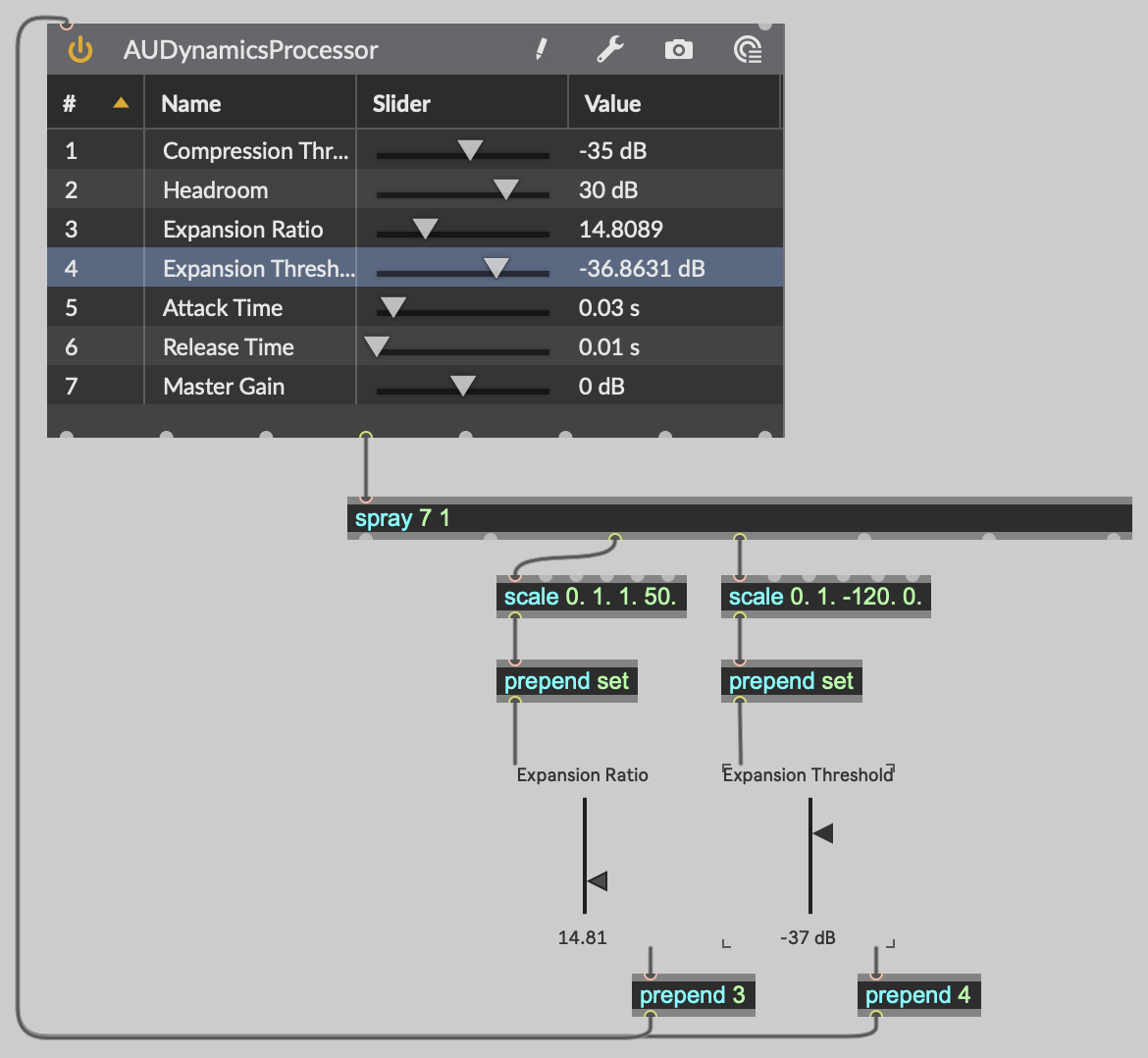
EDIT: Forgot to mention I added a [prepend set] to avoid feedback loops, although it doesn't seem to be necessary for this specific VST. But a a quick search on the forum showed others where it is required.

+1 for normalized range.
thanks for your answer! I only now saw the missing 1 one after the zlslice object. I originally had it "zlslice 1", did not work also. Will try your method later!
[zl slice 1] left outlet probably didn't work as you expected because it gives you the normalized value (between 0. and 1.) that you need to [scale] to your actual parameter range before it reaches your slider/knob.
And if you were using [zl slice 1] right outlet, it was probably not working because it gives you a symbol that you need to parse to get a float from it. [fromsymbol] can help for this.
the object is called [zl] and "slice" is an argument to it, which puts it in a certain mode.
(you could also dynamically change its mode using loadbang->"modeselect slice"->zl, but i´d recommend against this.)
since max v6.x you can alternatively type [zl.slice], which is a virtual object, which gets mapped via mapping prefs or something similar (but we do not have to care how it works; the two methods are linked with each other and are technically the same max object, that´s all we need to know)
luckily most other objects are not that strange.
note to self: dear 110, learn how to use the correct apostrophe character, then things won´t break into the next line.
Hm, I cannot get it working like this. did it exactly the way you did it. could the plugin be the problem?
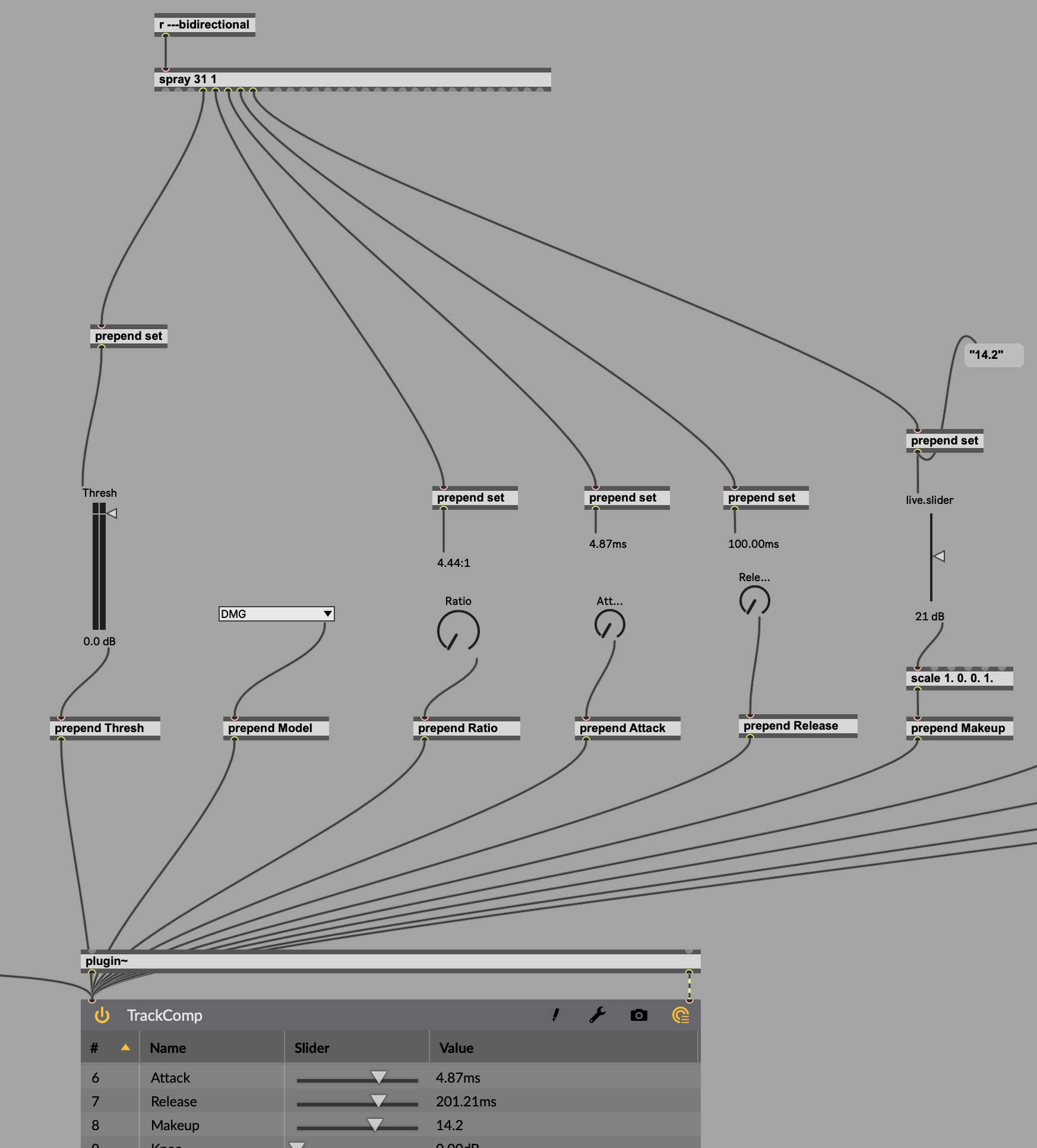
Got it. my problem: I could only get bidirectional communication working when setting the vst3 to spit out "value" parameters alone. "string" did not work. Now I am trying to find a way to split the signal, because I also need the "string" info for some values for the wrapper. Maybe someone has a simple fix for this?
got it. Zl Slice is your friend...
Next issue: How can I get hidden parameters from a vst object. I know the comp Im dealing with spits out Gain Reduction Info, but I don't know under which name. I read something about getparamlist, but I don't know how to implement it!
Check out the params message in the [vst~] doc or reference. Also, check out [zl.group] if you want to group the parameters as a list
thanks. I only got some empty midi names. I thought I would find some hidden names, hehe. will mail the developer. At least in this 360 link software by ssl, kind of a pluginwrapper, i was able to link trackcomps gr output to show in the wrapper.
print: Bypass Input Model Thresh Ratio Attack Release Makeup Knee Dry/Wet Autorelease Output "Ext SC" SCHPFFreq SCLPFFreq SCMode "SC Listen" RMS Curve Response Brightness RatioD "Q Bias" "Old VCA" StereoLink LinkType AutoGain Oversampling OversamplingOL A/B Program CC0 CC1 CC2 CC3 CC4 CC5 CC6 CC7 CC8 CC9 CC10 CC11 CC12 CC13 CC14 CC15 CC16 CC17 CC18 CC19 CC20 CC21 CC22 CC23 CC24 CC25 CC26 CC27 CC28 CC29 CC30 CC31 CC32 CC33 CC34 CC35 CC36 CC37 CC38 CC39 CC40 CC41 CC42 CC43 CC44 CC45 CC46 CC47 CC48 CC49 CC50 CC51 CC52 CC53 CC54 CC55 CC56 CC57 CC58 CC59 CC60 CC61 CC62 CC63 CC64 CC65 CC66 CC67 CC68 CC69 CC70 CC71 CC72 CC73 CC74 CC75 CC76 CC77 CC78 CC79 CC80 CC81 CC82 CC83 CC84 CC85 CC86 CC87 CC88 CC89 CC90 CC91 CC92 CC93 CC94 CC95 CC96 CC97 CC98 CC99 CC100 CC101 CC102 CC103 CC104 CC105 CC106 CC107 CC108 CC109 CC110 CC111 CC112 CC113 CC114 CC115 CC116 CC117 CC118 CC119 CC120 CC121 CC122 CC123 CC124 CC125 CC126 CC127