
Posible reasons why jit.gl.handle will stop reacting to mouse click

Hi all,
the patch I am working display a text through jit.gl.text, that I rotate with the mouse thanks to a jit.gl.handle. I could rotate the text without issues, until I able the output matrix attribute of the jit.world and I added the option to make the window fullscreen. But when I disable output matrix or the window is not fullscreen, it doesn't work again. I save the patch and open it again, and it works. There are some inconsistency in how this object is working, and I can´t find out the reason why.

Could you share a stripped down version of your patch that reproduces the issue?
I tried making a simple test patch but it apparently doesn't have the same issue:
Instead of [jit.gl.handle], you can also give a try to the auto_handle attribute of [jit.world]. It provides a new handle, a bit more difficult to focus (you need to click more precisely on the center of the object), but I find it more practical to use. If you click on an axis (green red or blue), the rotation happens only on that axis. If you click the bigger white circle, the rotation happens in the plane of the screen. If you hold cmd you can translate (also freely or per-axis, or even parallel to a given plan), and hold option for scaling. For rotation and translation, holding shift changes the axis to put them in camera space.
In the patch attached is missing some other jit.gl objects but that are in different layers than the text. I just notice that sometimes the handle becomes active when the mode of jit.text is set to outline. But not always is like this.
Thanks for the auto_handle tip, but I am trying to do something different with this device, which is overlaying text on top of videos and manipulate the text.
I would like to have a couple of this jit.text at different layers and having jit.handle for each one, so I can rotate them, but I am not sure how make that the clicked text activate his handle. I need to experiment a bit on that, but if you have a suggestion, please let me know.
I didn't know your handle needed to be invisible and that you were using auto_rotate. That's why I suggested jit.world auto_handle which would have perfectly worked otherwise.
You can perfectly have multiple texts each with their own jit.gl.handle which could be each picked regardless of their layer. The main issue is that you need to click on the handle sphere to pick one, and although you can make that sphere bigger for easier picking, the spheres of multiple handles could overlap, in which case it becomes more difficult to precisely pick one.
An alternative approach would be to use physics instead of jit.gl.handle.
It complexifies the setup quite a bit, has a few drawbacks (no more 2d or outline modes, although some workarounds can be done, like disabling an axis in the physics world so that all texts remain on the same plan which would mimick a 2d mode), but allows for much more precise picking (since the area of picking is based on the text mesh), and more complex rotation/movement/physics behavior. You could for example have collision between texts, have gravity, add more friction in the rotation, simulate force fields like some wind, etc.
I have to come back here because of a strange behaviour on the jit.gl.handle. It works well when I initialise the patch, and if I move the position of the handle then is not reactive to the mouse drags, but it is reactive to mouse clicks. Then I have to reset the handle object and it works fine again. I tried every attribute available and can´t figure out why it works like that. I am sharing the entire patch so maybe @TFL can help me out figure out what could it be? :)
I cannot reproduce what you describe. After moving the text using cmd+click+drag or directly using the position attribute of [jit.gl.handle], I can always click+drag on the text again if I want.
However, if you change the position attribute of the [jit.gl.text] itself using messages, then the jit.gl.handle indeed becomes offset from the text, and the click-sensitive area doesn't match with the text anymore. I'm not sure if that's what you meant, but here's how to avoid that:
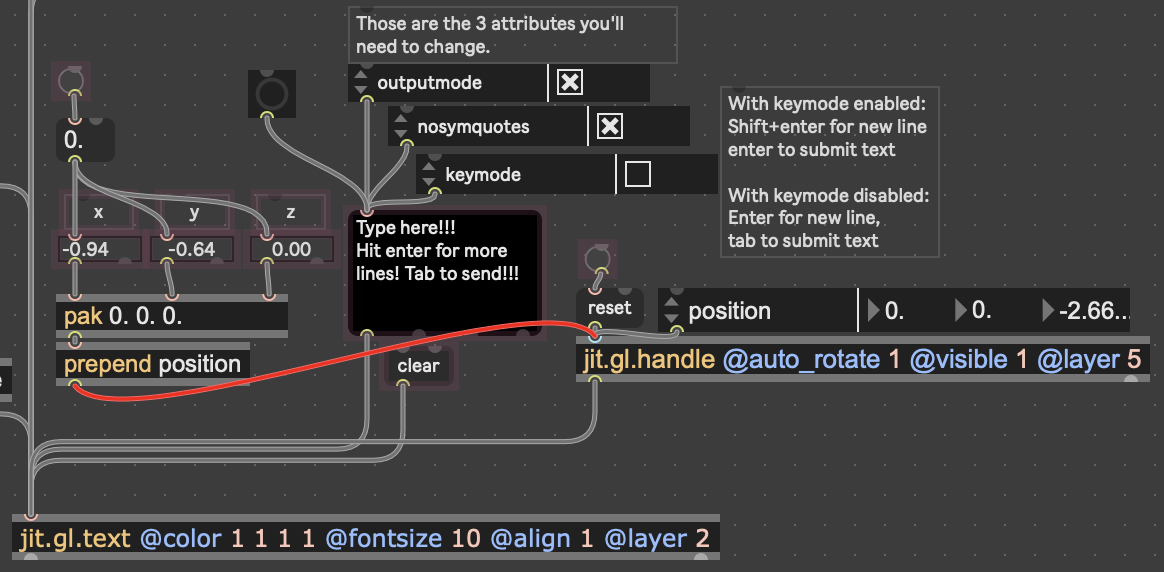
just set the position of the [jit.gl.handle] directly instead of [jit.gl.text].
Also, no need to share the entirety of your patch, you can remove everything that isn't necessary for reproducing the problem you're facing. So you can most likely remove everything related to the two [jit.gl.videoplane] and just keep the [jit.world], [jit.gl.text] and the few objects around.