
receive bang at a specific computer time

Hi, is it possible to receive a bang in Max at a particular time of the internal Mac OS computer time?
For example at 8:15 and 30 seconds p.m in order to have different computer at different places start at the same time without a network.

I don't think there is an object that does that by itself, but you could easily patch it.
One solution would be to have a [metro 1000] sending a time message to [date] every second, and compare the given time to your cue list. You could store that cue list in a hh:mm:ss format into [coll], and just query the current time formatted the same way. If you get an output from your [coll], then a cue point is reached:
Another solution is to rely on [transport] and use [timepoint] to get a point at a desired time:
Thanks. The problem is that it is not precise to use Metro 1000 to get the exact change of the second in the computer clock. I did it with metro 1 to get the time but that eats a lot of CPU.
I'm pretty sure the [transport] + [timepoint] approach have a precision of 1 tick by design, which gives 960 ticks per second at 120bpm. You can increase the [transport] tempo to increase that resolution if you want, but it's already way below an acceptable margin of error. The [metro] in that example I provided is just for previewing the transport's time, not for actually triggering the events.
Regarding the [metro] + [date] + [coll] approach, if you want more precision, you can indeed reduce the delay. 1 millisecond is probably overkill, but 10 or 100 is maybe more manageable for your CPU while still providing good synchronization.
You could also try using [qmetro] instead of [metro] for lower CPU usage while retaining good precision.
What do you want to synchronize exactly? How much of a margin of error is possible?
You said that both computers are not connected to a network, so I assume they have no internet access, so no time synchronization, so it is quite unlikely they will start in sync to begin with.

[maxurl] & internet time services?

to auto start (boot) computers at same time
you need precisely synced computer clock, and then usuall
boot at set time script
What has max to do with that ?
apropos "without network". what about using WLAN USB sticks for 5 dollars each?
Wlan is time wise not reliable enough. There is always dropouts especially on longer distances.
What do you want to synchronize exactly?
I wan't to start a visual conductor (with different tempi and bars etc.)
I started doing it with W-lan sync sending the information to receiver patches from a host but there were always drop-outs. Now I do it with Lan and it works fine but it's sometimes 50meters cable and I still hope for a version I don't need the Lan cable.
I'm still not sure how well the computers will stay in sync if every computer has its own app, starting in sync but I thought it's worth trying.
So your initial statement
“in order to have different computer at different places start at the same time without a network“
was missleading, I thougth you want to boot computers ...
wlan shoud also work ok, but not public internet,
if you make own closed 2.4g wlan using strong Access Point,
and use UDP you will have no dropouts at all.
I did such things many times, also for many connected clients.
one can compensate distance latency if
IPs of longer distance computers are known and defined.
if you want to try if computer time could stay in sync,
capture time using shell, you can lower polling interval to 1ms
or even 0.001 ms if such precision is needed.
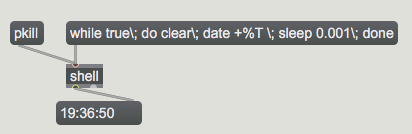

Run this on each computer?
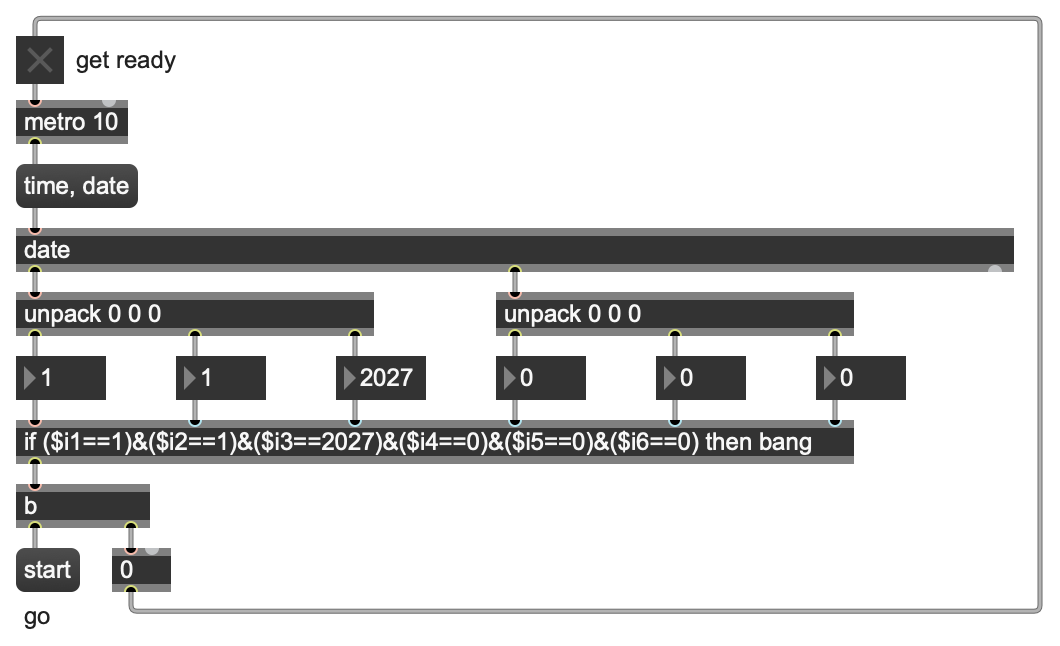
https://cycling74.com/forums/receive-bang-at-a-specific-computer-time?replyPage=1#reply-6a3189bd03310b715e65dc50
Thanks, the shell script works perfectly and uses almost no CPU
Well it does use some CPU, but not diectly visible in Max,
it runs as separated process.
you could use something like what Christopher Dobrian suggested
to switch polling off after time matched, or to remotely control cues and polling
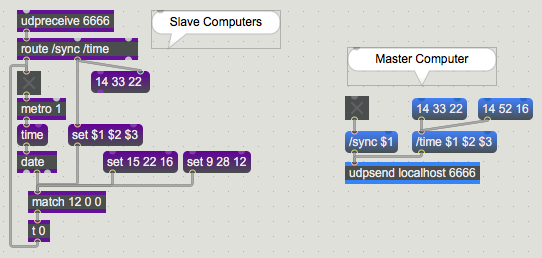
yes, date gives you the time.
but when wired or wireless network are both out of question, how would you udpsend? :)
UDP send no matter, wired or WiFi.
One can send cue time several times im advance
and also activate time polling , and receive OK from slaves that they are in idle time.
So nothing to worry about droped packets.
For few bucks one could connect few low freq transcievers, like 433 MHz
that can transmitt over 1000m to trigger such actions.
I use such for wireless pedals on stage.
Thanks, I will check it with just the start time via shell and with UDP.
In my old version I sent every beat (bar beat color) via wlan to the receiving computers. But even a hanging power cable between the router and the computer caused little problems as I need every beat in time.
How / where do I get low freq transcievers ?
there are quite few ones,
look for HC-12, HC-14, HC-15
Last time I used HC-14 with arduino nano over more then 500m without any dropouts.
they claim even 3km...
that are serial wireless devices, need a little arduino to
pass data to/from computer.
for example
but that distance is not meant to communicate high precision triggers like beats.
Long distance is long distance.
P.S.
maybe HC-12 would be a better choice , even that it
has somewhat lower distance, but it has smaller latency.
I would replace spiral antenna with a better one
3- 5dbi 433MHz IPEX-1 (U.LF) antenna.
ESP32-C3 would be a good board for it.