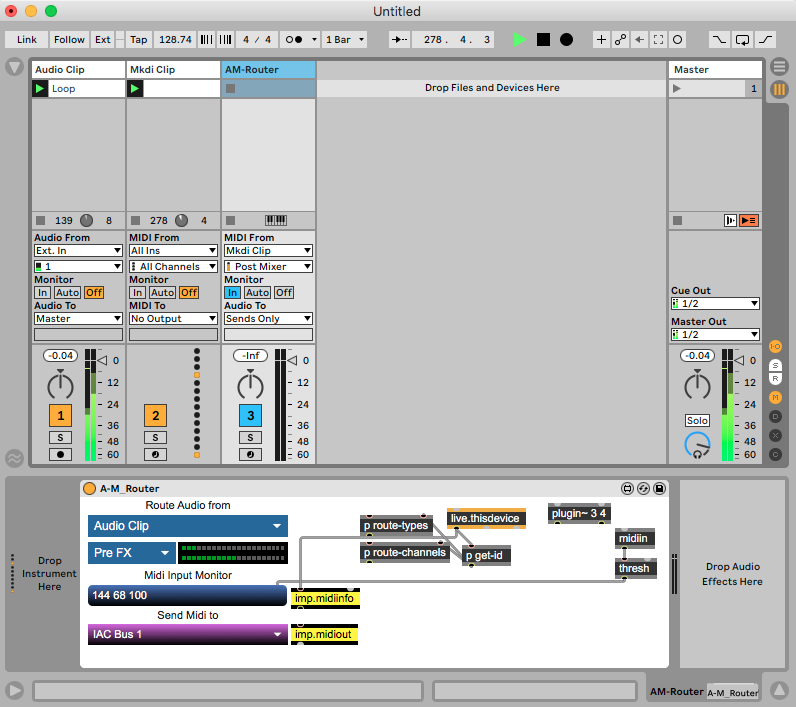
Route Audio/Master Track to MIDI device for MIDI & Lightshow Visualisation

Hi everyone!
I've spent the last 7 years developing Max devices solely focused on amplifying what you can do using MIDI inside Ableton to create Light-shows and stage visuals, and I've hit a roadblock...
I am attempting to make a max for live device that can listen to the audio flowing from the master track in Ableton, react to it, and generate MIDI visuals that are then sent out to hardware devices, as well as jitter devices that react and simulate these MIDI visuals, but have an ability to record the jitter feed where the visual have synced audio to the visuals that i am recording.
Currently i am achieving this by using the plugsend~ object on a secondary device to send the audio from the Master track (for example) into my MIDI device so i can sync the audio with the recorded MIDI visuals.
I am seeking a new approach, where the entire device is contained within itself, no secondary device needed, the MIDI device is able to listen to audio elsewhere in my Ableton set, and sync the recorded visuals to the recorded audio.
I've been tinkering with the ability to listen to the audio from other tracks, and have discovered that this is possible if the device type is set to audio. However, this is not an option, as all of my visuals respond to MIDI flowing through the MIDI device. I could absolutely create a second device to transmit the MIDI but then we're in the same boat, two devices...
It's a little bit out there, i know, but if there is any way of achieving the ability to, within a MIDI device, listen to the signal from an audio track, without the use of a secondary device, that would be absolutely perfect.
If anyone knows a way of accomplishing this, that would be super helpful. Always happy to provide more context if necessary!
Thanks a bunch :)
Charlie

I would use imp.midi externals to send midi out
directly from your audio device which can listen to any track
or send channel.
as original website is down, here mac/win package
Arm mac come from here
Hi there, thanks for the insight into this external, unfortunately this is not exactly what i am after.
The device i am working on is a MIDI device, it receives MIDI, it outputs MIDI and is set as a MIDI device in the Max settings. However, for it to generate the MIDI visuals i require, the device must be able to listen to Ableton’s output audio or master track, or even better, allow for individual track selection. Is it possible for a MIDI device to receive an audio stream in this way?
Thanks,
Charlie
so your problem is not to send/receive midi, but to receive audio ?
maybe you could look into audio routing stuff here
to get an answer.
it uses live API to route audio ,
but I have no idea if it can be inserted into a midi track.
I am not Live user and have no interest really into it,
but that routing between different track types seems to be one of many limitations in Live.
Correct, apologies if i hadn’t explained it clearly, it’s quite a niche so hard to find the right words. But yes, my end goal is to stream audio into a midi device.
I’ve previously looked into those max devices you sent my way, and there is an audio receiver device in the pack which does the trick. However, it’s an audio device. I’m after this same functionality on a MIDI device. Even changing the demo device to a MIDI device, breaks it instantly.
It may be a stretch but if anyone can grant further insight that would be great.
depends on your midi device.
does it need to receive midi from ableton track
or only from external sources ?
maybe you could play with instrument device type and imp.midi externals ...
Hi there,
This device receives MIDI from MIDI clips placed on the MIDI track that the device is currently placed on, MIDI Passes through it as it goes out to MIDI hardware, and my device simulates its visual appearance. It can also generate and send new MIDI so as far as i am aware it must remain a MIDI device.
not necessary , instrument receives midi from a track just as well,
if you need only midi out to hardware insert imp.midi.