
Splat - couple of bugs?

Hi,
FYI, I am running Max v9.0.8 on Win10. (EDIT: just updated to v9.1.4 -- same behavior)
Issue 1
I have been building a looper patch as a personal project to learn gen and genexpr. I have been chasing down the source of some clicks I've been noticing, particularly at the loop point. My investigations have led me here:
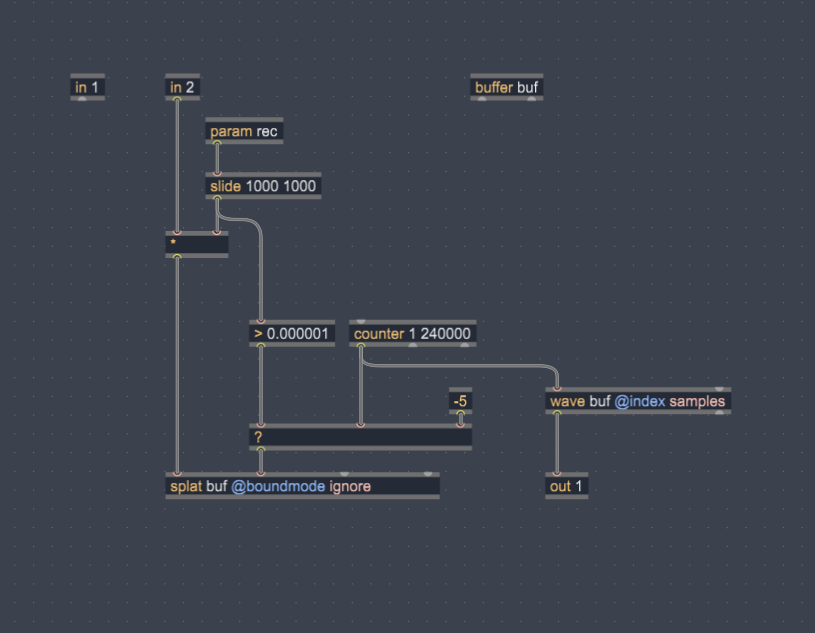
I created the most basic of looping patches in order to test splat's behavior.
A counter continuously runs, feeding the sample index of both the splat (writing, when rec>0) and wave (reading, always). When rec=1 it fades in the audio input (in2) to the input of splat.
When I use splat there is a click at the loop point after I record in audio that crosses said point. When I put poke in its place, there is no click. It seems unrelated to overdub modes, all of which I tried. Same behavior: splat clicks on the loop point, poke doesn't.
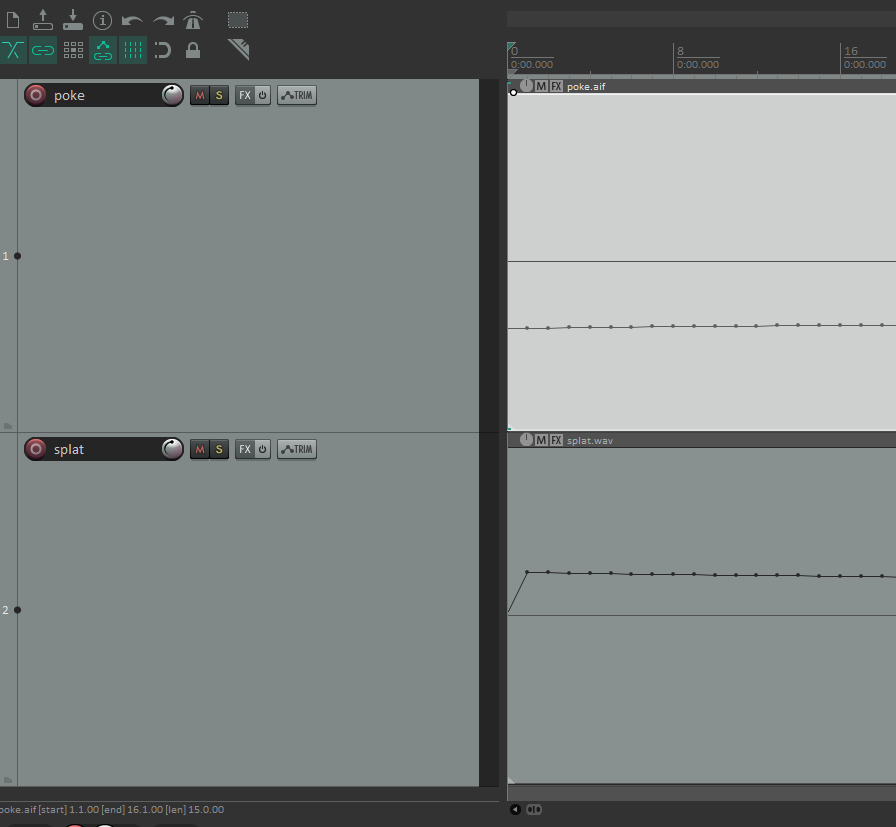
I recorded two very similar loops (same program material) - one with poke and one with splat - exported the buffer contents and am analyzing them in Reaper. I don't know how accurate Reaper is for sample-level analysis, but this is what I see.
Loop Start:
Loop End:
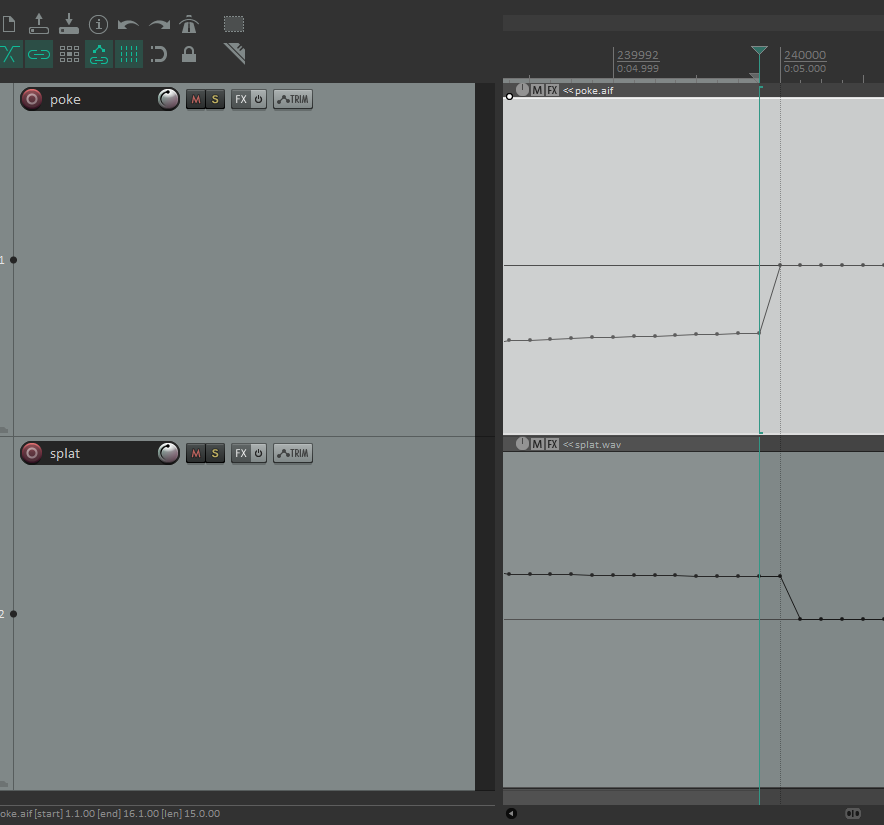
You can see there is a discrepancy. It looks like splat's write pass is offset by a sample. It begins writing at sample 1 and ends at sample N (where N is the loop length, in this case 240000 samples). Poke is writing at sample 0 and ending at sample N-1, as expected.
I would have expected splat's interpolation to deal with this, but it does make sense that this would create a click as there is a discontinuity between the loop end and loop start, which is not present with the poke version.
Is this a bug with splat? Or is it something else inherent to splat? Admittedly I want to use splat for its interpolation, so using poke is not a valid alternative.
Issue 2
I think the documentation for splat is incorrect. Specifically the "overdubmode" attribute.

This would imply that when not specifying the overdubmode attribute, it would default to "accum." However this is not the case. It seems to default to "mix."
Your input is appreciated!
Interestingly enough, if I add a corresponding offset to the buffer playback, it alleviates the clicking caused by splat.
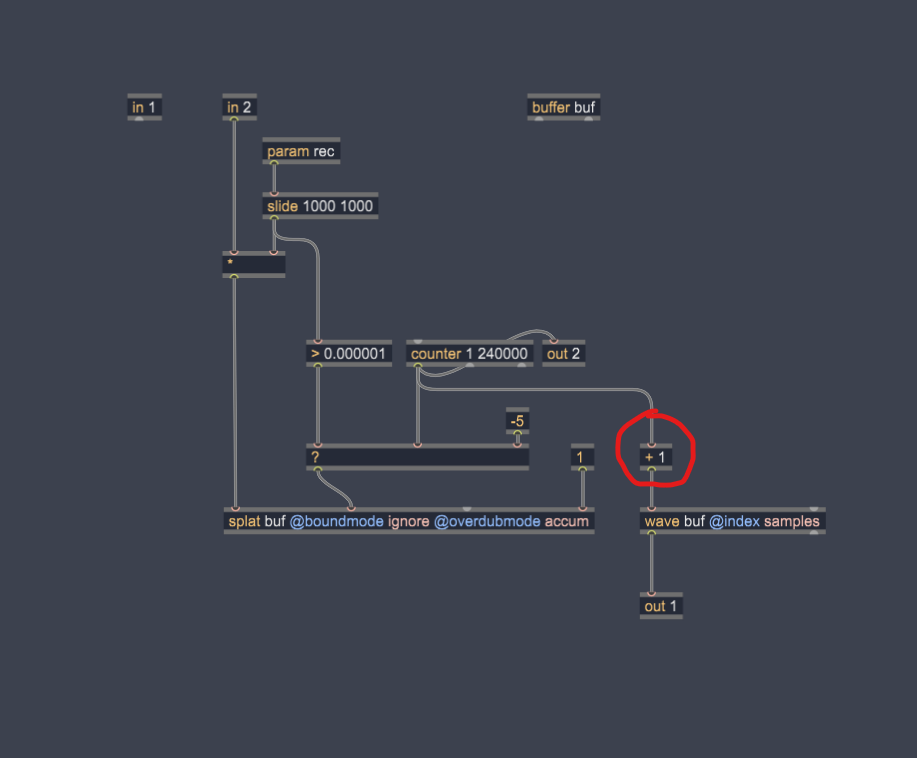
I think this supports my hypothesis that splat is writing to the buffer with a one sample positive offset.
I'm still curious as to why interpolation - both on the write side and the read side - cannot overcome this discontinuity. It's especially problematic for me if I wish to play back the buffer a fractional rates (thus fractional sample indexes) which seem to always click.

I would rather offset splat's position then for objects that read from buffer.
you need proper indexing in any case, also for buffer copying.
that splat writes to sample 0 when position is set to -1 must be a bug.
I don't see any reason for that.
Maybe it preserves something for interpolation ?
No idea.
Maybe someone with better knowledge about splat could chime in.
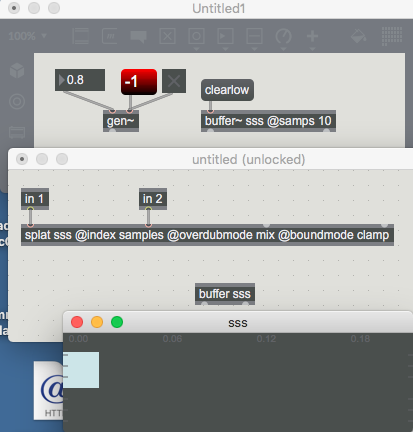
I think in the example you've shown, source audio, the attribute "@boundmode clamp" will mean any sample indices out of range will be forced within range. So it makes sense that a sample index of -1 writes to sample 0
It does not explain the behavior I've demonstrated above though, where specifying sample index 0 writes to sample 1

Hello!
A couple of things:
Since your counter is progressing at sample rate (moving +1 for every 1 sample of passing time) then you don't need to use [wave], you can use [peek], because you directly read samples with no interpolation needed. For the same reason, you don't need to use [splat], you can use [poke]. The splat op is only for interpolated writes, which will blend values between consecutive samples in time.
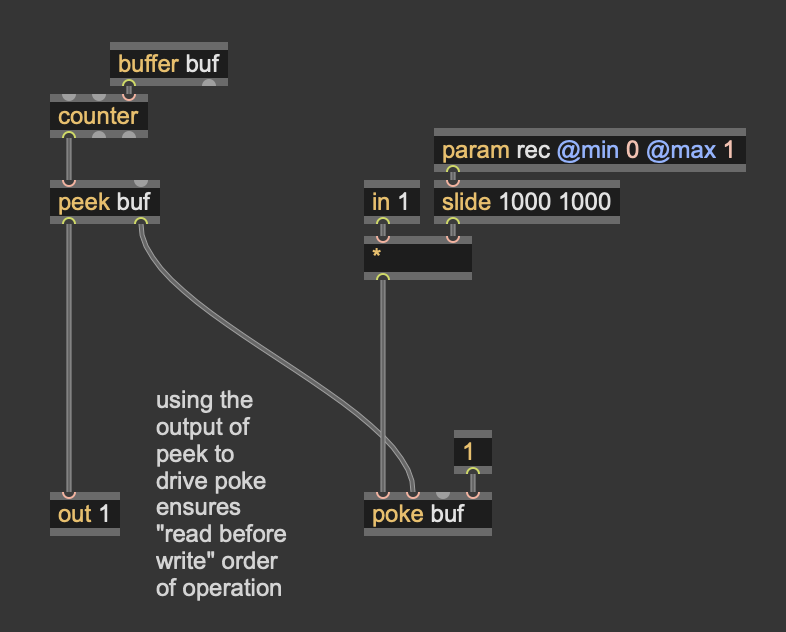
The [+ 1] oddity: what may be happening here is that you are writing to the buffer before you read from it. Buffer reading/writing is one of the rare cases in gen~ where order of operations might not happen in the order you expect, because there's no deterministic way for the compiler to know what is the right way. The simplest way to prevent this happening is to have one of the inputs of the writer (poke or splat) be driven by one of the outputs of the reader (peek, sample, wave, etc.). For example, the last outlet of [peek] is the sample index being read from, which you can route into the sample index input of the [poke]. So the looper can look like this:
Overdubbing:
@overdubmode accum means that existing data in the buffer is scaled & added to input when 4th inlet is connected and > 0
@overdubmode mix means that existing data in the buffer is blended with input when 4th inlet is connected and > 0
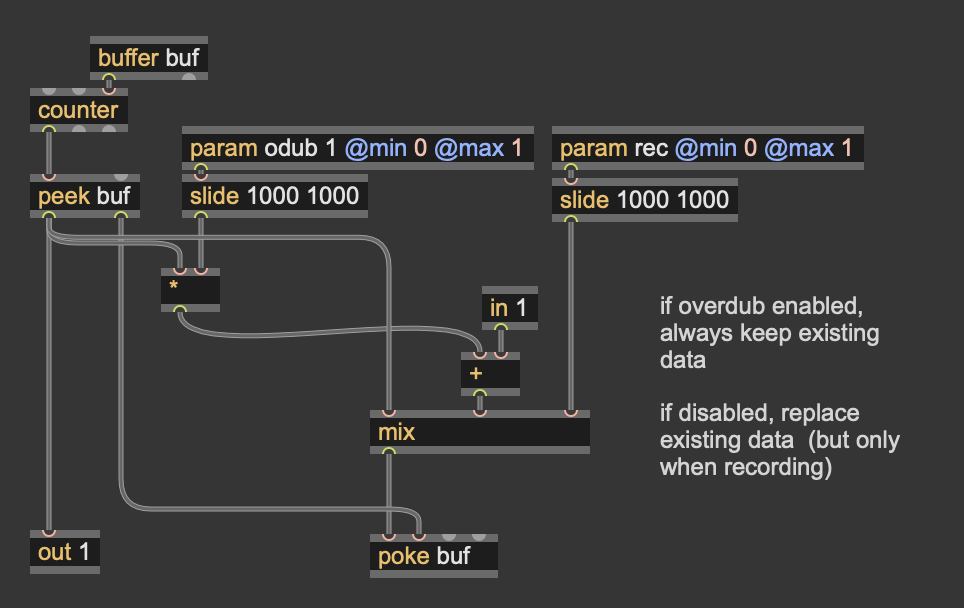
For a general looper you might want to be able to choose between these; in that case, you can patch the behaviour yourself either by taking the output of the peek and mixing/adding to the input to the poke:
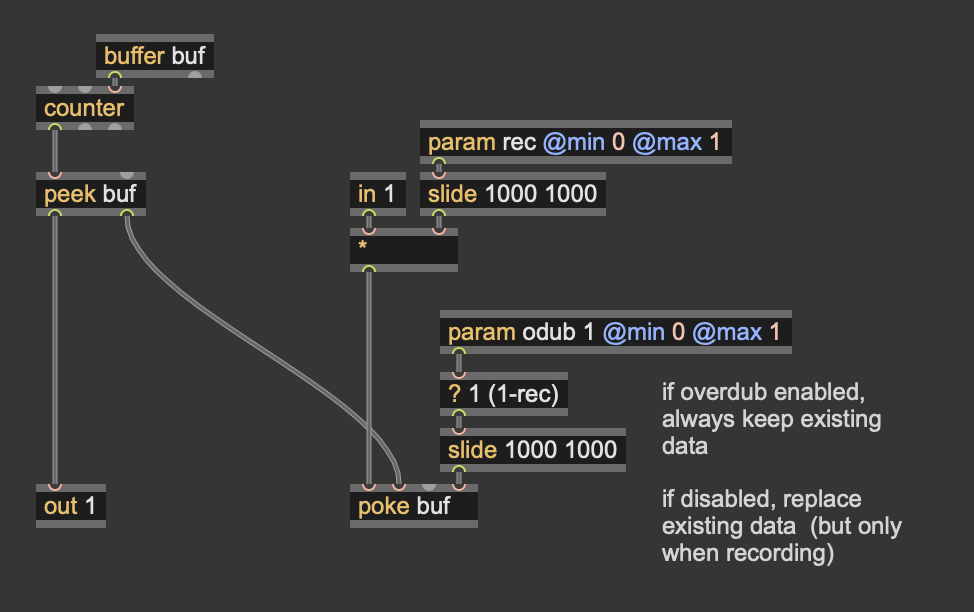
...or by controlling the overdub input of poke directly:
Side note 1: the clicks at the boundaries might have been because you are using @boundmode ignore, which treats the buffer as a linear chunk of memory (indexing 0..N), not a loop of memory; whereas by default @wave will use @boundmode wrap, which treats the buffer as a circular loop of memory (indexing 0..N-1). Typically if you are doing a looper, you will want to use @boundmode wrap. (But as noted above, since your driving counter is locked to sample rate (which is usually what you want for a buffer writer) this really doesn't matter.)
Side note 2:
The default overdubmode for poke is accum
The default overdubmode for splat is mix
Side note 3:
What is [splat] for? It's for those cases where you are not using integer write indices to a Data or Buffer, and it will variably blend the input value with the two nearest sample positions. There are not actually that many applications for this, and it's definitely not a good choice for building a looper. The splat op is really more useful for when using the buffer to store parametric control data, not audio per se.
For loopers, it's a LOT easier if you keep the write index always moving forward 1 sample at a time, and use poke. If you had different write speeds, you may have to deal with the case of a writer moving at >2 steps per sample, and that will leave "holes" in the buffer that will sound like a horrible metallic distortion. Even below this there will be variable leaking of existing data depending on write speed, which is probably not what you want. And you'd also need to AA filter the input before writing, to avoid aliasing. There's so many challenges to getting this right, and [splat] is not the solution to any of them.
Hope this helps!
Graham
Thanks a lot for the comprehensive reply, Graham!
Since your counter is progressing at sample rate (moving +1 for every 1 sample of passing time) then you don't need to use [wave], you can use [peek], because you directly read samples with no interpolation needed. For the same reason, you don't need to use [splat], you can use [poke]. The splat op is only for interpolated writes, which will blend values between consecutive samples in time.
For loopers, it's a LOT easier if you keep the write index always moving forward 1 sample at a time, and use poke. If you had different write speeds, you may have to deal with the case of a writer moving at >2 steps per sample, and that will leave "holes" in the buffer that will sound like a horrible metallic distortion.
So this is actually the reason why I chose splat and wave. The patch I showed in my original post was just a simple example to demonstrate the discrepancy I noticed between poke and splat. In my actual patch I am (attempting) to build in varispeed playback and overdubbing which means I have non-integer values feeding the sample index in the case of rate <1 and I am skipping values in the case of rate >1.
I can think of ways to avoid the non-integer values when rate <1, but I can't (with my limited experience) think of a way to write at rate >1 without skipping samples.
The [+ 1] oddity: what may be happening here is that you are writing to the buffer before you read from it.
Excuse my ignorance, but I don't understand how the read portion is relevant, considering I'm simply writing to a buffer, then saving that buffer to disk and looking at it in a DAW. How does the read step influence what is written to the buffer? I still find it very odd that splat is not writing index 0..N-1 or index 0..N (which could be explained by the boundmode note you made) but rather it appears to be writing index 1..N.
Overdubbing:
@overdubmode accum means that existing data in the buffer is scaled & added to input when 4th inlet is connected and > 0
@overdubmode mix means that existing data in the buffer is blended with input when 4th inlet is connected and > 0
...
Side note 2:
The default overdubmode for poke is accum
The default overdubmode for splat is mix
Thanks for the explanation. Overdubbing is about the only thing I feel comfortable with here, haha! My original post was drawing attention to a potential mistake in the reference documentation. The documentation for splat makes it look as if the default overdub mode for splat is accum, when, as you confirmed, it is not. Rather, it is mix.
Side note 1: the clicks at the boundaries might have been because you are using @boundmode ignore, which treats the buffer as a linear chunk of memory (indexing 0..N), not a loop of memory; whereas by default @wave will use @boundmode wrap, which treats the buffer as a circular loop of memory (indexing 0..N-1).
Very good to know. This is not obvious in the documentation. It could explain other clicks I am experiencing.
There's so many challenges to getting this right, and [splat] is not the solution to any of them.
Very sage advice. Duly noted. If I wanted to build in varispeed playback and overdubbing, where do you recommend I start looking?
@ MELT
no, clamp boundmode has nothing to do with splat position bug for sample index 0
or in other words first sample in the buffer.
no matter what boundmode
setting index to 0 makes it write sample value at position 1.
all bound modes seem to only affect > then valid buffer index if out of range
not very first one.
all boundmodes that wrap or clip etc would write sample at index 0
if one goes to minus range. like -1 or -10,
but index 0 allways writes sample at index 1.
end of explanation.
if that is intended or not ... out of my knowledge.
all boundmodes that wrap or clip etc would write sample at index 0
if one goes to minus range. like -1 or -10,
but index 0 allways writes sample at index 1.
I didn't get that from your previous post. Understood. And agreed that something seems odd with splat.
Amazing -- yes indeed it does look like there is a bug in the interpolate write of [splat] -- I can confirm that here. That must be a very old bug! (What seems to be happening is that the interpolation is running backwards -- so writing to position 0.1 is blending 90% into position 1, and 10% into position 0, when it should be 10% into position 1 and 90% in position 0. The fact that this bug hasn't been noticed in over a decade goes to show how little [splat] is getting used!) Anyway, we'll get that bug fixed up for the next update.
--
Anyway, even without the bug, I hold that [splat] is not the solution for a varispeed emulator. This discussion has come up many times in the forums, and there's a couple of ways to solve it.
One is that with speed > 1 you may need to write more than one value per sample to the buffer, which can be done via a codebox for loop in the gen~ patcher -- and you may need to take care of interpolated read of the input before writing to the buffer (e.g. using a short delay line on the input, or an allpass interpolator, etc.) as well as interpolated read on the playback.
The other way is to bounce between two buffers/delays, so that the 2nd one is still going at 1 frame per sample of time.
You may also need to take care to pre-filter before going into the delay, and post filter coming out, if you want to avoid aliasing (because a varispeed buffer is variable-rate resampling).
I worked up a varispeed looper/delay example with Jeff Kaiser & Gregory Taylor which they cover in chapter 4 of their book here: https://technophony.com/building-live-loopers-in-max/ which is available free or on a pay-what-you-want basis.
Thank you once again Graham. I'm honored to have found the bug!
And cheers for the suggestions for further reading. I did in fact buy the examples you did with Jeff K and Gregory T a month or so ago and they (along with the text) were pivotal in getting me started with gen. I'll dig in again with varispeed/interpolation in mind.
I think probably bouncing between buffers is the simplest (from a conceptual point of view) for me to begin to implement. Nevertheless, I will continue reading and experimenting.
Thanks!