
Steve Reich/Brian Eno Techniques

Hi,
Right now, I’m totally into Brian Eno and Steve Reich. I’m exploring their music and how it’s composed, as well as how I can “replicate” it using Max MSP and put my own spin on it.
During my search, I came across a Max patch on YouTube created by Dan Reid, who made a “Steve Reich sequencer/composition patch.” There’s a download link in the video description, but it no longer works.
Does anyone happen to have this patch somewhere or can help me recreate it?
Or maybe Dan Reid is reading this and can help us out ;-)
You can watch the video via this link:
Or perhaps there are other resources you can recommend to me.
Let me know!
Best regards,
Jeroen

Hi Jeroen - Dan Reid supplies his email address on his CV page - you can make contact and let him know that link is a dead-end and that you are interested in that maxpatch?
Have you see the "Clapping Music ( Steve Reich ) in Max/MSP" video on the Wellenfront Max Lab youtube channel?
It does not play the full score and no max patch is available for download but the interesting max programming can be rebuilt from what you see on the screen.
regards - len

three basic ideas of reich, if stripped-down / simplified:
- phasing (two clocks with only a small offset playing the same or similar repeating sequences)
- mutation (loop a sequence, but change it a little bit every round)
- longer polyrythm (let 19 run against 20 which each clock playing a different sequence)
have fun patching! ;)

There is a lot of different melodic and rhythmic invention in Minimalists. I would look at the actual music score - I only remember playing 'in C 'by Terry Ryley- there were about 50 well trained musicians - it lasted about 50 minutes. we just started and folks changed to the next section randomly.
Find the score and program it =- also look at perfromance notes. I just found the score and perfonamnce notes in 5 minutes. easy to program that - write out each looping section in max. and program counters to change to next section so like it says try to stay with 2 or three measures and you progress
then build the entire piece for as many musicians as you want to simulate. each with their own automated score or lines , or if you want to give it performance a live feel use gates or switches to push a button that changes to the next section then you can perform whatever 10 musicians yourself
use counters and measure numbers with each performer so you can track where they in the operfronace
fun!
Also do not wanna miss both Tom Johnson early minimalist and Michael Gordon Post Minimalist.
@Leonard Zajdek
Thanks for pointing out the email address. I’ll definitely reach out to Dan Reid that way.
If I can get my hands on the patch, I’ll ask Dan if I can share it here on the forum.
I’ve already seen the video of Steve Reich’s “Clapping Music.” It’s a really interesting patch—too bad it’s not available ;-).
Maybe I should also try to get in touch with the person who created the patch.
@Roman Thilenius
I’m already using these techniques in Ableton, which is easier for me than programming them in Max.That way, I can play the WAV file exported from Ableton using the sfplay object in Max.
For an installation at an exhibition, I’d like to create a patch that mimics the principle of multiple tape players.
I’m starting to get the hang of it, if I do say so myself ;-)
But it never hurts to gain a little more inspiration or knowledge from other people’s ideas and patches. Thanks anyway for the tips.
I'm having a blast experimenting with sounds and “programming” patches!!
@Wil
Thanks for introducing me to Terry Riley!
I’ve already been experimenting with a patch where I have 8 “tape players” play wave files that are replaced by another wave file at the end of the file. The patch also randomly decides whether to add a certain “pause” between the start of the next file, so there’s a bit more dynamics in the overall sound wall. It’s always fun to experiment. Sometimes I enjoy the experiment more than the final result ;-)
clapping is a nice example to approach the task.
the composition itself is super simple. 12 beats. 1 rythm. 2 channels/instruments. repeat. after every 2 repeats, rotate one beat of one channel by -1. after 22 rounds you reach the original again. repeat 4 times and quit.
but when you start recreating it with max (or any other language) you will quickly find out that the math behind it can be constructed in 117 different ways. that is the moment where you start to learn how to create you own original pieces.
here a version of my 18 years old sequencer tutorial.
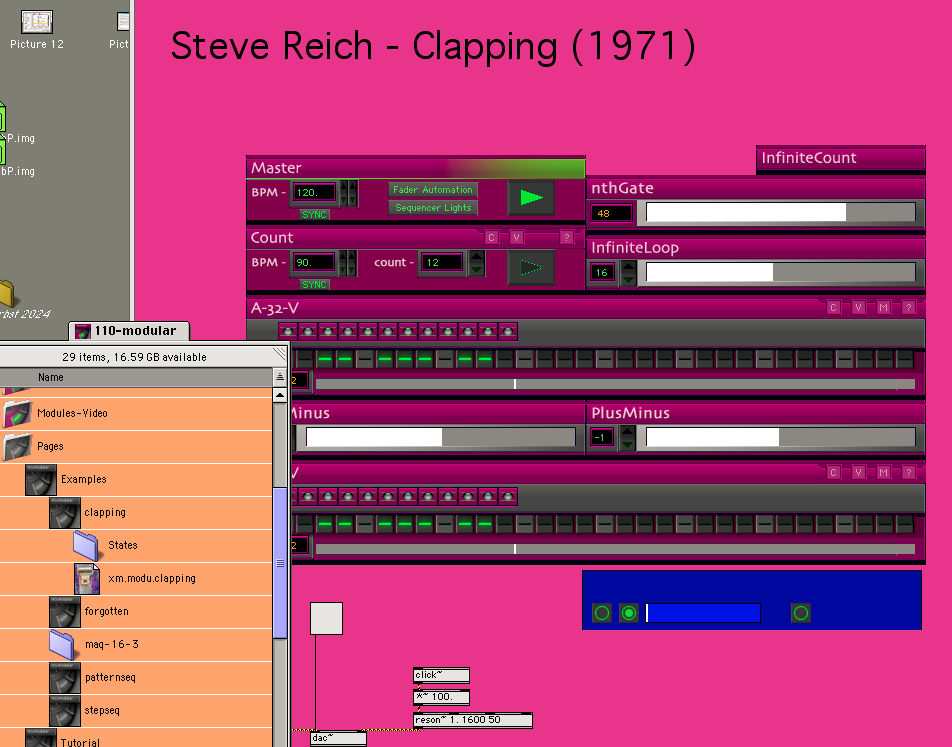
dont be afraid of programming things like that yourself. in fact with higher order objects such as those - or with ableton - it is often more work than with simple math objects.
dont do all at once. first get composing done, then add audio. if you use readymde audio samples you will not really explore the math behind your patch, it is better to carefully set each musical event yourself.
terry riley is great stuff. and maybe his piece rainbow in curved air is good example for what i suggested how to approach the problem.
it was first composed to completion. then later in a different work step he found out how to record it (in this case using an overdubbing and 8x tape speed technique. which must haven taken weeks in the 1960ies, so don´t be lazy.)
Terry Riley - A Rainbow in Curved Air - Full CD
***It’s definitely better to program it yourself and understand the math behind it so you have control over it. But as you say, in Max you can implement an idea in 117 different ways, which makes it a bit overwhelming. So right now, staying in my comfort zone with Ableton is “the fastest” solution for me. But I realize this isn’t the best solution. But little by little, I’m starting to find my way around Max. As a self-taught person, it sometimes takes a little longer to take the right steps. But that’s exactly what makes it fun! Maybe I should force myself to invest a little more time in Max so I can reap the benefits in the long run. Too bad a day only has 24 hours ;-)
I’m going to listen to Terry Riley’s “A Rainbow in Curved Air” later.
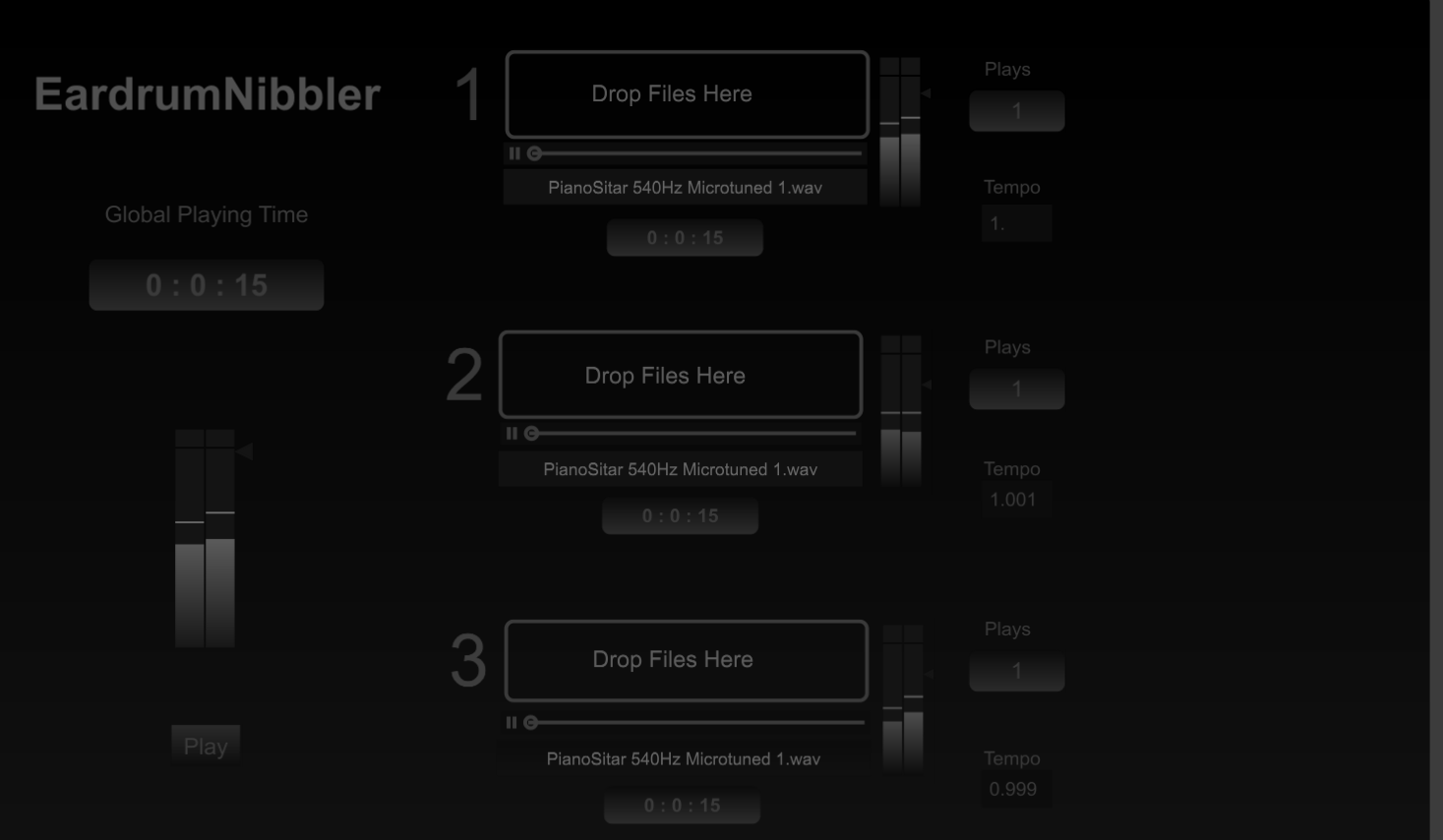
***In the screenshot, you can see an image of a patch with three “tape players,” all of which play back with a slight difference in speed. This is for an installation at an exhibition.
The exhibition is a “competition” for local amateur artists, and it’s taking place at the cultural center where I work as a sound engineer. The cultural center has a theater.
The theater has 540 seats. I wanted to do something with the number 540.
I created a piece of music 540 measures long, which I play back at three different tempos using the patch. This creates a really cool phasing effect. The goal is for the three players to start playing together again after 540 hours.
After some calculations, I determined that the tempo of the piece needs to be 66.66667 bpm to reach exactly 540 hours. Unfortunately, Ableton only allows me to enter two decimal places, so I ended up with 539 hours, 58 minutes, and a few seconds.
I also used Microtuner in Ableton to create my own custom tuning system for the piece, in which the number 540 plays a major role as well.
I’m having a blast!
Leonard,
Thanks for sharing the patch.
A quick look showed me that this is a very informative patch;
if I have a little more time today, I'll try to break down the “system” and understand all its features.
@Leonard
Thx mate!
I'll take a look at it tomorrow after work.
Best regards,
Jeroen
Jeroen
now this refashioned patch - cLAPPINGsAMPLES - will stop after 156 bars like the original score -
regards len
@Leonard Zajdek
This is another nice gift to boost my learning curve inside MaxMsp!!
I see a pattern in my patching where I'm thinking/making it to complicated.
‘Keep it simple’ is what strikes me most about these patches.
And getting to know the various possibilities offered by some of the ‘basic’ modules within MaxMSP.
Music is a "Math" thing!
These patches are opening my eyes and teaching me to think differently about music, programming, experimenting, …
What a privilege to be part of a community where people voluntarily help and encourage one another.
I’m so grateful!
Kind regards,
Jeroen
I dont know if he was mentioned , but for pure math minimalism check out all Tom Johnson music (and scores) - and his book "Self Similar Melodies"- he was 'possibly' the one to coin the term 'minimalism' in music when he wrote about it in the Village Voice. (Its debatable though)
I personally like "predictables" - but I think I took the videos down that I shot in Dresden when they were performed . I have audio and score analysis , maybe when find time I will put on a drive to share
I just completed a Tom Johnson (ish) note picker in Max that chooses all the notes of a set based on simple formula, example : 5 choose 3 - will select and play through all possible 3 combination from a set of 5 notes in order from low to high (or inverted) - im not ready to share that yet though!
Also check out Micheal Gordon ! Wow, super post-minimalism.
@EARDRUM NIBBLER - Rolando Rampoldi has a youtube channel fantastically packed with interesting algorithmic, minimal, generative compositions - however its all created with pure data - here is a patch I adapted from his video "Algorithmic Music Composition : Phasorial Modules & Live Coding in Pure Data" - it contains 4 abstractions that are open to seemingly endless combinations:
regards len