
sub-patcher or object "muting" in jitter to reduce CPU load?

Please forgive what may be a dumb question... I'm an old hand at MSP, but a newbie at jitter...
Is there a way of enabling and disabling jitter processing "on-the-fly" within a subpatcher to manage computational resources? I'm looking for something like the "mute 0 1" message for a poly~ object to stop its audio processing - but for jitter.
I've tried some obvious things like routing my jitter signal around objects using ggate and gswitch objects to pull them out of the processing chain, but this doesn't appear to help...
Thanks
-geoff

most jitter objects "stop" processing when they dont receive input.
so [gate 2] and you are done.
not sure what happens with some of the generators and what could be best practice to stop them.

Hello geof, Hello Roman,
as far as I understand jitter objects like jit.gl.pix, jit.gl.slab it doesn't always help to just disconnect them by gates.
The reason for this is that the patch cords don't really transmit texture data. They send messages containing the name of the texture. This texture binding remains if the patch cords are disconnected. See attached patch and delete the patch cords between the movie players and the jit.gl.pix - it will still show an output in the vizzie viewer (as long as the jit.gl.pix receives bangs).
So as far as I know the way to reliably stop jitter objects is to set their enable attribute to 0 and disconnect them from receiving bangs or messages.
I use e.g. a bypass technique that disables and uses gates and which is employed in this patch several times
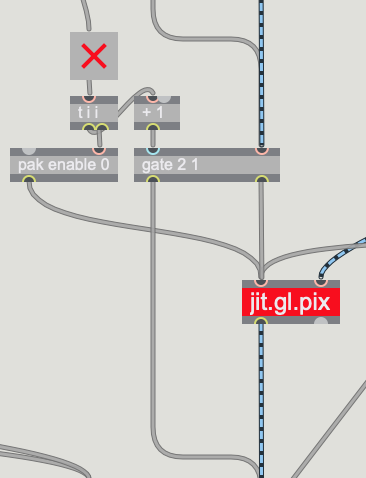
https://cycling74.com/forums/how-to-make-those-stunning-videogame-glitches-!/
"They send messages containing the name of the texture."
beeing bound to a matrix should not cause any processing. (?)
"as long as the jit.gl.pix receives bangs"
yes of course. bangs will have to be disconnected. the are what triggers output.
btw. ... jit.gl.xxx uses host CPU cycles? ;)
i didnt recommend him "enable 0" because of my bad experience with that in MSP. but it is of course the most straightforward option to turn externals off.
what would you think about using the "thru" option in the case of pix & slab? then you dont need that gate stuff at all.
what would you think about using the "thru" option
I don't know if I understood your question, Roman. But @thru 0 doesn't seem to stop the shader from execution.
By the way I didn't read the title of the thread thoroughly and the question about computational resources might also relate to GPU resources. Sure gl.pix and gl.slab run on the GPU ( and to balance computational resources in a jitter patch it is recommended to perform on the GPU everything that doesn't need matrix access to the data.)
Can you tell me what is your
"enable 0" [..] bad experience with that in MSP
i obviously misunderstand when a shader process executes and when not.
how would one measure that anyway?
I don't know a way in Max to profile shaders / GPU usage.
Referring to the @thru 0 topic I think this patch shows some details.
But to come back to geoff's question.
a) enable 0/1 to turn off/on jit or jit.gl. objects should work
b) as Roman wrote removing all bangs and texture or matrix connections by gates should work
c) if all of this doesn't help you should check if you can convert matrix objects to jit.gl. objects or enable @output texture
d) it might also be worth looking if other parts of the patch are causing the CPU load like a lot of UI elements like attrui, float boxes etc.