
Troubleshooting user issues

Hi folks,
I have a set of Max projects that I use with some of my college classes, mostly fairly simple things that we use in the lab, where I have a room full of iMacs. Lately I've started trying to send the students home to run these on their home computers. And I find that a surprising number of students have a surprising number of problems getting these things to run.
Sometimes I suspect that they haven't installed the program correctly, even though it is a very simple install. Sometimes it may have something to do with how they have the audio set up at home. Sometimes patchers seem to be running but there is no sound.
What I'm wondering is: are there any useful troubleshooting things I can have them do when a patcher either fails to open or doesn't run properly? Some kind of diagnostic they can run, screenshot, and send to me?
Thanks!
-mk

Nothing is so simple this days.
On Mac max can fail to get all needed rights to use audio or something else,
on Windows it can be audio or midi driver which is not correctly configured
or even does not allow 2 apps to use it at same time.
Most of my little apps use sounds that were generated in Max, so I don't think we have issues with rights. But audio or midi drivers, for sure. But I'm having people with problems even on Macs, where most users have the same setup.
"Most of my little apps"
Means your students use standalones and not Max ?
In both cases there is nothing to install - opposite to Max.
A big difference.
On Mac it is about privieges, on Windows beside possible drivers issues
also presence of installed VB runtimes could play a role.
Getting privileges to use audio driver has nothing to do with
sound files origin.
On Mac there is another problem with headphones output not being
correcty recognised by Max when plugged/unplugged.
Maybe it was fixed , I don't use such new Mac Books or MacOS
and can't tell.
OK, apps is the wrong word. I mean patchers. Although I am seriously considering trying to convert these patchers to standalones this summer.
A lot of these patchers are used with headphones, so I will look into this issue with Max and headphones. As for those other possibilities (privileges or VB runtime issues), is there anything I can ask the users to do that would generate something useful for troubleshooting? I vaguely remember someone suggesting some such thing in one of my earlier crises, although I may have misunderstood something here.
that is really not easy to answer.
It could be really a system problem of any kind,
or users are not getting max and audio driver to work.
Would it be possible to tell what is wrong from a couple of screenshots
showing windows settings and max audio setup ?

Hi. Max and Mac dont usually have issues with headphones.
It's been a while, but I just plugged my headphones in (Macbook Pro M1 Taho 26.4.1 / Max 9.14) and didn't have to change anything. The headphones auto-adapted. (Using cable NOT bluetooth)
But for schooling, I made a short demo:
Using [dac~ 1 2 3 4] - create aggregate device in Apple audio settings. Then easily route headphone to channel 3/4. Now can hear sound on BOTH Macbook speakers and headphone same time.
Why schooling? To get students acquainted with different settings and where to look for them- This same process works with All Max and Mac. Before M1 and Max 9, I set up 8 channel surround with Intel Mac - channel 9/10 to headphones.
Left image is Apple Audio
Right Image is Max I/O mappings
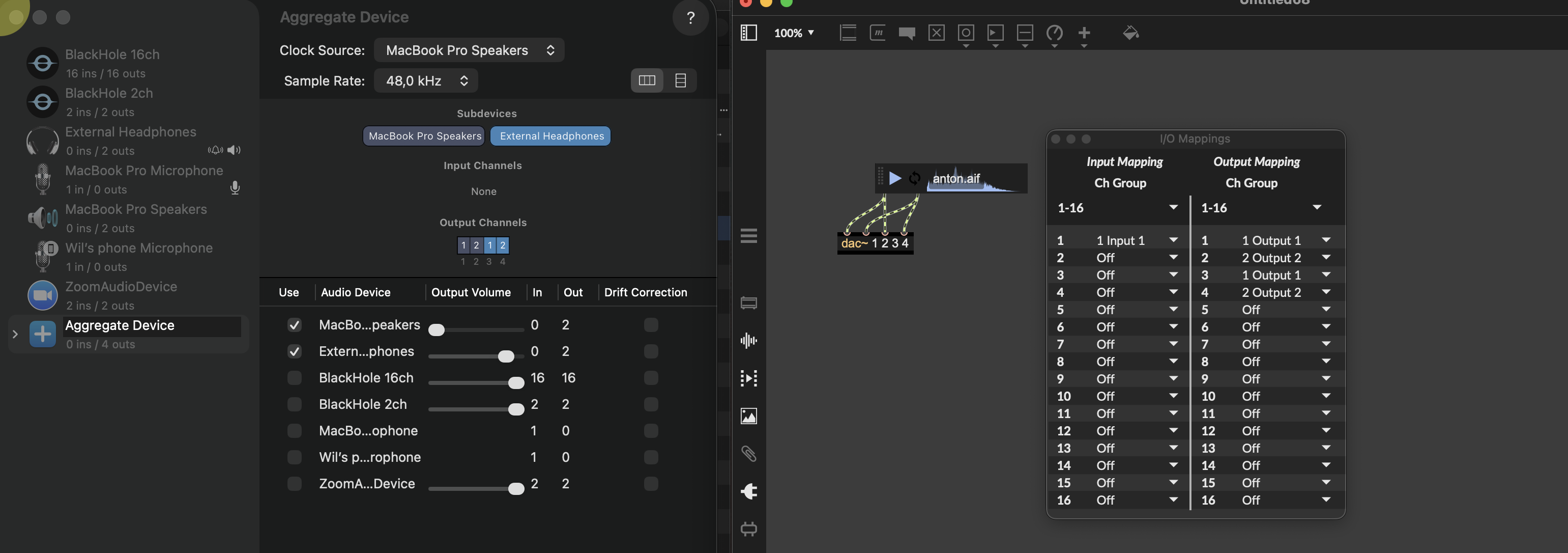
Maybe this helps
Also trivial but maybe. I have had students sit at their computers for quite a long time - nothing working - audio DSP was OFF!
Thanks for those suggestions - one thing in particular that you said just jumped out at me as a possible explanation. I also found that no configuration was necessary when I used the headphones with a cable. But more and more students don't even have a wired headphones. I wonder if there's any correlation between the seemingly random students who have problems and wired vs wireless headphones? Will look into it.
The idea of a "schooling" video is a also a good one - I was thinking about a few simple test patchers to confirm that different things (like audio) are working. Maybe a nice tutorial, with some demo patchers, would increase our success rate.
And yes, I also had students with DSP off. Added a visible button so they couldn't miss it. Still, some did.

Coming from a background in technical support, I'm afraid you'd probably have to troubleshoot each individual issue first before you can make any assumption about an underlying general issue.
In most cases, the problem is in front of the computer, not inside the computer.
After my own limited attempts at tech support, I entirely agree, and that is a great way to say it. I may quote you in fact.