v object to save data of patches when max closes

F_Dos's icon

Is it possible that the v object will remember that last value entered when max patch is closed? so if I entered a value to the v object then for some reason I close the patch and reopen it - at the other patch that is receiving the v object a bang will still output the last entered value?

only if new value is entered to the v object it will overdrive the last one.

Is that make sense?

TFL's icon

You could easily try it yourself and realize that no, values stored in [v] aren't saved with the patcher.

[pattr] does this, though, as well as [dict] and [coll] with @embed enabled. But you still need to save the patcher to get the current data stored within the patch.

If you don't want to save the patch but still retain the current data when you close the patch, then you need to save your data outside of the patch, like in a separate text file, typically a json that you would access through [dict], or a [pattrstorage] that regularly automatically save the current state in a preset and write this to disk, although countless other approaches are possible.

F_Dos's icon

You could easily try it yourself and realize that no, values stored in [v] aren't saved with the patcher.

yes I try that, therefore asked for a different way :)

So I think best way is to save it to a text file at a location on my PC then to recall it when patch is opened again?

Source Audio's icon

trouble with v (value) object is that

1- it can't get cleared

2- for your wish - it can't store anything into a patcher.

3- closebang is not 100% reliable method to store something

when patcher closes.

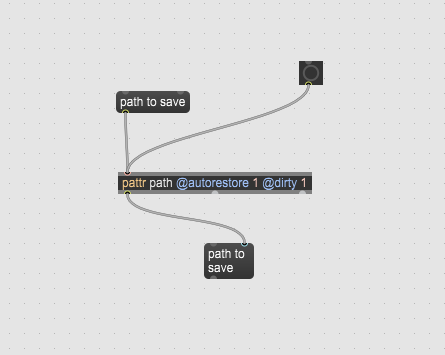
I would suggest to use pattr with autorestore and dirty flags set

instead

F_Dos's icon

I would suggest to use pattr with autorestore and dirty flags set

instead

and how can I recall the message after patch is closed? I don't get it
Source Audio's icon

autorestore flag makes it output stored value on patcher load.

dirty flag makes it ask if you want to store the patch if value changed.

What exactly are you trying to do ?

only store single item ?

you talk about patch, not compiled standalone, or ?

F_Dos's icon

What exactly are you trying to do ?


I have a main patch that opens 6 different patches one after another, with a 2-minute interval between each one.

Via UDP, I receive a folder path where I need to save data from each patch.

At the beginning, the main patch receives this path through UDP and stores it inside a v object.

Then, every time one of the patches is opened, a bang is sent to the v object inside that patch in order to retrieve the folder path and save the data generated by that patch.

This works great 99% of the time. However, the other day the main patch was accidentally closed and reopened, and after reopening, the folder path was no longer stored in the v object.

I'm trying to find a way to handle this situation.

you talk about patch, not compiled standalone, or ?

patches. One main and another 6 different ones

Source Audio's icon

you can grab values from pattr,

or if you prefer send path from pattr to value object.

F_Dos's icon

you can grab values from pattr,

how can I do so?

what message I should send to pattr in order to grab value?


or if you prefer send path from pattr to value object.

is this better?

LSka's icon

you can use [pattr] in conjunction with [pattrmarker]

Max Patch
Copy patch and select New From Clipboard in Max.

Source Audio's icon

No matter what you use at the end,

you have to prevent unintended closing of main patch

which would break the running tests order.

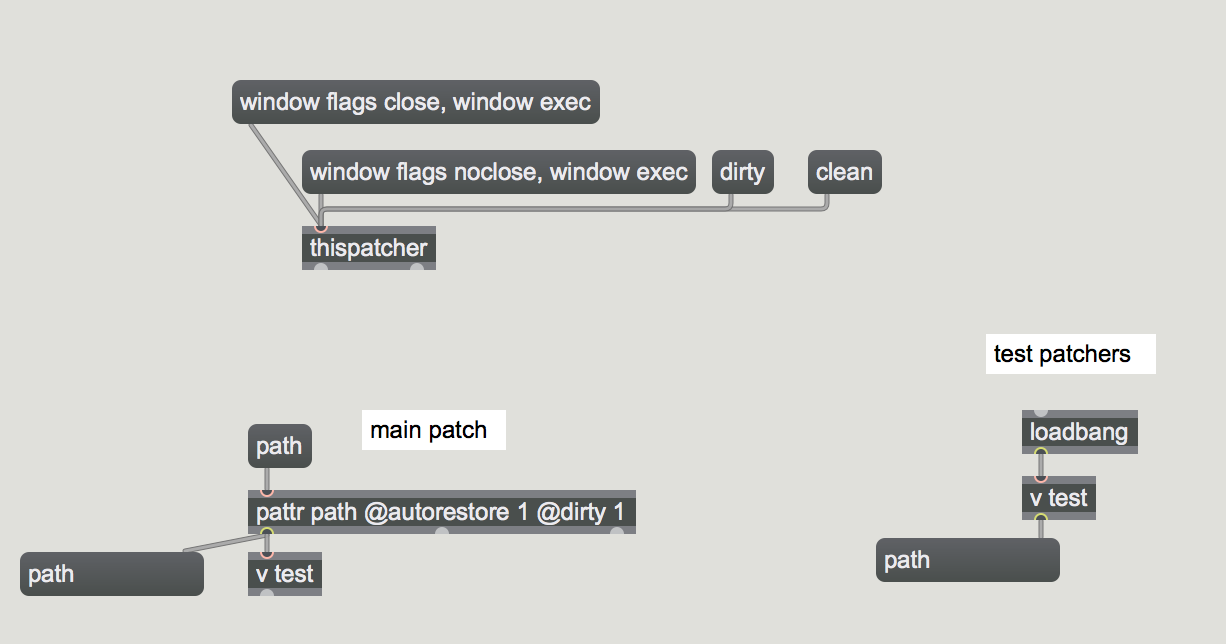
While this can be done by setting noclose

flag to thispatcher, or at least setting dirty flag

it is still not enough to maintain it remotely.

One could report current state via UDP

and so take actions in case something went wrong, like if max crashed.

restoring last set folder path is easy to fix

F_Dos's icon

While this can be done by setting noclose

this sound as something I should add. so if a specific message is arrived the main patch will get the setting "noclose" ? It needs to be option to bypass or to be enabled only on certain condition right?

restoring last set folder path is easy to fix

how?

what LSKA offered seems to be one option of it right?

Source Audio's icon

To retreive a path is really simple problem to solve.

even your first thought to save it as text is quite ok.

All depends on the flow and what you see as possible probems that could arrise.

Like if someone closes main patch while tests are running.

One can't offer good advice without knowing details.

like if main patch got closed, but loaded test3 patch is still running.

what should hapen when you reopen main patch ?

does it know where it left and what is running ?

who is controlling everything ?

remote computer or the one were main patch is. and so on.

thispatcher window flag noclose disables window close

by shortcut or click on window close button.

if you also set dirty flag, you will be asked if you want to store the patcher

also if you triggered quit message by mistake.

again can be done by thispatcher message or by pattr itself if you decide to use it.

pattrmaker or connecting pattrout into v object, does not matter really.

or reading set text fie from 6 test patchers.
F_Dos's icon

I will try what you suggest in the screenshot.

like if main patch got closed, but loaded test3 patch is still running.

what should hapen when you reopen main patch ?

does it know where it left and what is running ?

who is controlling everything ?

all the control made via python and send to max via UDP

the only thing matter for me is that the path of the folder will return when main patch is reopen because this what sends the path for each of the 6 patches.

so in any case if main path is closed no patch can be loaded.

F_Dos's icon

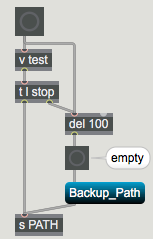
how can I make some logic condition that if [v] object is return empty when bang - a backup path will outputted instead?

Source Audio's icon

bang v object and if nothing comes out trigger something else after short delay.
F_Dos's icon

one thing I noticed is that if I close the main patch without saving it will remember the last path I had only when I saved the main patch. Is this somehow fixable so it will remember the last path (using pattr) also if the main patch was not saved when close?

Source Audio's icon

If you close it without saving it

even when dirty flag warns you about it,

then one would think that it is intended so.

if not, auto save patch every time you receive new path.

with all the riscs to save patch in modified mode that you don't really want.

send message write to thispatcher to do so.

maybe a better way would be to use exernal text file ?

F_Dos's icon

if not, auto save patch every time you receive new path.


how to do so? [write] to thispatcher is open a dialog where to save patch

maybe a better way would be to use exernal text file ?


so path is save to external text file and recall when path is opened again?

F_Dos's icon

is it possible to report if a folder is present or not?

then if s file is getting a path to be saved in a non exiting folder then a default folder should be the correct path to file.. ?

ok - report if folder exist helped

Max Patch
Copy patch and select New From Clipboard in Max.

Edit 2: did not really worked...

Source Audio's icon

send path to absolutepath first to check.

you can check both. text file and stored path

F_Dos's icon

the left hand side of your screen shot should be placed in main patch?

will try that asap

Source Audio's icon

Sure, path write is in the main patcher.

that is in case you want external text file

and no pattr stuff and be forced to rewrite your main patch.

I picked user documents folder, but you can use whatever

path or name that you are allowed to write to.

F_Dos's icon

I'm confused a little - I still neww to use the [v path] object right?

main:

patches:

Source Audio's icon

no, you either read text file in all patchers without v and pattr.

or then use pattr without text file.

but you did not tell when that path gets received.

before 6 sub patchers open ?

Roman Thilenius's icon

arbitrary data + shared memory between instances + save and read from disk == [coll]

F_Dos's icon

but you did not tell when that path gets received.

before 6 sub patchers open ?

Yes, path arrived to main patch before 6 patches opened

Source Audio's icon

in that case you have no problem to let them read that text file.

they will find it even if main patch got closed by mistake.

reopenning main patch should check which subpatch is currently running

and adjust to simply continue where it left.

F_Dos's icon

for some reason on windows I'm getting path without slashes /

I noticed that the txt file of the path saved the path with slashes to the other way \ and not /

Source Audio's icon

where from do you get that path ?

or better say where do you loose the slashes ?

F_Dos's icon

where from do you get that path ?

from python. I have no control over it now. can I just replace the direction of the slashes?

or better say where do you loose the slashes ?


I'm loosing them in here but I think it is because I'm getting them the other way around(?)

Source Audio's icon

check text object where you store the path.

and post original python text

F_Dos's icon

I have no access to python code right now.

I can tell the it store the path with slashes in that direction: \

Source Audio's icon

try to insert

conformpath max absolute

directly on udp output.

or mod that script to send forward slashes instead

well maybe you receive other things via udp which will get in trouble

when conformpath is inserted

F_Dos's icon

I'm pretty sure the problem is those slashes to the wrong direction. I will check it again next week as well your suggestion to use conformpath max absolute.

Source Audio's icon

you will have to separate that path from other udp messages.

as soon as \ backslashes get out in the max, you loose them

or

tell that guys that make script for you to make your life easier

F_Dos's icon

as soon as \ backslashes get out in the max, you loose them

Yes this exactly what happens!

assuming the script can't be change for the moment - is this issue could solved in max?

you will have to separate that path from other udp messages.

I'm receiving the path seperated from other udp messages. The problem,as we say is that I'm getting it with backslashes instead of forwardslashes

F_Dos's icon

ok I think this make it clear where the problem is?

path txt file:

max path:

I can see that that txt file is stripping the slashes completely .

Is this can be fixed within max?

TFL's icon

As a workaround, you can open your file with [filein] instead of [text]. This way, it will be interpreted as raw bytes instead of characters, and you will be able to replace backslashes \ (92) with slashes / (47):

Max Patch
Copy patch and select New From Clipboard in Max.

You might also need to escape the last character (most likely a 32) before passing the resulting path into [conformpath]

Source Audio's icon

it is not text file that is problematic,

but path received via UDP that has backslashes.

you say you receive path separated from other messages.

post example. one path message, one "other" UDP message.

if that is true, insert conformpath max absolute before storing path into text.

if you can not separate other UDP messages (because they are all OSC messages)

then try your luck with regexp

regexp \\\\ @substitute /

I hope that your python script at least sends path as symbol in case it

contains spaces

TFL's icon

it is not text file that is problematic,

but path received via UDP that has backslashes.

I was assuming the text file with the path was created by the python script that OP apparently cannot modify. That's why I suggested a pure Max workaround. But if the UDP > write to disk part is made in Max then we still didn't see how OP performs this part...

Source Audio's icon

If only max was involved , there would be no problem in first place.

As I see it from previous posts about this,

python is needed to capture touch screens

which does not work in max.

All the rest could have been done in Max,

but one gets asked here for help mostly

after wrong decisions were made and not before

F_Dos's icon

All the rest could have been done in Max,

but one gets asked here for help mostly

after wrong decisions were made and not before

That is all true, unfortunately, nothing I could do to change it.

I appreciate all the help offered.

I will try the latest suggestion asap

F_Dos's icon

The combination of [conformpath native_win_absolute] and [conformpath max absolute] fixed it!

Thanks

Source Audio's icon

whay would you need to use both of them ?

can you not post original received path from UDP on windows

and on mac ?

to preserve original message print it to max console and copy it from there.

F_Dos's icon

can you not post original received path from UDP on windows


mac was only for myself troubleshooting at home

I would prefer not to post the full path but rather only the part with the UDP received of the folder path

window:

main:

Max Patch
Copy patch and select New From Clipboard in Max.

as now I'm storing the path to the V object every time main patch is opened - in the sub patches I'm just bang the v object to get the path.

First time main patch is opened and receiving path it is saved to txt file.

with this part every time main path is opened again it will load into v object the last path to folder

This method works just fine!

Source Audio's icon

you don't understand what I am asking, but if you are happy,

I don't need to bother you any more.

but remove that pattr thing, that will solve your problem

in this post

F_Dos's icon

but remove that pattr thing, that will solve your problem

in this post

https://cycling74.com/forums/specific-patch-always-ask-if-to-save-even-when-no-changes-been-made

Thanks!

Source Audio's icon

from your last patch everything seems to be wrong again .

you receive path from UDP and store it into text file.

6 subpatchers try to open that file and read folder path inside.

if they can't find the text file for whatever reason, they try

1- to read different text file with backup path ?

or better

2- to use fixed backup path like for example:

~/Desktop/FILE/MAX/BACK-PATH

none of that seems to working in that last patch you posted.

because:

1- main patch if got closed by mistake needs to do nothing about the path.

It is allready written in that text file, and subpatchers can use it.

only job of main patch would be to listen when current subpatch is done and then call next one.

if that is your logic structure.

F_Dos's icon

2- to use fixed backup path like for example:

~/Desktop/FILE/MAX/BACK-PATH

what do you suggest here if I may ask?

to have another txt file with backup path to a different folder (aka BACKUP FOLDER)?

how to implement that?

F_Dos's icon

6 subpatchers try to open that file and read folder path inside.


the 6 subpatchers are now just read the folder path from the [v] object

The problem that could arise is as you said - if they can't find the text file for whatever reason

in the 6 subpatchers I have this:

so if v object is empty for some reason a backup folder path is available

Max Patch
Copy patch and select New From Clipboard in Max.

Source Audio's icon

you need backup folder path only if new one fails.

that backup can be fixed path to existing folder.

but to give you good advice, I want to know ALL about that paths and how

subpatches use them

with ALL I mean what creates the path in first place and based on what

and do 6 subpatchers add something to it

F_Dos's icon

Thanks for your willing to help. Unfortunately I have no access to what and how the path create in the first place...

Source Audio's icon

but what do your subpatches do ?

I guess that pyton script creates folder and sends path to max,

is that correct ?

so what do your subpatches write there ?

Allways same file names ?

F_Dos's icon

but what do your subpatches do ?

I guess that pyton script creates folder and sends path to max,

is that correct ?

Yes that is correct

so what do your subpatches write there ?

they write some data into txt files.

Allways same file names ?

yes, just the name change with every different patch
so fo example first patch file name will be: patch01_date_time.txt
second patch02_date_time.txt

Source Audio's icon

so it is NOT same file names but UNIQUE files

based on patch ID and timestamp.

Again, you do this wrong.

why do you use value which is DEPENDENT on main patch.

if main patch gets lost, subpatches can not get the path.

they should read that text file !

then to that backup folder.

as file names are UNIQUE, you don't need specific folder for a test.

but you can auto check - create it just to make sure.

use jasch createfolder external

it can create folder together with subfolders if it does not exist.

if it does, it leaves it together with any existing files in peace.

left is what goes into main patch, right into subpatches.

blue is path for text file like what you posted last time.

use ~/Desktop shortcut, so there is no need to specify user name,

and it would work the same on mac and windows.

Max Patch
Copy patch and select New From Clipboard in Max.

F_Dos's icon

if main patch gets lost, subpatches can not get the path.

The thing is that if Main patch get lost (closed for some reason and not reopen) non of the patch will be opened because they get open from within the main patch (python send to main patch which sub patch to open then main patch open the correct patch)

so If no main patch open nothing will work. the other guy should make a warning message if main patch is closed.

so I think if the above problem solved (main patch will be always open even if accidentally closed) the files should always written

F_Dos's icon

is this matter if using this:

or that?

Source Audio's icon

last time you posted different info

one would understand that max is starting that 6 patchers.

So what for is that backup folder ?

in case python failed to create folder ?

impossible, if it can't create it it should not send path to max

and proceed with openning subpatchers.

Your problem ist that that python script and what goes on in it is out of your control.

otherwise one could make handshaking between max and the script

to take actions if something goes wrong.

in any case , use what I suggested in the last patch.

You can add a script that watches if max is open and restart it together with main patch

if it fails.

That should actually be part of that python script.

P.S.

use regexp on windows, nothing on mac.

but without knowing exact form of UDP messages to max,

it is left to you to try out

F_Dos's icon

You can add a script that watches if max is open and restart it together with main patch

if it fails.

script that runs on windows? or it is script in max ?

use regexp on windows, nothing on mac.


Will do so.

it is left to you to try out

seems to work good!(in the Max side..)

Source Audio's icon

max script to monitor itself would not be helpful.

you need external script.

but max can be set to auto-start you patch.

for much faster startup, I would use standalone

free of all junk that max app uses.

and oldest max version that can do the task.

F_Dos's icon

you need external script.

but max can be set to auto-start you patch.

how this can be done? (without using standalone for the moment(I'm afraid I will mess-up with the standalone creatrion))

Source Audio's icon

If you are so afraid to make standalone,

why are you not afraid of running scripts ?

this is example shell script to start max at that path and tell it to open that file on mac

and restart it in case it crashed

  • while true; do

  • open -W -a "/Volumes/HD3/Max-833.app" ~/Desktop/TEST.maxpat

  • sleep 1

  • done

Roman Thilenius's icon

"clean" to [thispatcher] will allow to close the patch even when something has been changed, but like others said it is better to find the culprit and eleminate it.

Source Audio's icon

back to auto-restart max

If you don't want to use standalone,

at least try to run patch using runtime max version.

That will restart it together with the patch within 1-2 seconds

On windows it is MaxRT_nocef.exe

example with no timeout:

Max is located in partition E: in folder Max-914 (I never place max on boot hd)

patch is located in partition D: in folder Files

path can be forward slash based.

@echo off

:start

E:/Max-914/MaxRT_nocef.exe "D:/Files/My Patch.maxpat"

GOTO:start

place this into plain text (using your paths) and save as bat file.

run it to start MaxRt and the patch.

To break restart loop, kill cmd.exe

TASKKILL /F /IM cmd.exe

Max 8 starts even faster...

F_Dos's icon

thanks for that' I will try this but before that -

what regarding intentional need of restarting the main patch? is that also possible with script?

or what will happen if I close the patch? (not crashing) it will reopen immediately or?

Source Audio's icon

no, it will not.

such script would only monitor app itself.

On windows it depends also on preferences

one can set max to quit if no window is open (including max console)

that would make max quit itself, and the script will catch that and restart max and the patch.

I would put that patch into noclose mode,

means one has to unlock that first before closing the patch manually

gets possible.

if you need to edit the patch, then start it

normally in max app, edit etc

That auto-restart is meant for performing the test

F_Dos's icon

I would put that patch into noclose mode,

noclose message into thispatcher? not working

as well message: [window noclose)

Source Audio's icon

do you ever open help files ?

F_Dos's icon

do you ever open help files ?

Yes.. I missed that.. just found it. thanks!

Roman Thilenius's icon

"So I think best way is to save it to a text file at a location on my PC then to recall it when patch is opened again?"

btw.

yes, because saving data via embedding it into the patch will really only work with patches, but it will not work with apps, plug-ins, or collectives.

it is a great feature (for example of coll) when you want to have nondynamic data ready at init, but i would never use it for user- or runtime-generated data.