
Vizzie 2: A word about textures and matrices

Thanks for all the kind words about Max 8. I've privately gotten a few messages from people who are aware of my involvement with Vizzie about what they perceived as a lack of responsiveness with Max 8. In particular, they were upset to not see the improvements in performance that they expected. The reason for this is something that might not be immediately apparent to users, so I thought it might be useful to mention it.
When I sat down with Rob Ramirez to work on the redesign of Vizzie 2 for Max 8, we made the decision to keep all Vizzie 2 modules operable with both matrices and textures. What that means is that if you have an ordinary jit.movie object sending its input to a Vizzie module, the output will be the matrices that Vizzie 1 always worked with. If you send a texture to the module (by using a jit.movie @output_texture 1 object or Vizzie 2 PLAYR module - which outputs textures by default, it'll work with and output textures down the line to any other modules you connect to it. The source is what determines the output all down the line - as above, so below.

In the cases where I heard from users about the lack of performance in their patch, it turned out that they were using non-Vizzie objects for sources - in nearly every case, it was a jit.playlist object, which was sending out matrices, as it ordinarily does. Again - going with either a vanilla Vizzie 2 module or setting the jit.playlist object to output textures did the trick.

Lots of clever folks who've used Vizzie along the lines have included Max patching of their own or made other judgements about their input sources. I thought it'd be generally helpful for you to be aware of this "feature" of Vizzie 2. So remember - to take full advantage of Vizzie 2's improvements, stick with textures!

Great information here, Gregory!

Hi!
Did this functioality of as above so below change down the line? Right now vizzie forces textures out in one of my old patches. Attached screenshot shows proof.
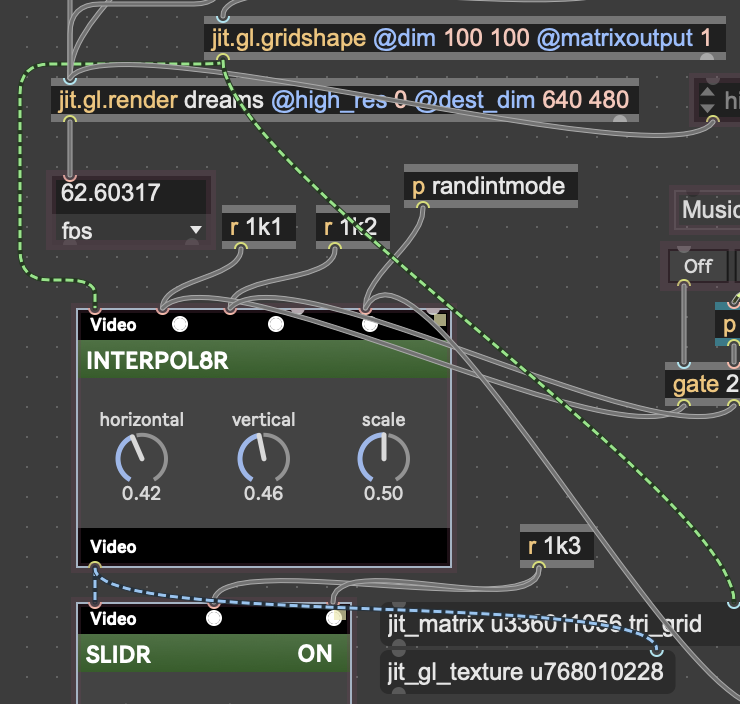
Best,
Jonas

Vizzie defaults to textures these days.

Here is vizzie-1 pulled directly from the Max 7 dmg, with the package version set to 3.0. You can unzip this and drag it into your ~/Documents/Mac 9/Packages folder and it will override the built-in Vizzie.
If you want to "bake" in version 1 modules to a specific patch but still support Vizzie 2, you can open up your old patch, and for each vizzie module that you want to keep from version 1, open up the inspector and select the "Embed patcher in parent" checkbox. This will embed this version of the module in your patch upon saving. You can then either remove vizzie-1, or simply edit the package-info.json and bump the version string back down to 1.
Awesome, thanks a lot for the swift answer. This will save the show. And you read perfectly how I would like to selectively bake in the old functionality. My patch is running just like 10 years ago, what a runback!