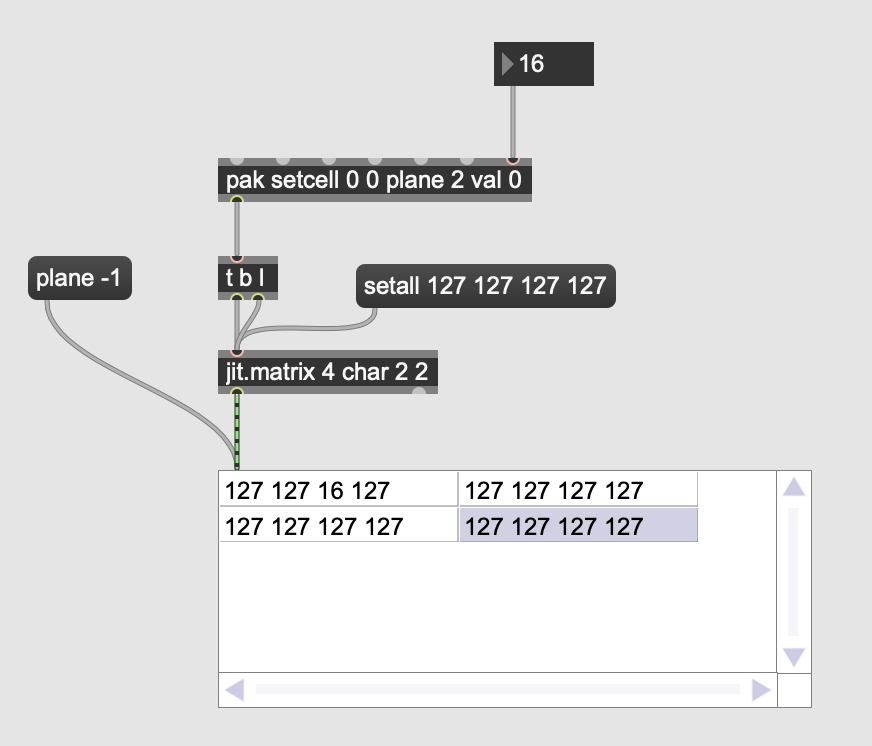
Changing a cell in a single plane on a jit.matrix object.

Is there a built-in way in jitter to edit a single cell in a jit.matrix object, but only at a single plane?
For instance, say you have a jit matrix like this:
jit.matrix 4 char 10 10How could I set the value at coordinates 0 0 and plane 2 to be "myval"?
I'm familiar with the getcell and setcell approaches, but I haven't been able to find a way to use them which would enable me to change values on a single plane without overwriting or restating already existing values on other planes.
In other words, I can't just say:
setcell 0 0 val 0 2because this overwrites already existing data in the plane. I need something less destructive.
My end goal is a patcher which given a list of x y coordinates, a list of values, and a list of channels, will update these values in a destination matrix.

setcell 0 0 plane 2 val <myval>