
Clipping noise in poly~ object

Hi,
In my AudioTest.maxpat patch i want start a sound sample (sound001.wav in ResistorNoise.maxpat subpatch) randomly a short while after each other.
Because of the reason that each started sound can be oveclapped by another sound i use the poly~ object. Inside the poly patch NoisePoly.maxpat object I have used the line~ object to avoid clipping noise while playback the sample(s). But when i start the Patch there is still some clipping noise hearable.
Maybe someone can give me a hint how to avoid these clipping noise..
Or in other words how would you playback the same sample couple of times with only a bit random delay for starting each sample?
My solution would be using the poly~ object for handling multiple instances of play~ object. But in practice i can hear some clicking noise while playback the sample(s)...
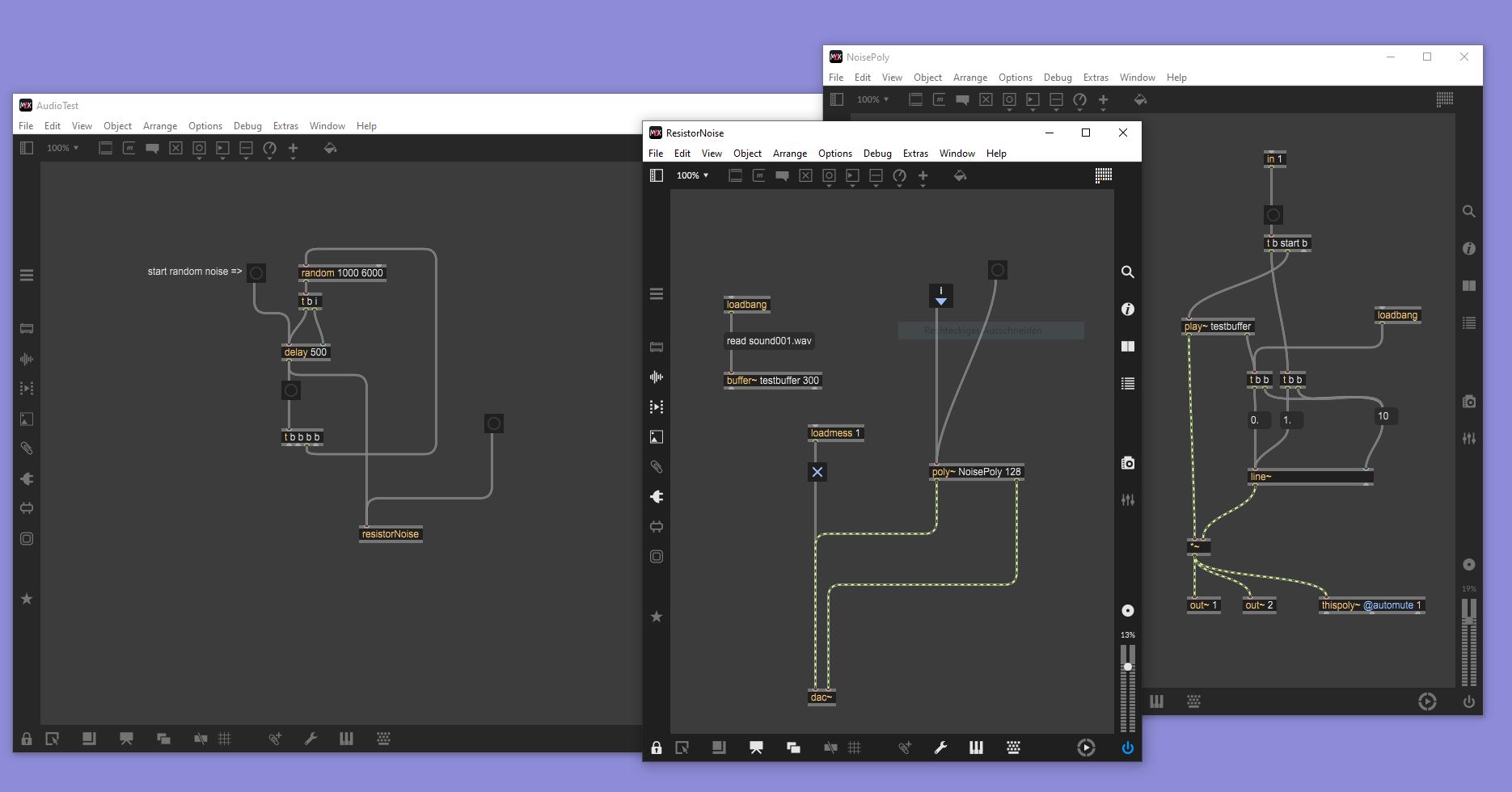

Hi - you don't supply your audio file so it's not possible to duplicate what you're hearing, but my best guess is that you've implemented things in the wrong order. You start line~ to create a fade in before you start playback (i.e. the fade in is already partly done before the file starts playing), and your fade out only begins after the file has stopped playing. Make sure that you start playback first and then immediately fade in; and make sure your fade out is complete before the file stops playing.
However, this is a very complicated solution to a simple problem! If all you want to do is layer the same file multiple times and delay some of the copies, then you could use tapin~/tapout~: give tapout~ multiple outs.
J
Hi,
thanks for your reply. I have uploaded the audio file in my first post, but it seems that it is only possible to playback the file in the browser instead of download the file. I have tried to modify my patches but i still hear some clipping noise sometimes while playback the sample randomly. You can get my Patches and Audio File here: Download files
I am not sure if tapin~/tapout~ objects are working for my problem. I just want to playback my Audio File every 1000 to 6000 milliseconds (time should be choosen randomly, and can be less 1000 or more 6000) ...
Could be the performance of my Laptop CPU be the Reason for getting this clippling noise?
C.

can it be that things are clipping because the sum of the signals is too loud at the audio output?
in theory, if a generator produces two signals which are both at 1.0 at the same moment/sample, the peak of the output signal will be 2.0.
so in theory, to avoid that, you would need to /~ 7. the sum when the maximum number of voices is 7.
in practice, where often not all but only some of the channels are normalized, /~ 2. (-6db)or /~ √2 (-3db) is sufficient for ~100 tracks/channels/voices.