
Depth of Field jit.gl.pass Questions?

Hi All,
Really like the Polish Your Pixels package, and the Max 9 amazing improvements in jitter, and have seen some of the visuals being produced on the youtube shorts, and really impressed! Great work, very inspiring.
I have been trying to get to grips with the tutorial viewer in polish your pixels, and have had some great results (in my opinion!), but I have been struggling to figure out how to use the jit.gl.pass object with @fxname dof-hq properly.
I was using a gl.gridshape going into to a gl.multiple to produce lots of shapes, and then have some in and out of focus, much like the examples look like in the scale and distance tutorial viewer side bar. But I wasn't able to get anything like it. I also tried to use the same settings I could see being used in the tutorial. The focus controls seems to bring all of the shapes in or out of focus. I even just tried with 2 gridshapes, positioned quite far apart on the z axis to see if I could see the focus 'working', but had the same result, again everything in or out of focus. Also when I use the 'show in focus' toggle everything disappears.
So I think my question is, am I using the wrong object (gridshape) to try to see this camera focus effect? Do I have to use a setting in the gl.camera to enable this? Does the @position of the gridshape not effect it's 3d depth in the depth of field fx? Are the patches used in polish your pixels available somewhere? I'm using a windows 11 machine.
Any help, as always greatly appreciated.
Thanks Rick.

happy to take a peak at your patch
Hey Rob,
Thanks, that would be great.
Here I have copied the very simplest iteration, with just 2 gridshapes. Let me know any suggestions or obvious errors.
Many thanks,
Rick
Hi Rob,
I have just discovered the help patch for dof-hq, and can see the focus shifting to different points in the scene, as I was hoping for.
I will use this as a template for my experiments, and try to figure out the difference between what I had originally created. I can see gl.environment, and gl.pbr objects which my patch doesn't contain, so perhaps these are necessary?
Anyway as always with max, check for the help patch, they are super useful!
Thanks
yeah looks like the main thing you are missing in your patch is a jit.gl.material or a jit.gl.pbr attached to your gridshapes.
It's useful to hear your feedback, as it makes apparent that help patches for individual pass effects are needed here.

oh yes indeed! that would be very much appreciated!
Hi Rob,
That's great, thanks for confirming the need for one of those.
I am always conscious of trying to use the most efficient processing route in max, would it matter which of these objects I used? Is one heavier gpu wise?
Thanks again.
Also, I would really like to continue to send the scene/shapes through some effects like jit.fx.ge.randlines or similar, and retain the ability for a depth of field effect with the gl.pass object. When I capture the gridshapes or multiple to a gl.node, I can then continue to send the visuals through randlines etc, but, I lose the depth focus control again. It's either the whole scene in focus or out of focus.
Is there another way I should be doing this? Or is it not possible? I hope it is, and that i'm just using the wrong objects.
Thanks again.
jit.fx are 2D screenspace texture based effects, so they aren't going to be operating in the 3D world-space necessary for DOF.
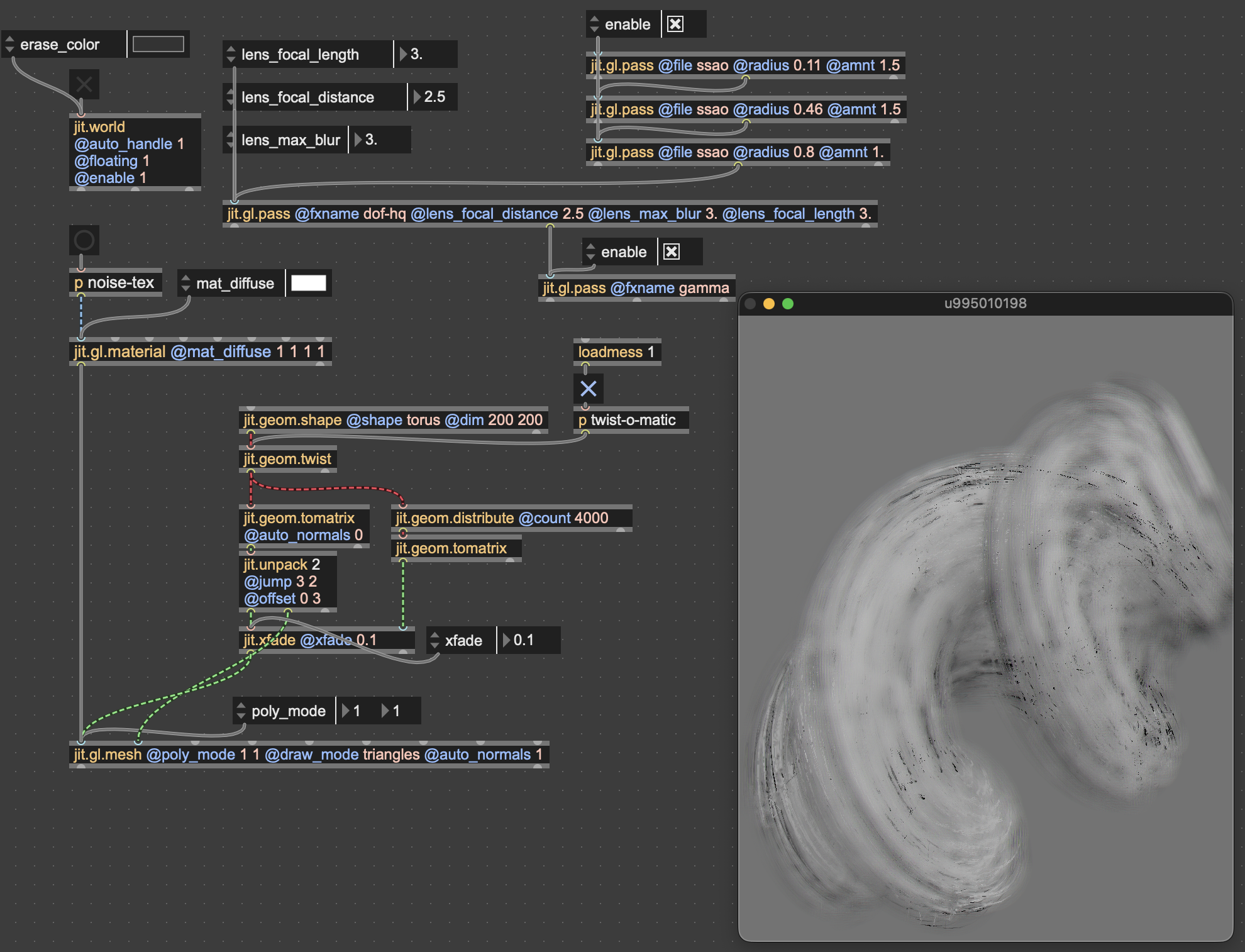
If you want random-lines type effects on 3D geometry, there's tons of ways to do that. I recommend exploring jit.geom for this.
here's a starter patch for exploring randomized line drawing with DOF, mostly cobbled together from various help and example patches.
Hi Rob,
Thanks for the clarification on the jit.fx objects, I understand now that's not a route to take.
Thanks for the great demo of jit.geom, I will dive in to that to understand that set of objects better, but can see already that the depth of field is working. Brilliant!
Cheers

Very nice demo Rob!
Ricardo, you can still use jit.fx objects on the final output though! The trick is to render the scene in an intermediary [jit.gl.node], here named n, and then get the output out of the last [jit.gl.pass] (and NOT using the @capture attribute of the [jit.gl.node]).
Oh that's amazing, thanks for the contribution. This method is so helpful. I'm going to have a lot of fun!