
Detonate write message does not write second track

Hi there,
I'm trying to export a midi file with two lines. I've tried the write message alone, with the 0 1 numbers (for beats and multi-track respectively), 1 1, 1 2 (experimenting) but the resulting file only has 1 line.
I recorded in two instances of Detonate with the same name for convenience, and in its piano-roll both show up. I tried to do channel 1 and 2 in the notes' message but did not work. With track 1 and 2 it shows fine.
I sent the write message to the second detonate (same name) and it exported only the second line. I guess it may be a bug since the piano-roll shows the two tracks, but exporting only one... or maybe someone knows a particular method to export multi-track/multi-channel
Thank you

In my experience multiple instances of detonate are unreliable/buggy. But otherwise multi-track/multi-channel recording and export seems to work as expected.
Thank you for your response, Broc.
In your example, detonate records one line from the midi input, exactly as the help file that comes with detonate. That works fine. However, to record simultaneously from two lines (e.g. two players) I need two instances of detonate. I tried first to name directly the object and the piano roll shows the events in both, but when exporting, only the line that was recorded in the particular instance appears in the midi file. I tried then the argument @name <symbol> and Max crashed.
I guess I can live with two midi files and then join them in a MIDI editor, but I was hoping it worked in detonate.
By any chance you know any other MIDI recorder object on Max (not seq) even if it's external that can record two or more tracks simultaneously?
Thanks again
I still think it should be possible with one instance of detonate, just a matter of input handling. How exactly looks your input from "two players", are they sending on different ports or channels?
This is how it looks like. I did some conversion to 'adhere' to the detonate standard of 120bpm so its output in midi is quantized.
Apparently your input notes are in format <pitch, velocity, duration>.
But then velocity 0 (as shown on the left part) makes no sense to me.
Generally I've found that recording on a 2nd instance of detonate works only if it also receives 'record' and 'stop' messages (see patch). But I don't think you need 2 instances, just send the notes from both parts to a single instance. Even using 2 parts seems not necessary as they are doing basically the same.
Hi Brock, thank you for your time.
So, in my patch I used the record message for both instances (maybe I did not connect it in the example I sent you, sorry). It works recording, and the result in detonate piano roll looks accurate. However, when I send the messages to just one detonate object something strange happens. That was the reason I decided to use two instances when I started testing the object. Here a couple of pictures that illustrate:
1. Detonate, two objects, two lines recorded (basically the example I sent you, the result is correct, when I export only exports one line):
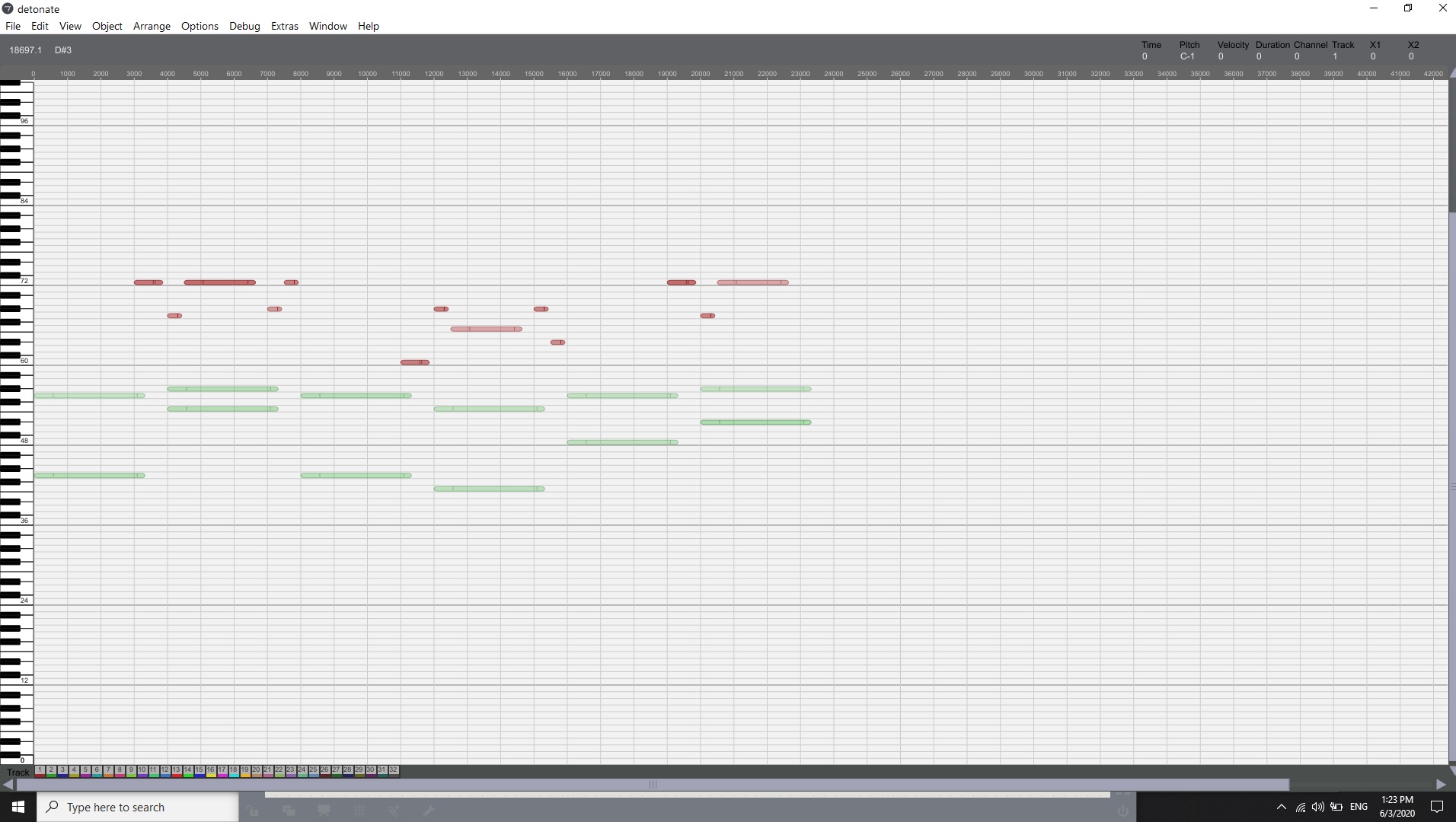
2. Detonate 1 object, 2 inputs (incorrect representation):
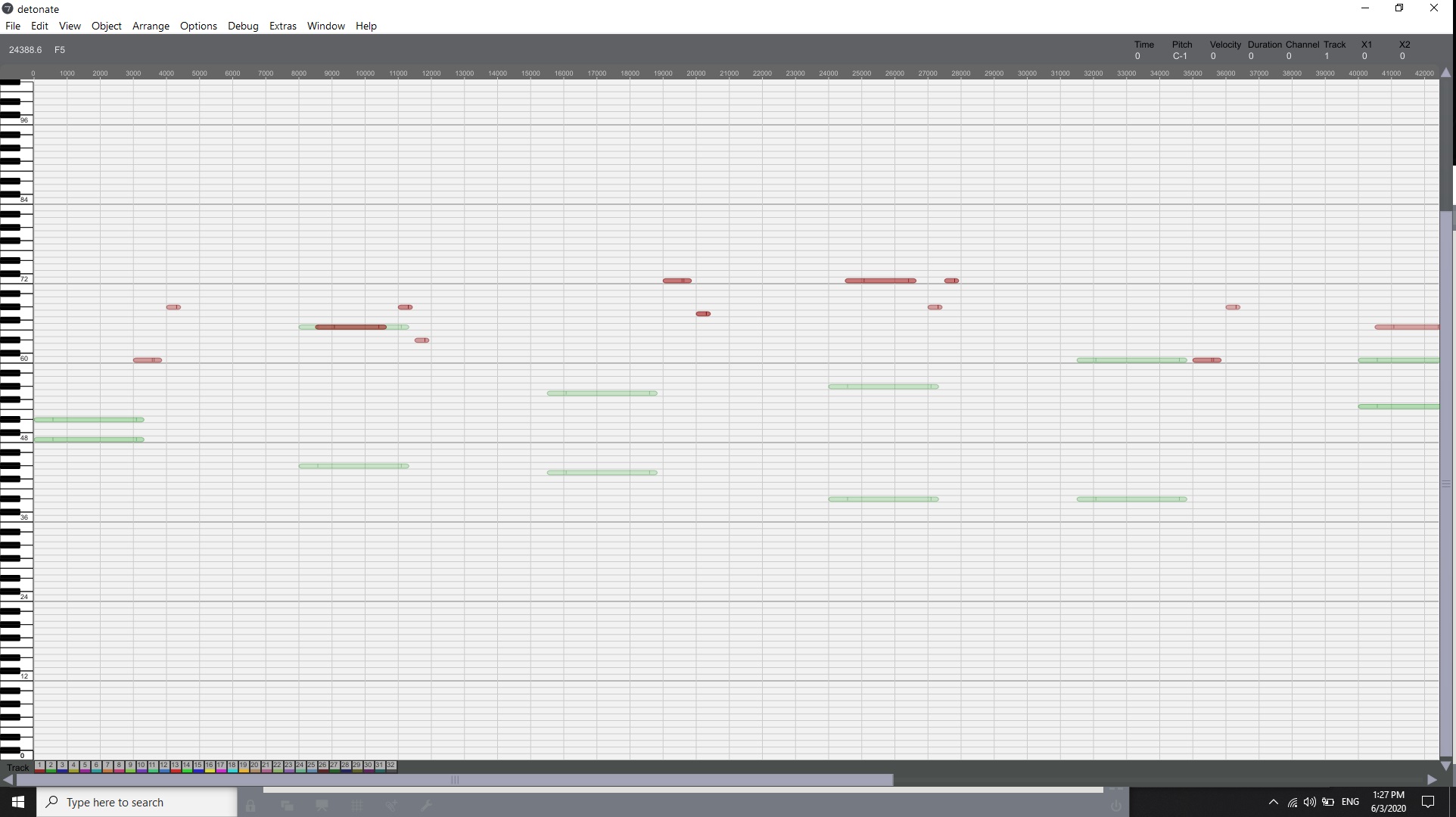
I may have a problem with my code for the second version... it is basically the same I sent you before, only that the output message of the midi events go both to the same detonate object.
I'm sorry but I think it is NOT as it's expected. It is counting the delay time for the second track from the first track. 2000 ms are counted from the last event on the first track, so the event is at 3000. That makes the two lines codependent.
Good point. But I suppose that's just how detonate works: At input the delay times are counted as distance from the last event, regardless of channel and track numbers. If needed, the timing of individual tracks can then be calculated internally, for example when exporting a type 1 midi file.

whenever i do something new with detonate, i always mix up tracks and and channels at one point.
it is totally okay that delta times are across channels within the object (analog to midi file forrmat 1) - but of course that should be changed when exporting individual channels.
where do you need the exported midi files? most DAWs let you explode a multichannel file onto 16 sequencer tracks... if you are looking for a temp workaround...
> most DAWs let you explode a multichannel file onto 16 sequencer tracks
Yes, but unfortunately just Ableton Live does not...
duh. :(
in pluggo you could just play the detonate data to the host. cant you do that with live devices?
in my detonate based player VST i also allowed myself to simply interchange tracks and channels on the fly, so that you can record midi onto tracks even from different detonate tracks.
No, it's a limitation of Live. If you have detonate within a M4L device, you can't get multichannel output to other tracks - all channels from detonate are merged into one channel. The same applies to any other midi generating plugin.
and i am already annoyed that i only have 16 channels. :)