
Help understanding jit.world name context and naming context for jit.gl objects

Hello! I need help naming the context for jit.gl objects. I am working in a patch that have a source movie playing from a jit.gl.movie and going through some jit.fx and finally reaching a jit.gl.videoplane that fix that video to a specific layer. Then there is, on one side, a jit.gl.text that I move with mouse clicks with a jit.gl.handle, and on the other an fpic , both of them in different layers. I read in the max documentation that when working with jit.world the context should be name, so I name the jit.world as vworld and type that name into every jit.gl object there is in the patch, and now nothing is being displayed.
I am not sure I understand how to name the context correctly. For example, if I read a video with a jit.gl.movie and that video get resize with jit.gl.texture, goes through some effects and then ends in a jit.gl.videoplane to be position in a specific layer, should I only name the last jit.gl.videoplane with the context name? or every jit.gl along the way? I tried both and it doesn´t work either way.

If you don't provide a name yourself for jit.gl objects, they will get one generated automatically, in the form u123456789.
Regarding the rendering context name, it is generally defined by a [jit.world] or [jit.gl.node] through the @nameattribute (or as a argument for [jit.world]) and objects rendering to a given context (or at least receive bangs from it) must have that contexts name filled in their @drawto attribute.
The cool thing is that Max will automatically populate that @drawto attribute for you by finding the closest world/node. This generally works well for simple patchers with only one context (typically one [jit.world] with no [jit.gl.node]), like in your case.
So for your patch (which by the way I cannot fully open because it is missing the bpatcher files), assuming you don't have a node or another jit.world somewhere in those bpatchers that I cannot open, you can simply remove every name typed as argument and it will work: Max will automatically generate required names and will automatically set the rendering context for objects that need one.
As for why it doesn't work in its current form: you have a [jit.world vworld @name VideoLooper] so you're giving your [jit.world] two times a rendering context name. First as an argument (vworld), second as an attribute (@name VideoLooper). The latter is kept (you can verify that in the objects inspector), so your rendering context is VideoLooper. So all of your other objects with vworld as an argument will try to render to the vworld context, which doesn't exist.
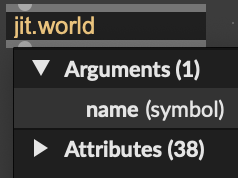
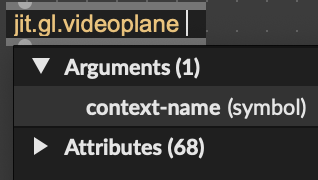
Arguments VS attributes can be a bit tricky, especially with jit.gl objects, as [jit.world] argument defines its @name attribute, while most other jit.gl objects argument define their @drawto attribute. You can verify what an argument means in the objects inspector:
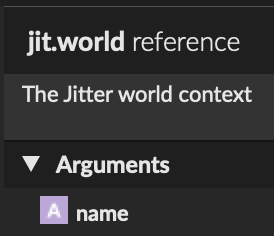
or directly when you type in the object box:
Since the worlds context name is also the name appearing as the title of the rendering window, I would go with [jit.world VideoLooper] (or [jit.world @name VideoLooper]) and remove every mention of vworld in your patch.