
Inconsistent times connecting with Live API?

I'm a very experienced developer overall but very new to developing in the Max8 environment and i'm attempting to create a simple device and sometimes the device works as i've designed it and sometimes it doesn't. I'm seeing a bunch of strange messages in the Max8 console and inconsistent behaviors within Live 11 that are making me wonder if (a) this is a stable development environment or (b) i'm just completely missing something simple.... i'm hoping for the latter. :-)
I am attempting to build a very simple device M4L device that i can place into a MIDI clip in session view that will allow me to automate a de-acceleration in tempo. I've chosen 80bpm arbitrarily as the target tempo. My device has a live.dial device which is set to the leftmost position. What i want is for the device to read the current project tempo and as i rotate the dial, to reduce the tempo down to the target of 80bpm. My device has the dial, a 'Start BPM' numbox, a 'Target BPM' numbox, all of which feed into a JS object for which i've written a script to get the job done. I've also created a debug button which (when pressed) should sense the project tempo and set the 'Start BPM' value to the project tempo and allow the dial to reduce the tempo from there.
The kicker is that sometimes it works but then, i'll test again by again deleting the device from the track, reloading it and after doing so, sometimes it won't work at all. On other occasions, it won't work on the first pass. I've tried numerous things and have even consulted Claude on this one and i still can't seem to remove the inconsistency. I'm seeing some warning signs from the above inconsistent behavior to errors in the console, two of them in particular: "jsliveapi: set: no valid object set" and "set: no valid object set". These errors also seem sporadic in nature.
Before i throw my code out there, i just wanted to check and see if there's something specific that needs to be done in order to get an M4L device to connect with the Live API? Claude has suggested to me that after adding my device to a track to wait 10 seconds before testing to allow the device to hook up with the API. As an experienced developer, that seems hopelessly brittle. Again, that works sometimes and not others.
I'm running Ableton 11, the most recent version and Max8 v. 8.5.8 on an M1 Mac Mini. Any advice would be helpful. Many thanks and cheers!

Are you using live.thisdevice?
That Claude " wait 10 seconds" suggestion kinda implies neither Claude nor you understand live.thisdevice.

this can't be simpler, unless you complicate it for whatever reason.
java script to do what ?
main thing is not to create stack overflows while interacting with the tempo.
Then why do you want to observe current tempo
if your dial allready has 'Start BPM' numbox, a 'Target BPM' numbox ?
that way it simply travels between the 2 values.
NAMAKEMON-
Thank you for your reply. I (and apparently Claude) did not know about live.thisdevice and i was having trouble getting the device's ID and was having trouble. Thanks for your suggestion and i will play with this and report back.
Source Audio-
Like i said, i'm new at this, so when i approached the problem, i have been having trouble setting the 'Start BPM' value because i don't want that value as a hard-coded one, i want my device to read the project tempo and set the 'Start BPM' value based on that. The problem is that i seem to be approaching connecting with the live session object to get the project tempo in the wrong way. Hence my question.
Here is one example :
using set message to numfloat prevents stack overflow.
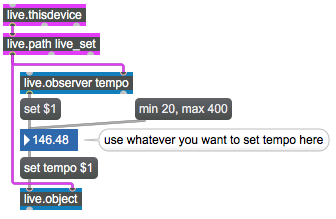
next question is how do you want to use live.dial to scale tempo using automation.
Again it would need to travel between min and max values.
Or instead use it to travel up or down scaling current tempo
by ramps, speed beeing dial offset from the middle point.
If you want I could post an example doing that.
and then what if you allready have tempo automated in master track ?