
OSX MXO Notarization Headache

Hello Team,
Trying to revive/update some good-old-useful MSP Externals for users and hitting the Notarization wall. Came across this Article which is more "Standalone" oriented than MXO:
https://cycling74.com/articles/max-8-1-mac-os-10-15-catalina-support-and-notarization
Does that mean that we can not "notarize" an object but we should do that on the Package level?
Has anyone gone through the hassle of doing the Post-Build Notarization in XCode? Any template to look at?
Thanks in advance for sharing,
Arshia
EDIT: I actually have everything setup (thanks cmake).
If I make a CMD Standalone of a program, it works (I can send it to others). But the same procedure with MXO fails.
But for some reason, MXOs seems to require additional steps. Any insights on how to handle external objects for Notarization from Cycling Devs would be very welcome.

I share this big headache with you!..
Thanks @Mame!!! Any chance to get some feedback from Cycling crew as to how we should configure XCode for Third-Party Max objects regarding Notarization? There are ofcourse two issues: The compiled object itself and the distribution DMG/installer etc.
I'm more interested in the object to start with!

I'm also very interessted. I don't even sign the externals (or only for local use). But don't want to force people to use command line or lower security to run them.
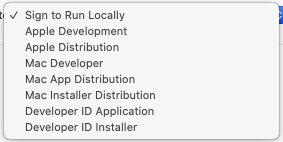
What to choose? And is there even a chance to get this accomplished without paying money to apple?
Does it make sense to sign without notarizing?

bump! would be nice to hear from cycling about the secret (?) necessary stepts to make it work.

Incidentally, I've recently been hitting a frustrating issue in building my external on OS X (Mojave) where the code signing build step has failed about 95% of the time, with the successful builds being randomly distributed somehow.
The issue I found is that if one develops the external in the natural place of testing (on a mac at least) in ~/Documents/Max 8/Packages/<external> and iCloud Drive is switched on then the latter interferes with the code signing step on xcodebuild.
The solution is to move the external project folder to a non iCloud drive folder (such as ~/Downloads for example) and then run "xattr -cr ." in the the project directory to remove the detritus (ironically which apple's system is itself creating) and then it should succeed (provided you have your Info.plist and bundle id correctly specified).
I've tried this twice and and it works (for "sign to run locally" case and for the "Development" case).
Anyway, hope this helps someone else who has been frustrated by this strangeness.
S

Is there any update on this situation? I've signed and notarized several of my Max apps successfully, using shell scripts. But I want to do the same for my externals and can't get it to work. I always get this back after submitting the notarization request to the Apple server:
Status Code: 2
Status Message: Package Invalid
(This is a frustratingly vague error message.)
When notarizing an app, I zip the .app bundle and notarize that; and that's what I distribute. I want to do the same thing with a package folder that contains one or more externals and other support files. I was able to sign the package folder, but notarizing it fails with the message above.
What special things do we need to do to get this to work? I've searched the forum, but all the other posts I've found have to do with notarizing Max apps. I read an Apple document that says plug-ins inherit the entitlements of the host app, but I'm still including entitlements when I sign my package.
I know how to get rid of the quarantine flag that is set on the package when its downloaded, but not every user is prepared to deal with the Terminal for this.
John
Okay, this is probably solved. I was able to sign and notarize just the Mac external in my package, not the package folder, which makes sense. As part of doing this, you have to zip up the external .mxo bundle before uploading to the Apple server. Then I was able to staple the ticket to my unzipped bundle.
I had not understood that you can (must) zip the bundle before uploading for notarization, but that you do not have to staple the ticket to the zip file itself. I didn't want that, because of course I didn't want my external to remain zipped within the package folder.
I just need to test this on another machine running Catalina (I'm still on Mojave...) to be sure it loads in Max.
John
@John,
Totally sympathize with your frustration. I found the code signing / notarization problems, which seem to be pervasive, definitely the most difficult and motivation-crushing part of external development. I personally gave up and put my project on ice for about 6 months after hitting a brick wall and reading useless error messages from Apple like the one you are referring to.
To be fair, however, I found that the situation is getting better with each new version of Max. I've had externals which would not be recognized in Standalones in earlier versions magically get recognized as Cycling tweak their packaging and code signing algorithm to catch up with Apple's constantly moving targets.
Still, as someone facing similar issues as yourself I would also be interested to have a canonical way from Cycling to get Standalones (or Packages) which also include user developed externals signed/notarized (especially in the case where one is using OS X Catalina or higher).
An official tutorial, shell or python script would be nice.
S
Thanks, Shakeeb. Yes, it would be nice to have better guidance on all this. I'm sure it's frustrating for Cycling, too.