
Recording data from two adxl345 sensors

Max 8 one does not post anything if serial object disconnects.
You can add periodic message to max, which would stop if no connection.
Same for your 2 Senders, but use larger interval.
I did not remove this from your original sender code :
if (now - lastHeartbeat >= HEARTBEAT_INTERVAL) {heartbeatPacket.id = 99; heartbeatPacket.x = 0; heartbeatPacket.y = 0; heartbeatPacket.z = 0;
esp_now_send(receiverMAC, (const uint8_t *)&heartbeatPacket, sizeof(SensorPacket));
lastHeartbeat = now;}
you had 500m s interval.
change it to 5 seconds set ID for each sensor like 11 and 12
something like
if (now - lastHeartbeat >= HEARTBEAT_INTERVAL)
{esp_now_send(receiverMAC, (const uint8_t []){11}, 1); lastHeartbeat = now;}
for other sensor use 12
do you want me to post code for all 3 senders and receiver V3 ?
for serial auto-connect to your ESP32 I need ALL asked infos on both mac and win.

do you want me to post code for all 3 senders and receiver V3 ?
This would be highly appreciated
pease delete more posts , like this last one, which is not going to work....
will do so
for serial auto-connect to your ESP32 I need ALL asked infos on both mac and win.
Will do so once at home
You remember I posted 2 detector variants some time ago ?
That one?
receiver CodeV2 had a mistake in setup() by accident I reversed send and receive init.
in case you want to keep using it change this in setup()
esp_now_register_send_cb((esp_now_send_cb_t)onDataRecv);
to this :
esp_now_register_recv_cb(onDataRecv);
.........
here is new code with 5000ms notifications from 2 sensors and ESP host to Max
baud is set to 460800 as in your last posted receiver code
In max you get S1 S2 and OK every 5000 ms and if it does not get received --- something is wrong
deay time is 100ms longer then pulse, and will not bang when receiving at 5000ms interval
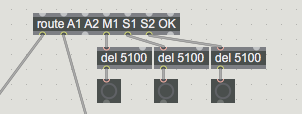
................
what do you want to use for autp record start ? is hour and minute enough ?
what do you want to use for autp record start ? is hour and minute enough ?
Yes hour and minute is enough
regarding the active window time - could you point me to the message you said you show this?
Thanks for the above code I will check it asap!
that shows measured pauses, but also alerts if no input has been received for set time.
Still I am not sure how you want to exactly deal with that
.........
For scheduled recording, one would run date when patch starts using metro 1000
and start recording for set length. in that case making folder and naming files would need to change.
unless you want to schedule several recording starts.
like 10:30 length 2 hours 24.20 length 1 hour 2:30, and 18:00 length 3:20
......
by the way , I can post js code that takes list input of certain length and writes line by line into a file on HD using coll format.
so if you input 1 22 33 44 it writes 1, 22 33 44;
( but you wll need to read files anyway into coll to play or analyse)
if you plan to make any math analysis and want to use excel for that,
one could modify js to write .tsb files (tab delimited cells)
........
if you plan to make any math analysis and want to use excel for that,
Yes that might be the case
by the way , I can post js code that takes list input of certain length and writes line by line into a file on HD using coll format.
Yes sounds great!
Still I am not sure how you want to exactly deal with that
Now I can check for when there's no activity over a certain amount of time. I wanted to look for the opposite — to know when I had a certain amount of activity over x amount of time. For example, if I have 8 hours of recording, I want to easily see at what times in that recording I had actual movement for over x seconds or minutes.
Is this system to write log of active or discconected of Sensor make sense?
edited patch:
I would use text instead, and write into a file ESP_date_time.txt.
but maybe you want to try excel one for this ?
Thanks for this patch look great. I will automate it as the other system for recording sensors so it will be in sync.
but maybe you want to try excel one for this ?
why you offered excl? any reason?
because you mentioned you might want to use it for analyses.
it does not have to be excel, I can use tab or space delimiter, and write .tsb
or .txt files
In that case excl it might be better only if it is not complicates things.
main difference is it writes direct to HD, not into max
you just pass a path to EXISTING folder and give it a name.
OK!
regarding the system of showing activity windows of time. is that possible to add to the current system?
I will post js ESP monitor, just say if you want tabs or space delimiter.
space delimiter
things will become a bit complex when you add auto record, monitoring etc.
if you are not sure, I would make 2 projects, one to manually do all, and one for scheduled recording.
in first place because of creating folder/file structure.
here is one example how to use scheduled record,
it has main functions, but it would need connection to the rest.
record start and length is set in hours minutes, timing is scaled to 1 second.
2 secondes before recording starts, folder and file should be created.
in fact it needs no folder as only 1 recording takes place.
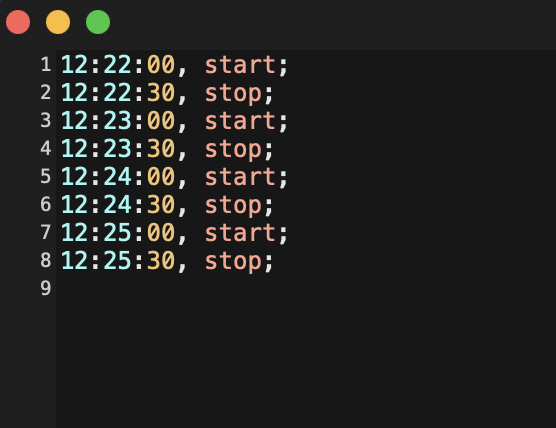
Or you maynbe schedule several recordings using a text file with start - length pairs ?
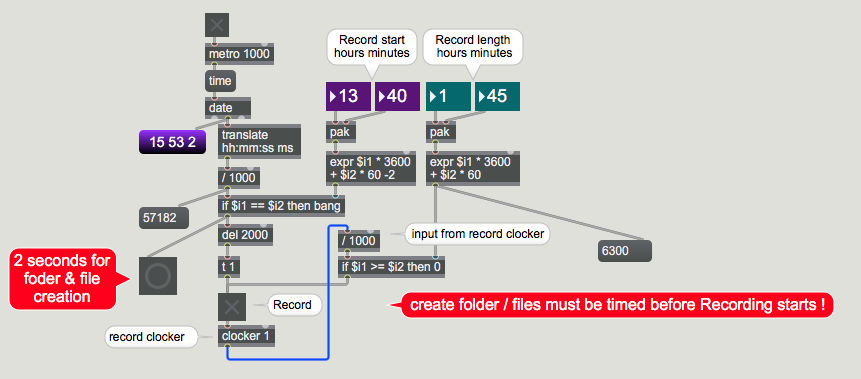
Or you maynbe schedule several recordings using a text file with start - length pairs ?
If there's a way to mark or view timestamps where movement happened, and jump to them easily during playback, then I don't mind having long recording files — the length itself isn't the issue, navigating within it is. So I don't particularly need scheduled recording, although it's a nice feature to have!
back to this question:
"For example, if I have 8 hours of recording, I want to easily see at what times in that recording I had actual movement for over x seconds or minutes"
Now you mark periods that were inactive if pause is longer then set time.
means in between that marks there are active periods.
in case your pause length remains as threshold, you start recording and first input triggers start time of first active period.
now you want to mark end of that active period when next inactive period happens ?
or to keep adding markers for "still active" if no pause for 20 seconds that you mentioned?
I don't really understand what do you want to write in the log .
Thanks for breaking that down — to clarify: I'm looking for option A. For each active period, I just want a single start/end pair logged: the timestamp when the active period began (right after an inactive period ends), and the timestamp when it ended (right when the next inactive period begins).
I don't need repeated "still active" markers throughout the period — just the two boundary timestamps per active window, similar to how the inactive windows are currently logged as pairs.
So for an 8-hour recording, I'd end up with a list of active windows, each one just two numbers (start, end), and I could then filter for the ones longer than X seconds/minutes.
pause END is START of activity
you write 2 values now, 1 last activity end - 2 new activity start.
in between is a pause.
next line start is next pause start or how long activity was...
So you have all that infos in the coll, only very first activity period is missing,
one could insert it when first value gets in.
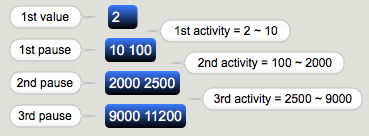
Or you maynbe schedule several recordings using a text file with start - length pairs ?
Now I understand what you said here. In that case Yes I would like to scheduale several recordings like something like this: (no need seconds)
next line start is next pause start or how long activity was...
So you have all that infos in the coll, only very first activity period is missing,
That's a really elegant insight — thank you! I understand the logic (previous pause end = next activity start), but I'm not confident I can wire it correctly in the patch myself.
Would you be able to show me how to structure this so the resulting activity windows are also visible in jit.cellblock, similar to how the pause windows are currently displayed there? I'd like to be able to see both the pause list and the derived activity list side by side.
As first one needs one line for rec start and LENGTH.
if you start recording at 23:30 for 3 hours, end would be in next day
23:30 2:30
I would recommend only 2 values
12:22 2:00 rec will end at 14:22
but if you prefer absolute time, ok, it is up to you in which case recording time will not be linked to elapsed recording counter but to date output.
........
for "activity" period logs :
one could revert to not write pauses but active periods, but is that hh:mm:ss format
in 8 hour coll effective to make math ?
you use this :
24:00:44 24:08:19 12:00:44 12:08:19 pause start - end in recording time and absolute day time
now you dump possible 2880000 lines into what ?
Thanks for both explanations!
On scheduling: I'll go with relative time (hour:minute + length), not absolute date-based time. My use case is a recurring daily pattern (e.g. record a few hours each morning and evening), not a one-time date-specific event, so hour:minute fits better and keeps it simpler.
On the activity-period logging and jit.cellblock: that's a fair point about 2,880,000 lines in the worst case — I don't think dumping that many lines into jit.cellblock makes sense for an 8-hour file. Given that, maybe it's better to keep the activity-window derivation logic conceptually as you described (previous pause end = next activity start), but only apply it when I actually need to inspect a specific recording — computing it on demand rather than continuously logging every possible line. Or would you recommend a different approach entirely for handling that volume?
here is the printing of the serial you asked earlier: (MAC laptop)
serial: port a: debug-console
serial: port b: Bluetooth-Incoming-Port
serial: port c: SOUNDPEATSCapsule3Pro
serial: port d: usbmodem1101
serial: port e: usbmodem21101
I wanted to explain something and ask for your advice: when I start a recording with all sensors working fine, and then stop the recording, the sensor-status logger (S1/S2/OK) ends up empty — nothing gets logged.
I have two questions related to this:
1. How can I save/log the current sensor status at the moment recording starts, even if no new S1/S2/OK message happens to arrive right at that exact moment?
2. Alternatively, is there a way to prevent recording from starting at all unless I've already received an OK confirmation from all the sensors? This to prevent that recording start before even open the serial
the above is not really necceseraly therfore can be ignored
I changed the logger name to fit the other files:
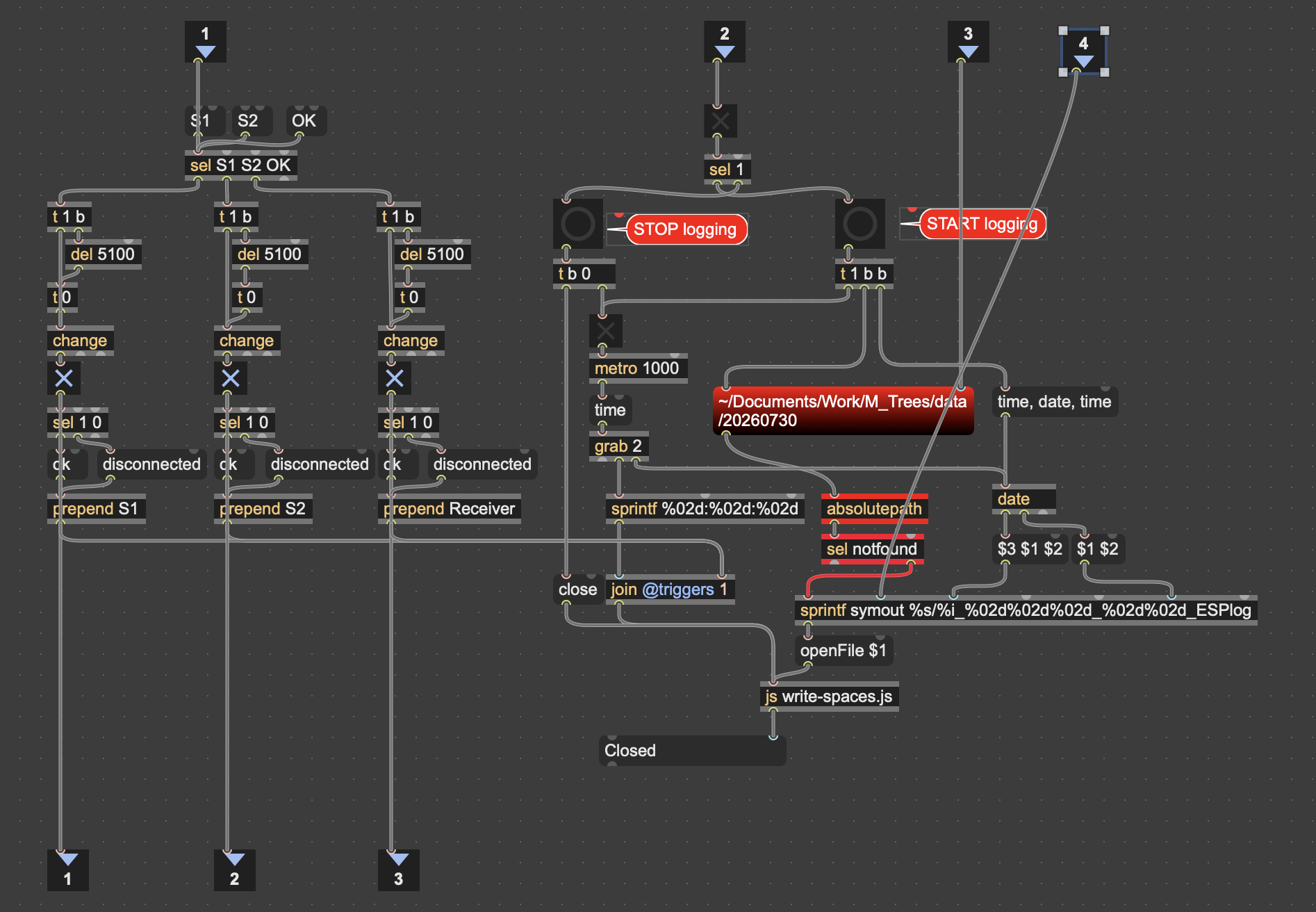
input 2 is from record button
input 3 is from [s folderpath]
input 4 is from [s counter]
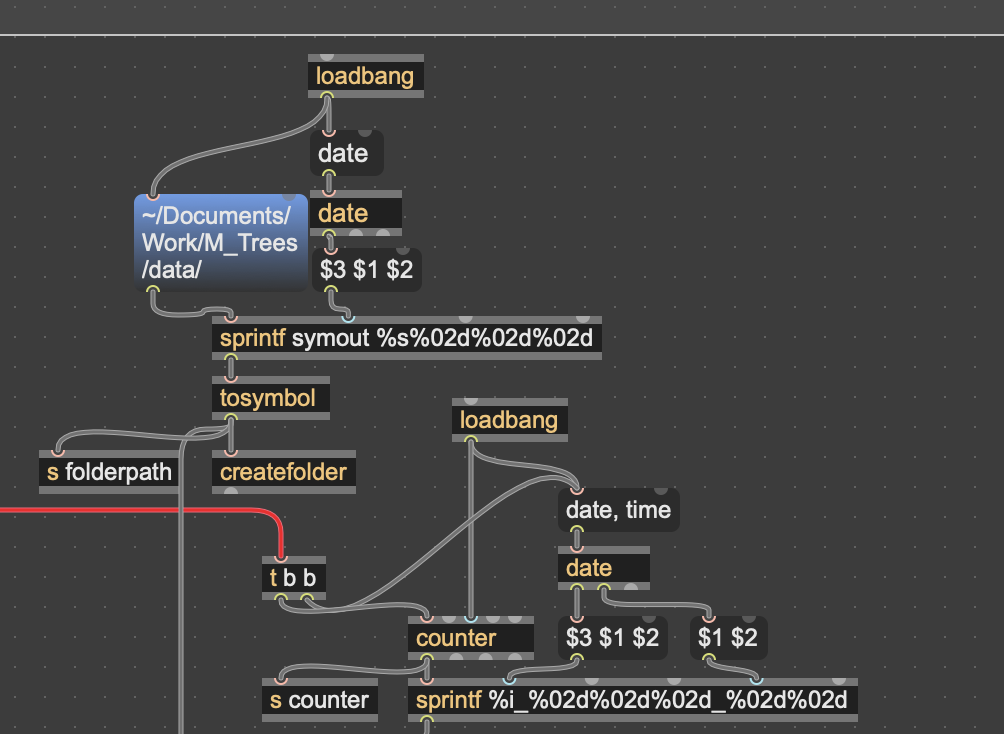
I run the recording through the night from 21:30 until 07:20 and thanks to the system reporting status I noticed the sensors disconnected few times. and the last one was from 02:00 until I stopped the recording:
Any idea what can it be?
( the first disconnected at 21:52 I made my self because I move the sensor to a difference place and I think I did the same at 22:28 and maybe also 23:00 but I'm not 100% sure)
21:52:32 S1 disconnected
21:52:44 S1 ok
22:28:54 S1 ok
22:28:54 S1 disconnected
23:00:39 S1 disconnected
23:01:09 S1 ok
23:01:48 S2 disconnected
23:01:55 S2 ok
23:04:17 Receiver ok
23:04:17 Receiver disconnected
02:21:29 S1 disconnected
02:21:30 S2 disconnected
02:21:32 Receiver disconnected
edit: the long dissconnected from 02:21 until finished recording is probably cause because my mac went to sleep:

that log is strange, order and timing of log makes no sense
21:52:32 S1 disconnected
21:52:44 S1 ok
22:28:54 S1 ok
22:28:54 S1 disconnected
23:00:39 S1 disconnected
23:01:09 S1 ok
in theory, because of your change inserted, you can not have
multiple ok messages without disconnected and opposite,
and no way to get ok and disconnected at same time ?
it is maybe because how you pack the messages .
I can not control every corner of code you write.
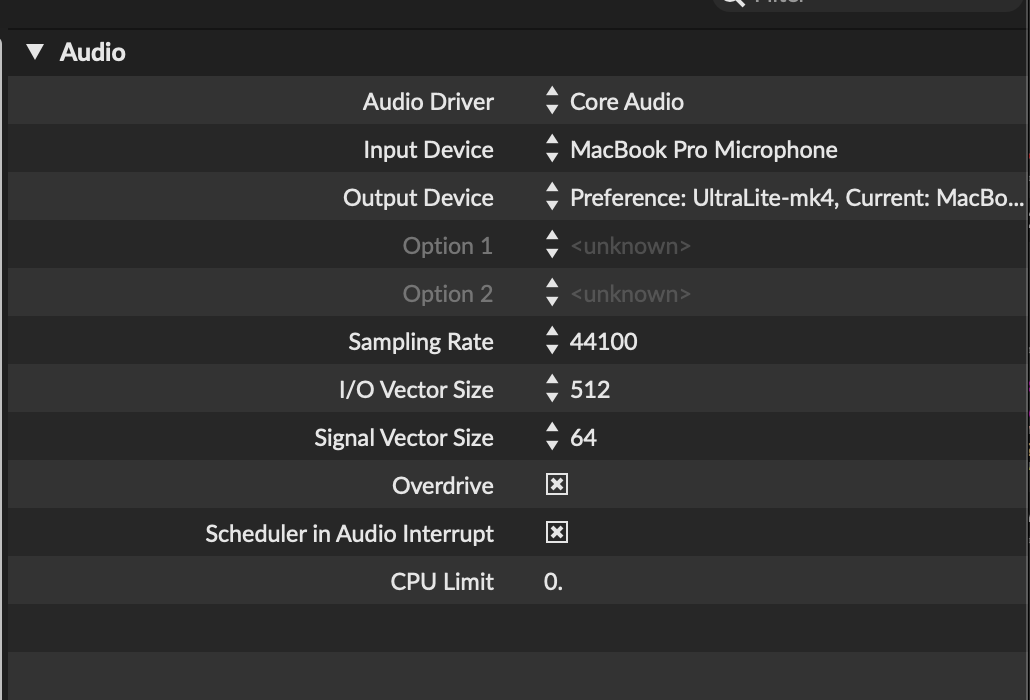
do you have Overdrive on and Audio Interrupt off as it should be ?
also remove all unneeded visual garbage from the patch.
at the end could js play a role ?
you could try to log to text file in parallel and compare.
.......
next thing to check is sender /receiver code, was there a lot of sensor messages
at disconnection time ?
.........
when you load recorded file into coll, you have to analyse pauses and or active periods.
and there you have many lines in 8 hours, if windy, max 2880000.
.......
I will test again with your original unmodified code and see if it works smoothly. The main discconectd I am almost 100% sure happens because my MAC went to sleep
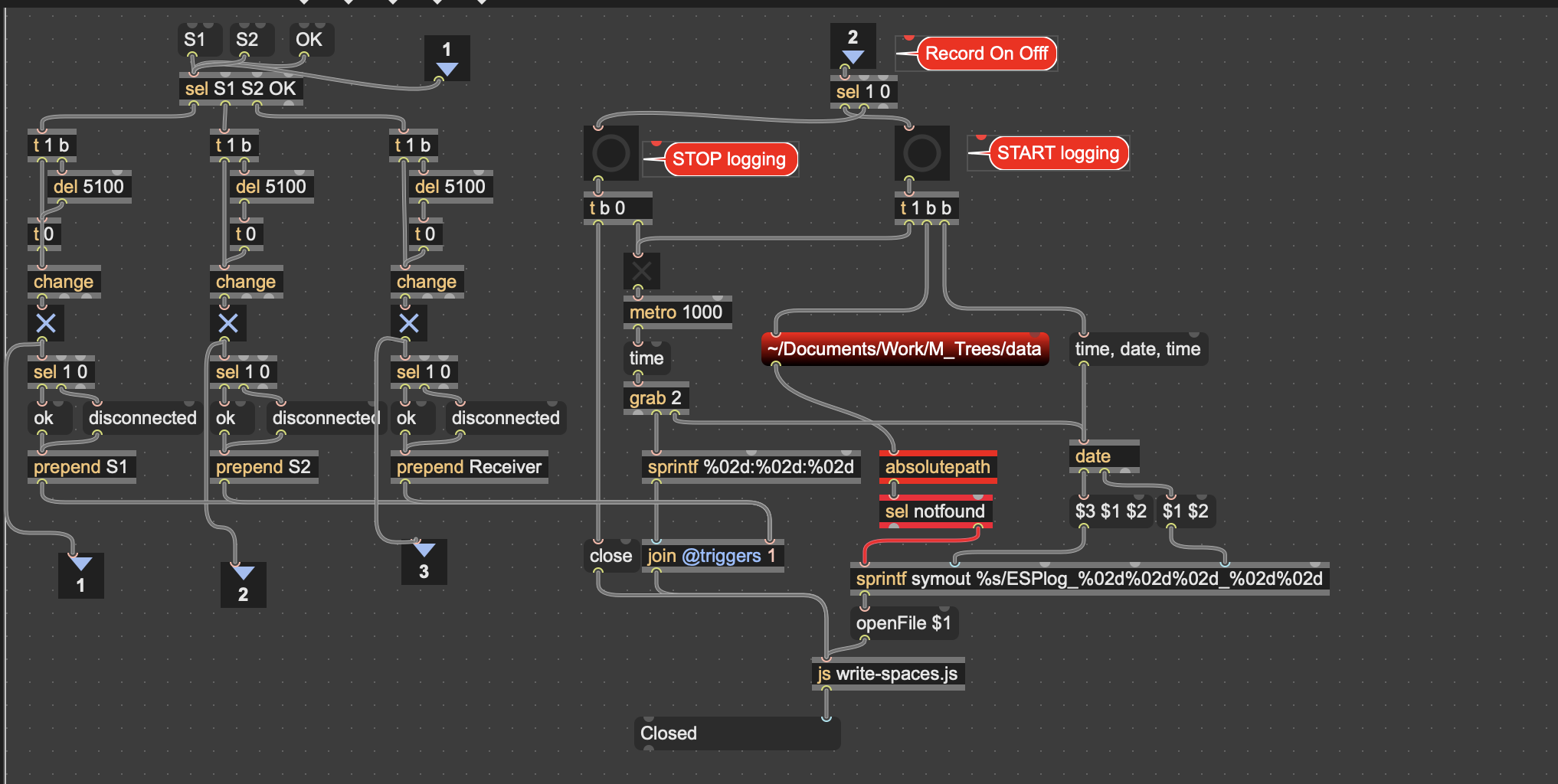
I'm back to your original logger file:
Do you think I should use this same logger (with small changes to make the file readable by coll — adding semicolons, etc.) to also record the data from the 3 sensors? Is it the safest method for that too?
Also, I wanted to circle back to something I asked before — about showing active-time windows instead of inactive/pause windows. Did you have a chance to look into that, or is there anything more you need from me to help build it?
you should turn audio interrupt OFF
you should turn audio interrupt OFF
Did so now.
small updated regarding your new codes:
I made those small changes:
In the Receiver:
onDataRecvusedesp_now_data_t, I reverted it to the standard v3 signature(const esp_now_recv_info_t *info, const uint8_t *data, int len)The struct copy (
packet = sharedPacket) is a direct assignment from a volatile struct, which throws a C++ compile error ("ambiguous overload for operator=") — I went back to copying field-by-fieldanalogRead(A2)was reverted back toA2, but my moisture sensor is wired to A10 — I changed it back
In all 3 Senders:
onSentused the old core-2.x signature(const uint8_t *mac_addr, esp_now_send_status_t status), which doesn't match Lib v3 — I restored the correct v3 signature with the explicit cast
I kept the improvements that did work well — the calibrate() guard against the 4-second freeze, and the explicit peerInfo.ifidx = WIFI_IF_STA.
--
Separately from your changes, I also added something of my own: an LED on the Receiver that only pulses when two things happen together — the 5-second Alive/OK heartbeat fires, AND something arrives back from Max over serial in that same window:
if (millis() - Alive >= 5000) {
  Alive = millis();
  Serial.println("OK");

  if (Serial.available() > 0) {
    while (Serial.available() > 0) { Serial.read(); }
    digitalWrite(LED_PIN, LOW);
    ledOn = true;
    blinkOnTime = now;
  }
}
Right now, I have Max sending something back every 5 seconds too, so this effectively confirms the full round-trip (Receiver → Max → Receiver) is alive, not just that the Receiver itself is running.
Everything's uploaded and running now with those fixes and this addition in place.
sorry for the libs confusion, I worked years with most optimal v 1.06, and somewhat with 2.0.17
but v3 is not in my brain.
did you keep that new loop in receiver ?
if (newPacketReceived) {noInterrupts();
I deketed my codev4.
about showing active periods, you should have understood that thy are allready marked with pauses, where pause ends activity starts, whre activity ends,pause starts, when longer then set time,
one only needs to group that 2 number differently.
If you can't manage it, post and I will try but my tume is really short this days
To answer your question directly: no, I didn't keep that specific change. Checking the code, newPacketReceived = false is still placed before noInterrupts(), same as in the original V3. When I fixed the volatile struct assignment (packet = sharedPacket → field-by-field copy), I kept the reset where it originally was, rather than moving it inside the critical section like your V4 attempt did.
Here's the full Receiver code I'm actually running right now, so you can see exactly what's in place:
// ==========================================
// RECEIVER V4 (corrected)
// ==========================================
// THIS IS FOR ESP32 Lib v3 ONLY - 3 axes as LIST, PREFIX to Serial A1 / A2

#include <WiFi.h>
#include <esp_now.h>

unsigned long Alive = 0;
volatile bool signal11Received = false;
volatile bool signal12Received = false;

#define LED_PIN LED_BUILTIN
unsigned long blinkOnTime = 0;
bool ledOn = false;
const unsigned long BLINK_DURATION = 500;

typedef struct {
  uint8_t id;
  float x;
  float y;
  float z;
} SensorPacket;

volatile SensorPacket sharedPacket;
volatile bool newPacketReceived = false;
SensorPacket packet;

float currentM1 = 0.45;
float prevM1 = -1.0;
unsigned long lastMRead = 0;
const float HUMIDITY_THRESHOLD = 0.005;

void onDataRecv(const esp_now_recv_info_t *info, const uint8_t *data, int len) {
  if (len == 1) {
    if (*data == 11) {
      signal11Received = true;
    } else if (*data == 12) {
      signal12Received = true;
    }
  } else if (len == sizeof(SensorPacket)) {
    memcpy((void*)&sharedPacket, data, sizeof(SensorPacket));
    newPacketReceived = true;
  }
}

void checkHumidity() {
  unsigned long now = millis();
  if (now - lastMRead >= 2000) {
    lastMRead = now;
    currentM1 = analogRead(A10) / 4095.0;
    if (abs(currentM1 - prevM1) > HUMIDITY_THRESHOLD) {
      prevM1 = currentM1;
      Serial.print("M1 ");
      Serial.println(currentM1, 3);
    }
  }
}

void setup() {
  Serial.begin(460800);
  pinMode(LED_PIN, OUTPUT);
  digitalWrite(LED_PIN, HIGH);
  WiFi.mode(WIFI_STA);
  if (esp_now_init() != ESP_OK) { while (1); }
  esp_now_register_recv_cb(onDataRecv);
}

void loop() {
  unsigned long now = millis();

  if (ledOn && (now - blinkOnTime >= BLINK_DURATION)) {
    digitalWrite(LED_PIN, HIGH);
    ledOn = false;
  }

  if (signal11Received) {
    signal11Received = false;
    Serial.println("S1");
  }
  if (signal12Received) {
    signal12Received = false;
    Serial.println("S2");
  }

  if (newPacketReceived) {
    newPacketReceived = false;
    noInterrupts();
    packet.id = sharedPacket.id;
    packet.x = sharedPacket.x;
    packet.y = sharedPacket.y;
    packet.z = sharedPacket.z;
    interrupts();

    if (packet.id == 1) {
      Serial.print("A1 ");
      Serial.print(packet.x, 3);
      Serial.print(" ");
      Serial.print(packet.y, 3);
      Serial.print(" ");
      Serial.println(packet.z, 3);
    } else if (packet.id == 2) {
      Serial.print("A2 ");
      Serial.print(packet.x, 3);
      Serial.print(" ");
      Serial.print(packet.y, 3);
      Serial.print(" ");
      Serial.println(packet.z, 3);
    }
  }

  if (millis() - Alive >= 5000) {
    Alive = millis();
    Serial.println("OK");

    if (Serial.available() > 0) {
      while (Serial.available() > 0) { Serial.read(); }
      digitalWrite(LED_PIN, LOW);
      ledOn = true;
      blinkOnTime = now;
    }
  }

  checkHumidity();
}
And understood on the active-periods logic — no rush at all, I know your time is tight right now. If you get a moment at some point to show how you'd wire it, I'd really appreciate it — but I'll try building it myself in the meantime (previous pause-end = next activity-start, grouped in pairs) and will only post again if I get stuck.
ok, i thought that interrupts could have caused that erratic serial traffic with disconnects.
when I come back later I wil send also js code to write coll format
Good thought about interrupts — Looking forward to the js code for the coll format when you have a moment, no rush.
Just to make sure the active-periods request is fully clear: I don't just want to see the active windows themselves — I'd like to be able to filter them by a variable duration threshold, exactly like the inactive/pause system already does with $i3. So I could set it to show only active periods longer than 20 seconds, or 10 seconds, or 3 minutes, etc. — the same flexible threshold approach, just applied to active periods instead of pauses.
I'll try building it myself in the meantime — no rush on your end at all.
this active periods give me a trouble.
you must first define exactly what for you active period is.
then one should see how to gain that information out of indexes stream.
in case of inactivity it was simple, compare current to previous index,
and if abs difference is greater then set time - then it is a pause.
can you describe your activity parameters in such simple formula ?
.......
here is js code to write coll formated text file using list as input.
Only problem with this is that js does not care if indexes repeat,
which coll does and rewrites them,
but in your case with ms progress as input it is not possible to have duplicates anyway.
same as for monitor you must provide existing folder path to create the file.
That's actually clearer, thanks — and I think it means I need two separate thresholds, not one:
1. A small "gap tolerance" — a pause shorter than ~1 second shouldn't break the activity window at all (the sensor is still "active" through it).
2. A separate "minimum duration to display" — after the activity windows are built, filter them by 20s / 10s / 3min etc.
Does that approach better defined?
I try the new js coll to write the sensor data. I have different data from both files:
The left hand side is from SensorA using the coll method and the right hand side is SensorA using the new js code.
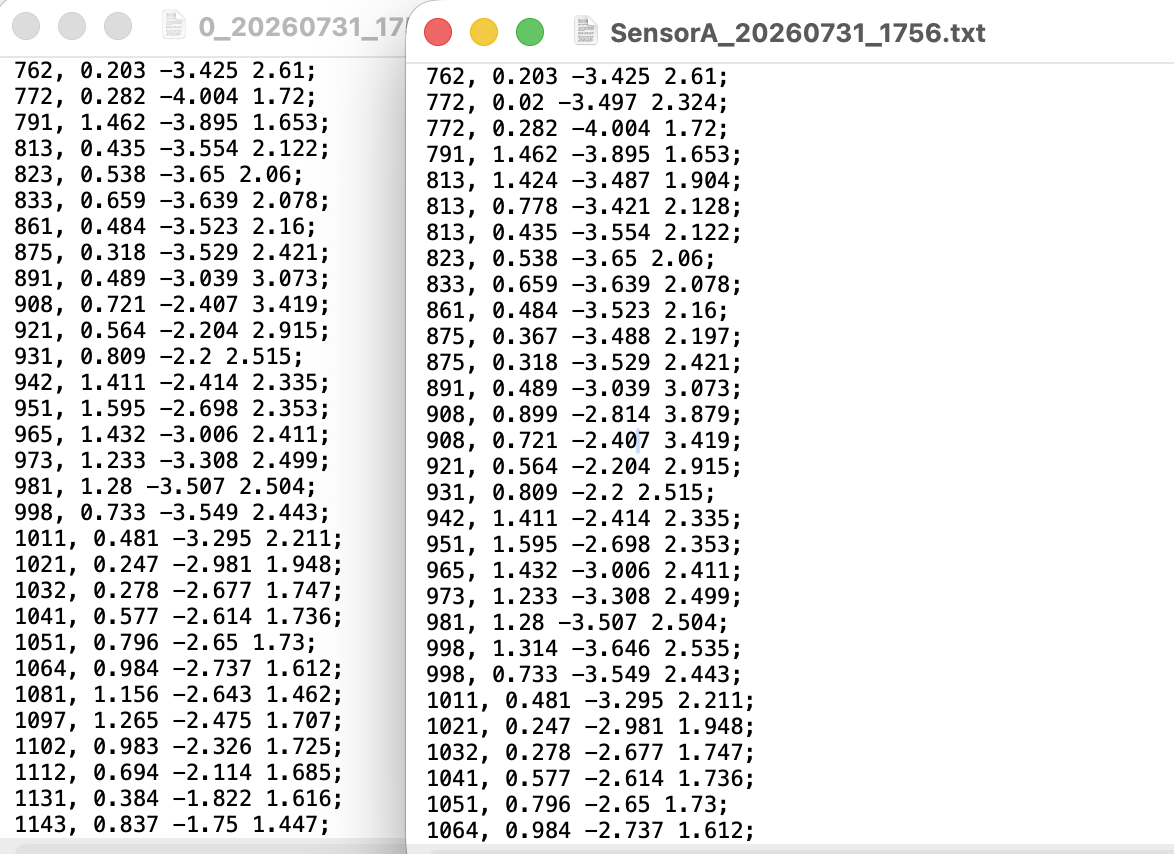
I modify as follow:
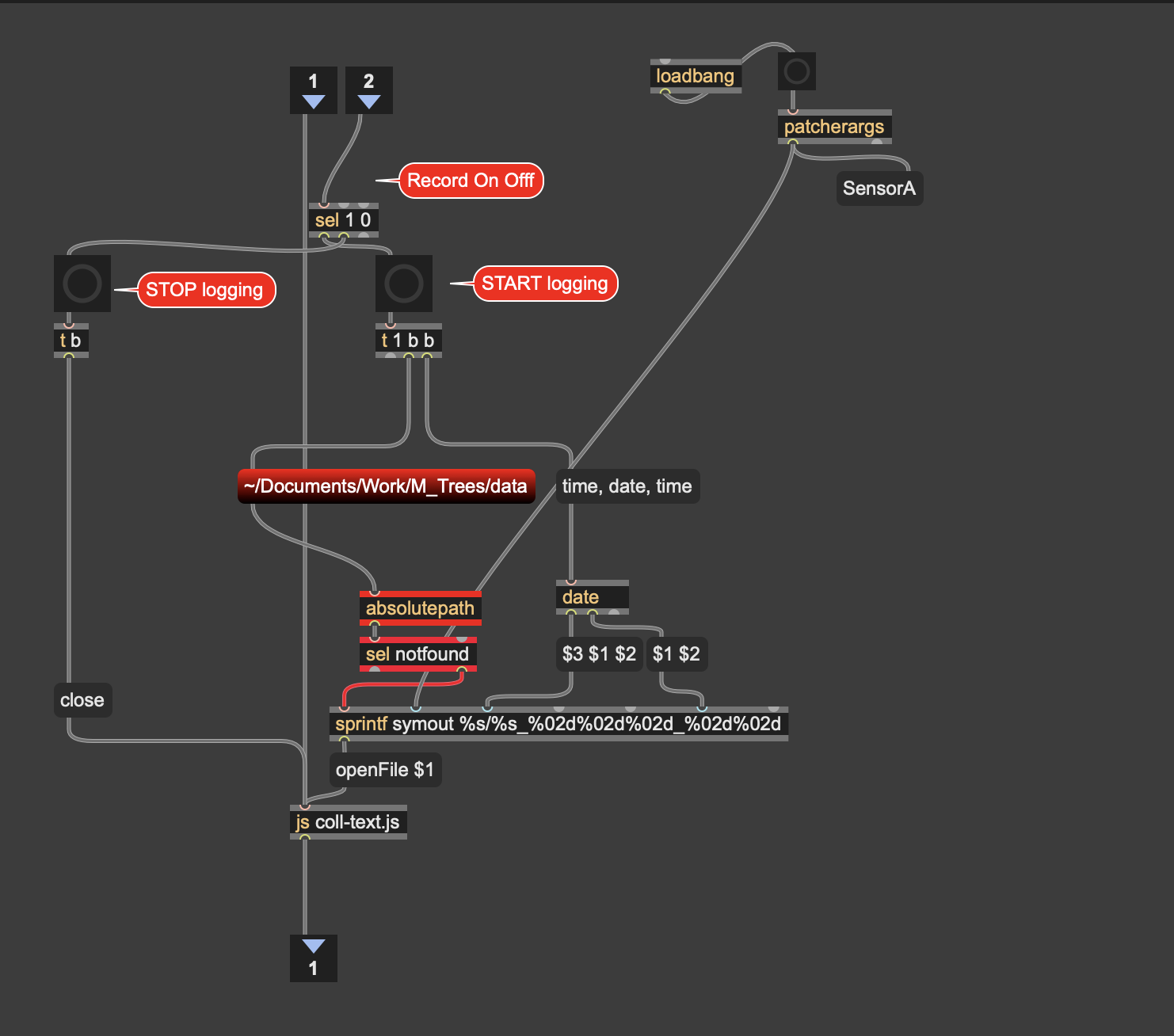
Edit:
Just to add — the fact that js keeps more data than coll doesn't bother me. I don't think those extra same-millisecond duplicates would have any real musical impact anyway.
What would you recommend going forward — should I keep recording with both methods in parallel (coll and js), or is there a reason to prefer one over the other now that we've seen this difference? Curious what you'd suggest.
Your only way to mark active and unactive periods is to measure pauses, as it is now.
then you could pass lengths between pauses to another comparison.
like what I showed on that screenshot.
the fact that you get more entries per 1 ms I explained - js does not strip duplicates.
but it is strange that you get them in first place. can you try to print captured values ?
makes me wonder if you get duplicates too and then why
OK, thanks for clarifying this. I have to leave home for a day or so, but I'll bang my head around this when I'm back.
I am leaving very soon for a month and won't be able to reply so often
can you try to print captured values ?
You mean to print to the max console the values entering coll and the js ?
console:
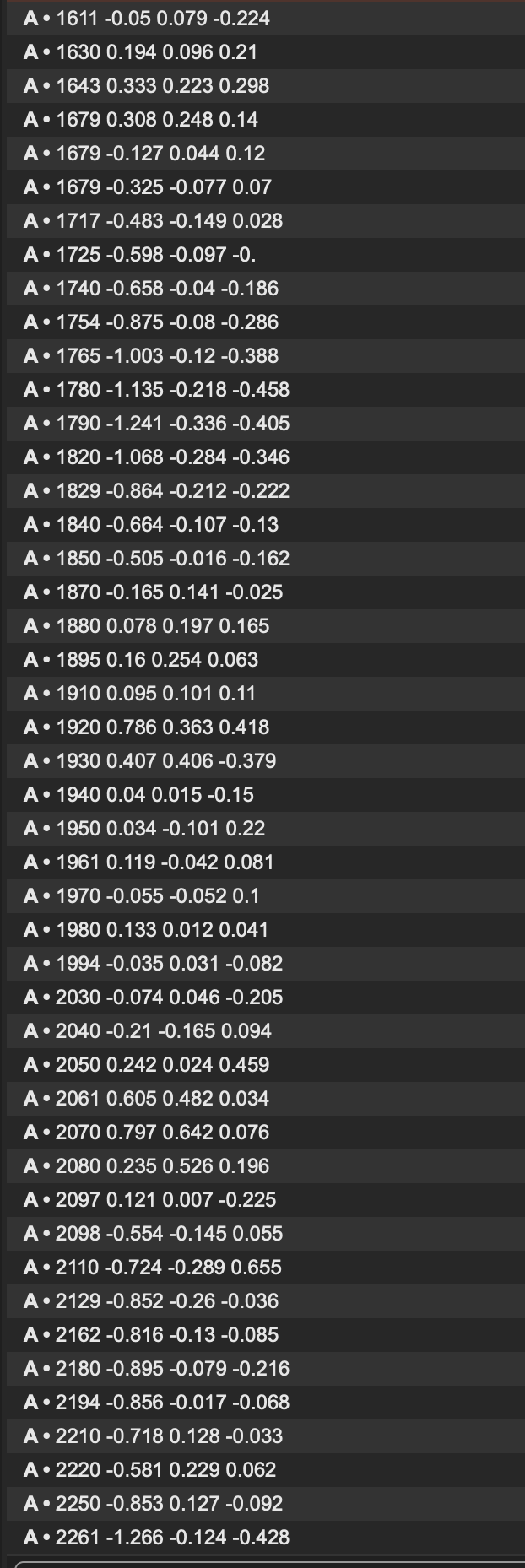
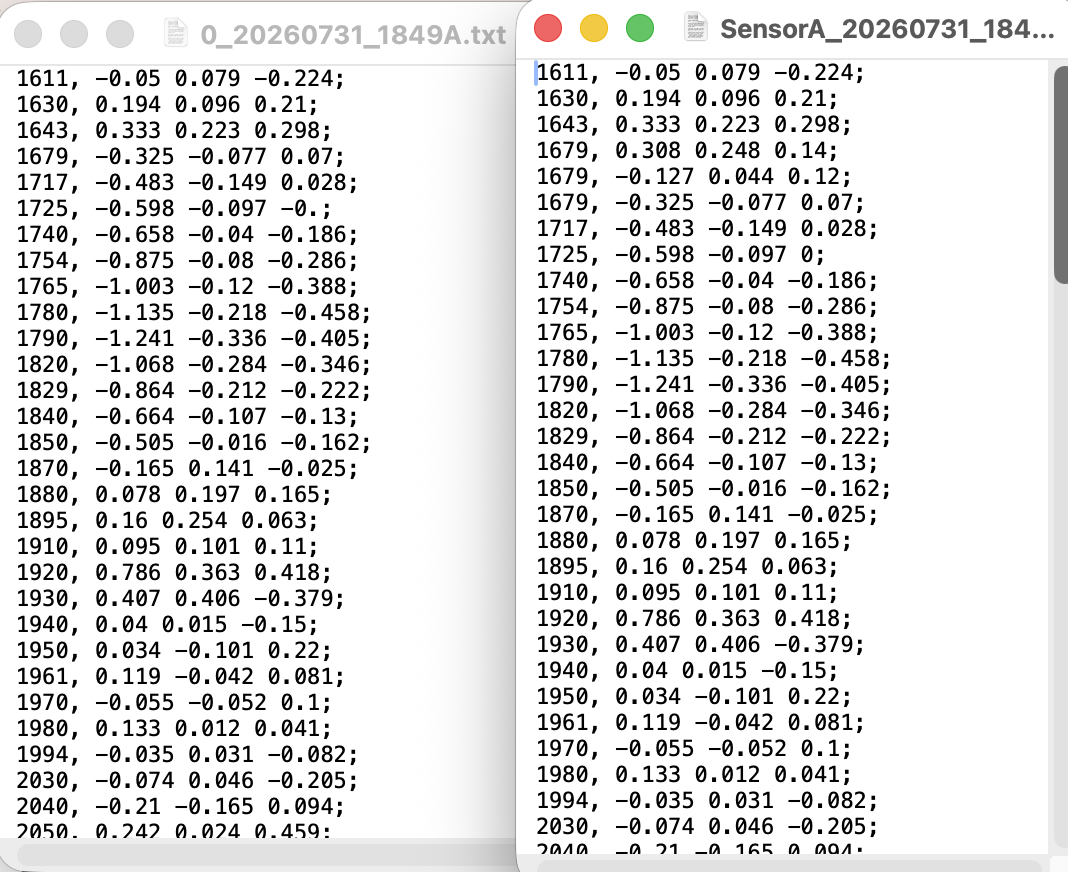
Left side is coll txt file, right hand side is js file
in that case you get real duplicates which coll removes.
print and js show exactly the same list.
As I have no time or hardware to test and can not think of anything else then to
remove not essential functions from the code and concentrate on sensor output in max.
adding this useless monitoring functions without being 100 % sure that they don't mess with the flow can be the cause of the problem.
ESP senders will not be able to run from a battery, power consumption is too much for longer period. means remove all power saving functions, remove disconnect detection, blinking,
in short anything that is not essential.
here is competely stripped code for you to test.
everything except sensors send/receive has been removed,
no power saving, CPU at max, serial BAUD back to 115200.
if you confirm it works better, then you might try to add your blinking or
disconnect detection, but I am out of that now.
in case you want to keep code as is, and are happy with stripping multiple received
lines of values within 1 ms, coll would do that anyway.
if you prefer to use js, here is code that strips 5 consecutive duplicates.
Thanks so much for all your help throughout this — the sender/receiver codes, the disconnect detection, the js loggers, and all the patient debugging along the way.
Quick update: I tried the minimal stripped-down code you sent. The duplicate-line pattern (js keeping more lines than coll) still showed up even there, so that confirms it's unrelated to the LED/S1/S2/OK monitoring — those weren't the cause. I'm going back to the fuller version with all the indicators, since they're cleared now.
Really appreciate the time you've put into this, especially given how busy things are for you right now. I'll keep testing and report back if anything comes up.