
Sending Art-Net data with vanilla Max9 objects

Hello Max community,
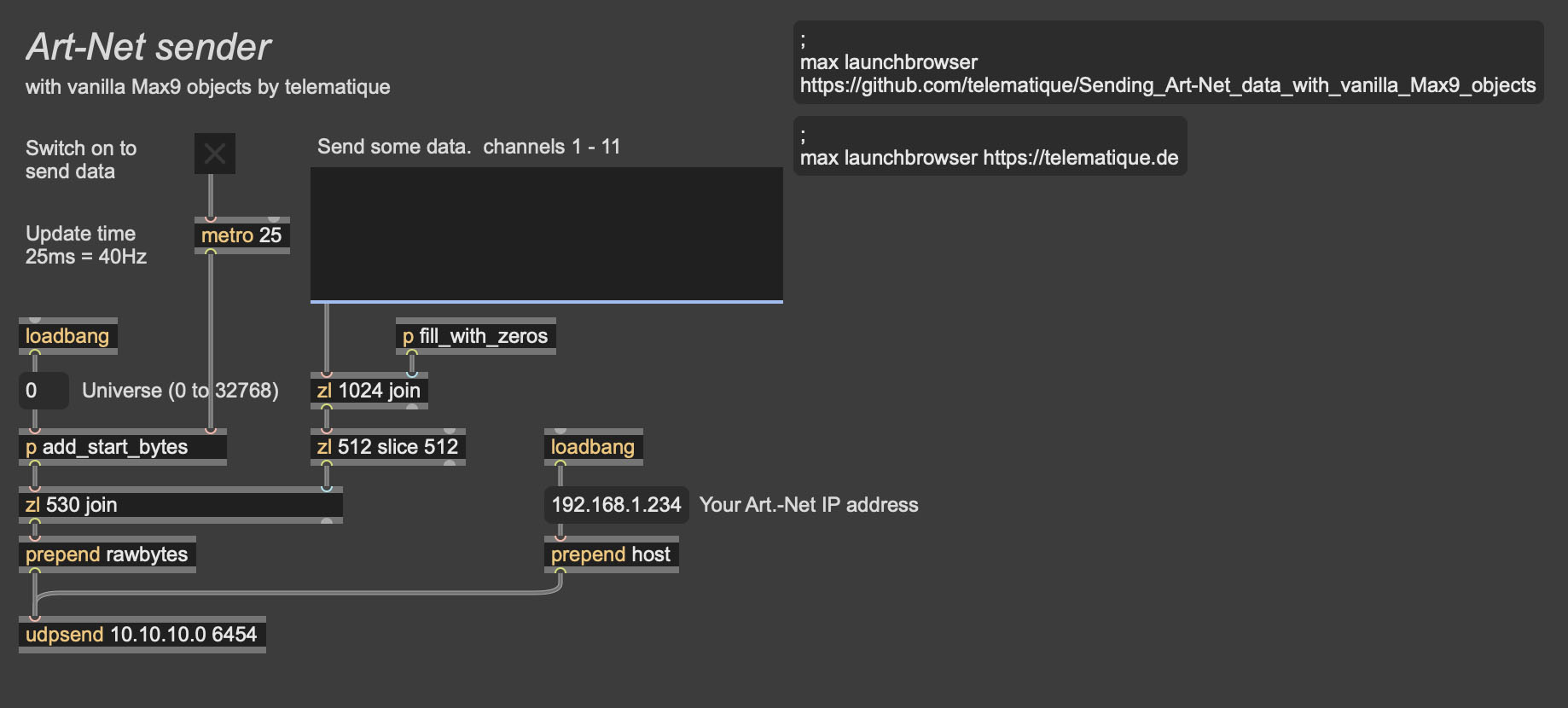
Cycling74 added the rawbytes message to the udpsend object so now we are able to send Art-Net data with vanilla Max9 objects.
Here you can download a simple demo patcher:
https://github.com/telematique/Sending_Art-Net_data_with_vanilla_Max9_objects
Simply modify the following parameters:
- Your Art-Net IP address
- Update time (common value 25ms = 40Hz)
- Universe (0 to 32768)
Successfully tested on a Silicon Mac with an ENTTEC ODE MK2.
Maybe someone will find this useful.
Happy patching,
telematique

Nice share 🙌

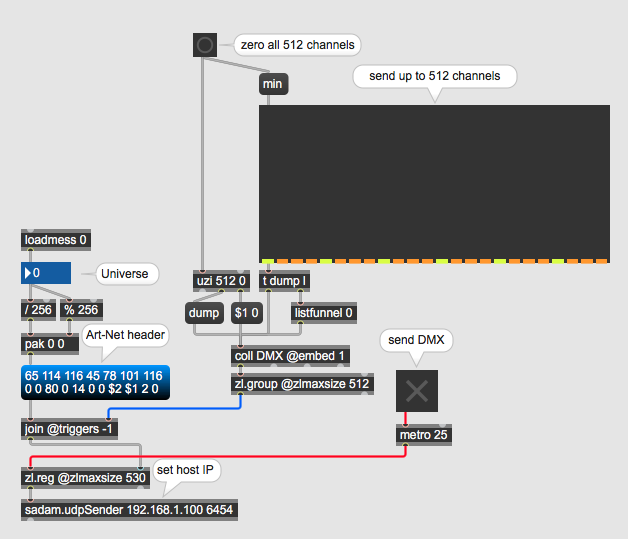
sadam.udpSender is option for older max versions.
at least from max 5 up

Hello Telematique,
Great that you found a solution which works with native Max objects and share it with us.
Thank you so much. From my perspective this solution closes a big gap. Will check it out today.
No need for the "Beam for Max" external which is quite expensive and oversized for send a few Art-Net channels.
For older versions of Max and Mac Intel machines there is also the Art-Net external imp.artnet.controller from David Buttler.
Best,
Pelo

Super nice share!
How about receiving Art Net data?
B
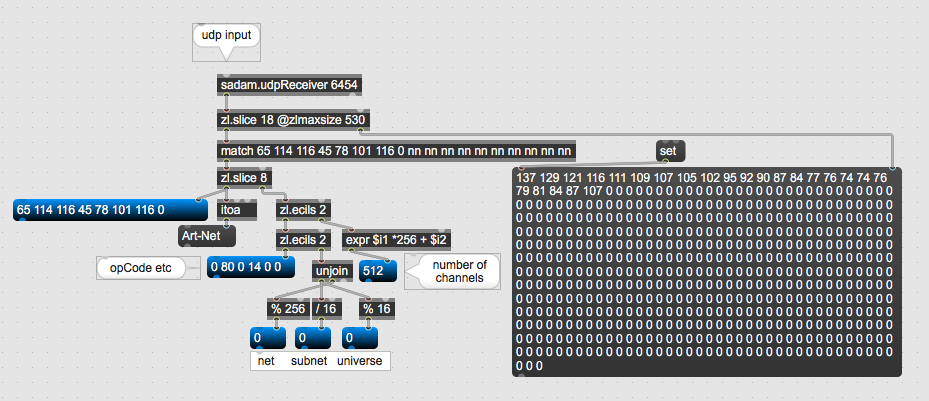
parse received packet header same way as you format it for sending.
after matching 8 bytes for "Art-Net" 0x00 , next bytes can be matched to
get OpCode and all the rest
Hey @source audio, thx for the reply.
Some of this probably above my head but I managed to get a start!
Probably an easier way, I can receive the commands but as far as choosing subnet, universe on the receiving end is beyond me at the point!
Any help would so appreciated!!
Bill
receiving art-net data from remote devices is not simply loopback
of sent messages.
You might want to read art-net specs to get better picture.
what exactly do you need to receive ?
check status of controlled devices,
or something else ?
Source Audio, thx for the reply.
You can see my limitations here!
I'm very familiar with OSC but for DMX/ArtNET, I've always relied on David Butler's IMP objects to do basic things like changing presets and very limited control of parameters on my max patches from a Grand MA lighting desk or another media server.
The idea that it can know be done on vanilla Max objects is exciting.
I've just started to dig into the specs.
B
if I remember correctly, imp.artnet objects only sent dmx packets
no polling requests or anything like that.
imp.artnet.node also only listened to that.
if that is all you need, then it should not be difficult
to parse net, subnet, universe, number of channel and then data.
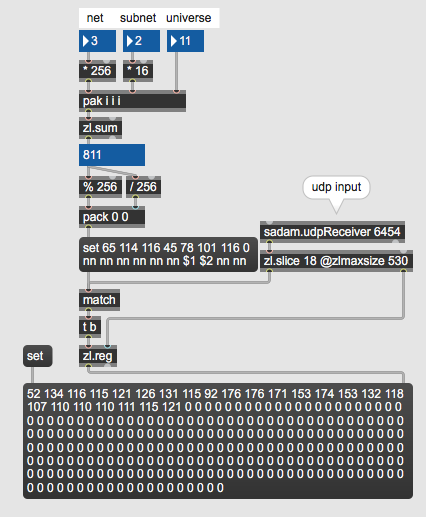
I don't use max 9 , that's why sadam ...
here you can pick net, subnet, universe to monitor
Wow, thank you, amazing.
I’m away from my machine but will check it out later.
Yer’ an amazing resource on this forum.
B
you are welcome.
In case you need other then ArtDmx data packet OpCode
now you know how to parse Art-Net header.
in docs they are represented in HEX
OpOutput used in your code 0x5000 = 50 hex or 80 decimal.
Hello Source Audio,
Thanks for sharing the receiver.
Now we are independend from third party externals :-)
Hopefully this solution is stable.
Here is the Max9 version of your patch.
Best,
Pelo

I tried it with Max 8 and it doesn't work( It works with Max 9).
Is there something different with udpsend in Max 9?

yes, in Max 9 updsend can send raw bytes. in Max 8 you can use sadam.UdpSender from the "Sadam Library" package

Thank you! Spared me having to blow a bunch of money on Battleship Beam.
\M

Hi TELEMATIQUE,
Thank you very much for your work.
I'm presenting a show at a theater equipped with ArtNET and today I tried using your patch to control fixtures but I couldn't seem to be able to connect to their node.
Their LX tech said that the node said I was not connected.
I'm on a M5pro mbp running Max9
I connected my laptop to their node via ethernet, set my address to manual in the same range as their node and then changed the patch udpsend ip address to match their node.
Not sure if there is something else I should do but the node doesn't see my laptop. The orange and green LEDs on my ethernet port are flashing but no artnet connection..
Should I try different subnet values for my laptop?
Thanks!

Hi Georgina,
Perhaps I can help you. I reacently used this patch.
Seems that you did everything right.
What IP have you set in the message box which is labled as: "Your Art-Net IP address"?
This IP address has to be the target address of the lightning equipment.
Make sure that you have not accidently deleted the port 6454 at the udpsend object.
Have you made a standalone or is the patch running in Max9?
If you made a standalone application you have to allow access to local networks in the macos preference.
Good luck,
Mike
Hi Mike and thank you!
The message box that says "your artnet IP address" is set to the ip address of the theatre's artnet node (is something like 17.2.1.108)
The port number 6454 is still there
Basically I took Telematique's patch and ran it with Max9 only changing the IP message box..
I created a new location in my computer's preferences and set the Ethernet address to 17.2.1.112 or something in the same domain) subnet mask is 255.255.255.0
I'm pretty sure Max is allowed to use the network by the system because it is set to communicate with a windows pc on another patch...
Why do you set IP address manualy ?
To make proof test you should disconnect
any kind of network connection,
also including WiFi, just to be sure.
Then plug ethernet cable and let it connect using
automatic DHCP so that it gets assigned IP from the host.
Unless host reserved that fixed IP including all dns etc settings for your MacBook.
It is possible to use multiple network connections at same time,
also from Max, but it must be done in proper way.
Hi Georgina,
from my perspective eveything looks good.
If I were you, I would test the Art-Net connection from your Computer to the theatre's artnet node with another software to be sure, that the connection is technically working.
I can recommend QLab. They allow you to send 20 channels with the demo and it is easy to setup and perhaps the theatre's ligning people can help ;-)
I personaly also prefer to use fixed IPs.
Good luck,
Mike
fixed IP can fail if not explicitly reserved by host.
other device could have grabbed it allready...
Hi and thanks!
I used a fixed IP because the theater LX person told me to do so. I will try automatic tomorrow.
"I'm pretty sure Max is allowed to use the network by the system because it is set to communicate with a windows pc on another patch..."You have to make sure that Max binds to correct network.
if you have several ones active, like en0, en1 etc assigning IP
address to udpsend does not make any selection in that sense.
in case you have multiple ethernet ports active, type this in terminal
networksetup -listallhardwareports
You can see which one to pick.
If you get IP ok and universe number matches, but max can't control the lights,
no need to install qlab or similar.
you can send single lines of hex bytes from terminal using netcat to test it.
2 lines below set full light xff or blackout x00 on 1st channel, universe 0
if you need to change universe to 1 set bold x00 to x01
lines end with IP you mentioned and ArtNet port.
nc -u -w 1 = netcat udp with auto termination after 1 second.
printf "\x41\x72\x74\x2d\x4e\x65\x74\x00\x00\x50\x00\x0e\x00\x00\x00\x00\x00\x0c\xff" | nc -u -w 1 17.2.1.108 6454
printf "\x41\x72\x74\x2d\x4e\x65\x74\x00\x00\x50\x00\x0e\x00\x00\x00\x00\x00\x0c\x00" | nc -u -w 1 17.2.1.108 6454
to address specified network interface add -b flag
for example -b en2 in case ArtNet needs to communicate on en2 port.
printf "\x41\x72\x74\x2d\x4e\x65\x74\x00\x00\x50\x00\x0e\x00\x00\x00\x00\x00\x0c\x00" | nc -u -w 1 -b en2 17.2.1.108 6454
last option is to send to all networks using broadcast IP address
255 255 255 255
but you don't want that really.

A bit OT, but I started some time ago to build a "zeroconf/bonjour" patch to get the list of nodes available on an Art-Net network.
I could test it only with the unique device I had at hand : an ENTTEC ODE ; I had no more time nor interest to continue working on it.
The patch needs the sadam library.
Don't hesitate to comment!
That is very helpfull.
try this for port types.
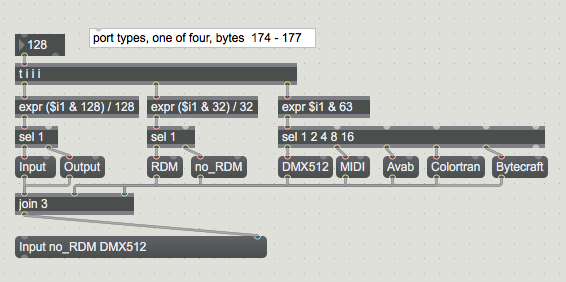
Thanks Source Audio.