
Sync a [phasor~] and [rate~] then have one of them be exactly 10 ms out of phase

Hello,
Question:
Is there a way to reliably and consistently sync up a [phasor~] and [rate~] then adjust one to be exactly 10 ms (or any number within the frequency of said [phasor~]) out of phase with the other?
Context:
I am trying to create a volume ducker that reduces clicks from the natural musique concrète chaos that [2d.wave~] creates. The [phasor~] that runs the X on [2d.wave~] seems to be in sync with most of the clicks that I hear. That is, when the X [phasor~] is beginning (or ending) a cycle, when the waveform goes vertical, the majority of the time the resulting sound from [2d.wave~] has a click from the sudden change. I want to use that timing from the end of that [phasor~] cycle to trigger a [zigzag~] envelope that turns down the volume via [*~]. The problem is that if I use the X [phasor~] to trigger the [zigzag~] envelope, the envelope will trigger too late; the envelope will begin right as the click audio artifact does. So, my solution was to have a [phasor~] and [rate~] perfectly in sync, except one is about 10 milliseconds (ms) out of phase. Whichever one is first will trigger the ducker, and the second one which should be about 10 ms later will cause the click audio artifact, but the ducker will have been triggered, so the [*~] will be at zero amplification while the click happens.
Problem:
My patch has six [phasor~] objects as independent clocks running the X on six different [2d.wave~] objects. So the solution of using the global transport synced with a [phasor~] & [metro] didn't make sense. Also, each X [phasor~] changes in rate (frequency) quite often.
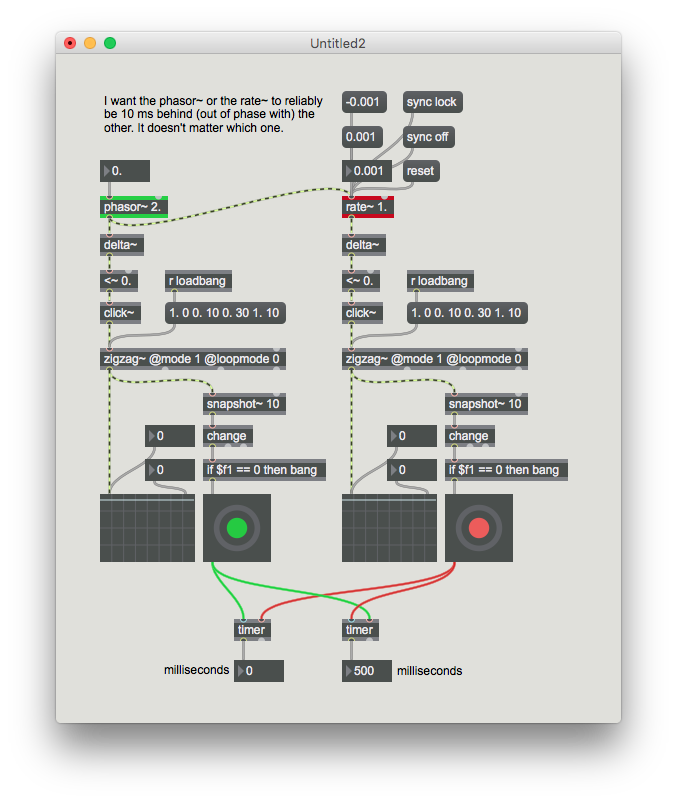
When I sync up the [phasor~] and [rate~] objects then try to adjust [rate~] to be off by however much phase, [rate~] adjusts that phase in the moment that I actually change it, not based on when it was in sync. Kind of hard to explain. When the two are perfectly in sync I will then click whatever number to change the rate~ phase alignment, and no matter what the number is it only depends on when I clicked on that change. Sample patch attached.
Thank you for taking the time to read this, any help would be much appreciated.
-Nick

You could insert +~ % 1. abs~
or even use delay~

I've done this kind of thing in gen~ a lot, you might want to consider solving it there.
It's pretty easy to rotate a phasor (i.e. shifting it in time) by adding a fraction and wrapping in [0,1]. In gen~ you can rotate by X with [phasor] -> [+ X] -> [wrap 0 1] (or [fract], if X is always positive). You'd want to do that before feeding to the [rate].
Then the task is to figure out what X should be. Basically, it depends on the phasor's duration. If the phasor freq is 1 (Hz), the duration is 1 second and if the rotation X is 0.1, then the resulting phasor will complete 0.1 seconds earlier. If the phasor freq F is 2Hz, then it will be 0.05 seconds early. For a desired predelay D then, you want a phase rotation of D/F.
If you don't have direct knowledge of the phasor frequency you can recover it from the phasor slope this way:
[phasor] -> [delta] -> [wrap -0.5 0.5] -> [* samplerate] => frequency in Hz
Graham
Also another trick for ducking:
Feed the phasor into a [triangle] (turns ramp into triangle wave), multiply by some number G larger than 1, then clamp in 0,1. That gives you a trapezoid envelope to multiply the signal with. (If you want smoother edges, you can feed it through a sigmoid shaper like a scaled tanh). The value of G determines the ratio of time in the duck, and thus depends on the phasor period again in a similar way as above.
Graham

if you really want milliseconds, then only tapout~ gives you that, but it will also destroy the possibilty of detecting a proper nonzero to zero transition, which is often needed in context of phasor.
so source audio nailed it already exactly with either delay or shifting the phase.
if you shift phase using +~ - %~ while caculating the shift in milliseconds according to the current phasor speed at audio rate, that will be quite expensive, so i would choose delay.
but maybe you dont need it at signal rate at all? then you could just delay the bang :)