
How to turn OFF max console window in Max for Live?

Hi.
I have a problem. In an Ableton Live set I am working on I did at some point make a max for live patch with ; max maxwindow in it to open the console window to check a few things while i was working.
This worked great, but I am done with the console window now, but even if I close it everytime something is printet to the max window (like a number being out of range, or udpreceive is binding to port etc.) the window pops up again! In the middle of the screen. Close it, same thing happens every message. I am not triggering any ;max maxwindow messages, and if i open the patches in another liveset I don't have the problem.
Is there a way to deactivate the max window again in this liveset?
Resolved: Turns out Granulator 2 was the problem.

I'm having this problem too, using Granulator II. Would really like a fix for this, as it keeps navigating away from Live and I can't find any errors that can be fixed. Never happened before using Live 9, but regularly happens now with Live 10.

about > ShowErrors > turn it off
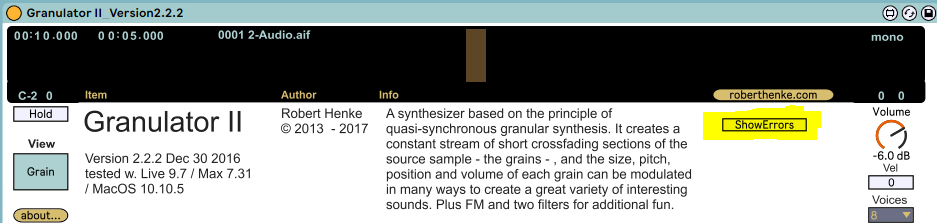
Had a different version of Granulator II without this option, but I've found v2.2.2 on his site to download. Thank you so much!

Hi Sarah. Years later, and I'm still dealing with this, Live 11 under Sonoma. First of all, I have a version that has the ShowErrors option, but the version number doesn't follow the same protocol that you posted (v2.2.2). Second, the option does not work. Where exactly did you get v2.2.2 from Robert's site? I cannot find it, anywhere. Thnx in advance.
Many thnx, DOUBLE_UG!!!