
Issue with regex @substitute

Hello all!
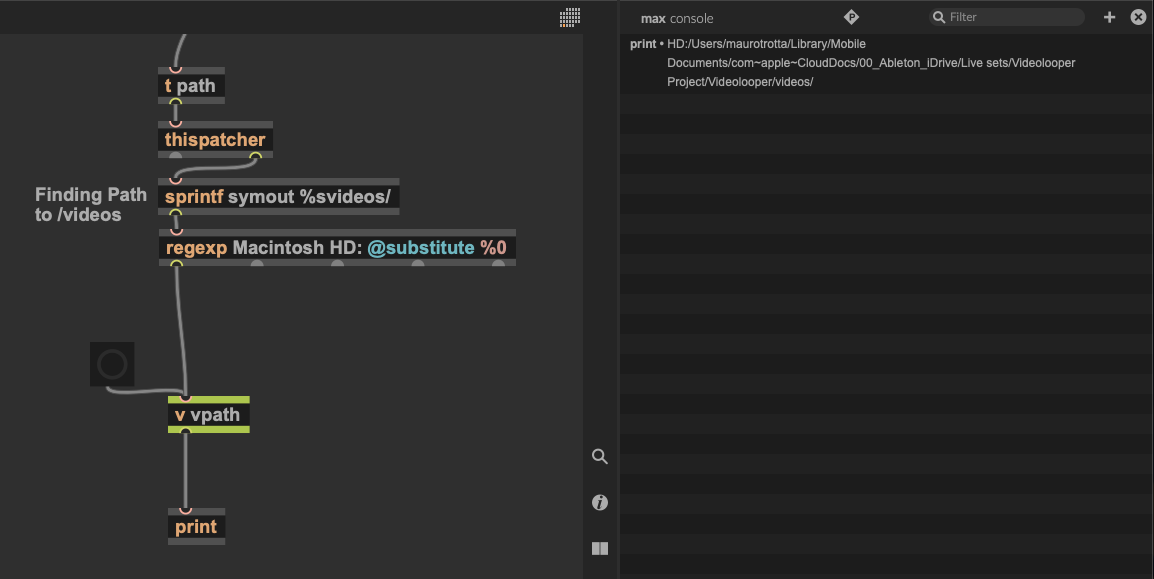
I need to delete part of the path I am getting into my patch in order for the jit.gl.movie I am using, can read the file. I am using regexp object to do it but still leave part of the path I need to substitute. What am I doing wrong?

use [conformpath]

It may work better wih quotes around the volume's name.
Maybe [conformpath] could be another option…

why would you need to remove "Macintosh HD" from the path ?
screenshot shows path issued from thispatcher and you add videos subfolder.
So you either use fixed absolute path to something
or ask your patch where it is in order to get that subfolder path next to it.
I don't remember jit.gl.movie needs slash based path like shell does for example.
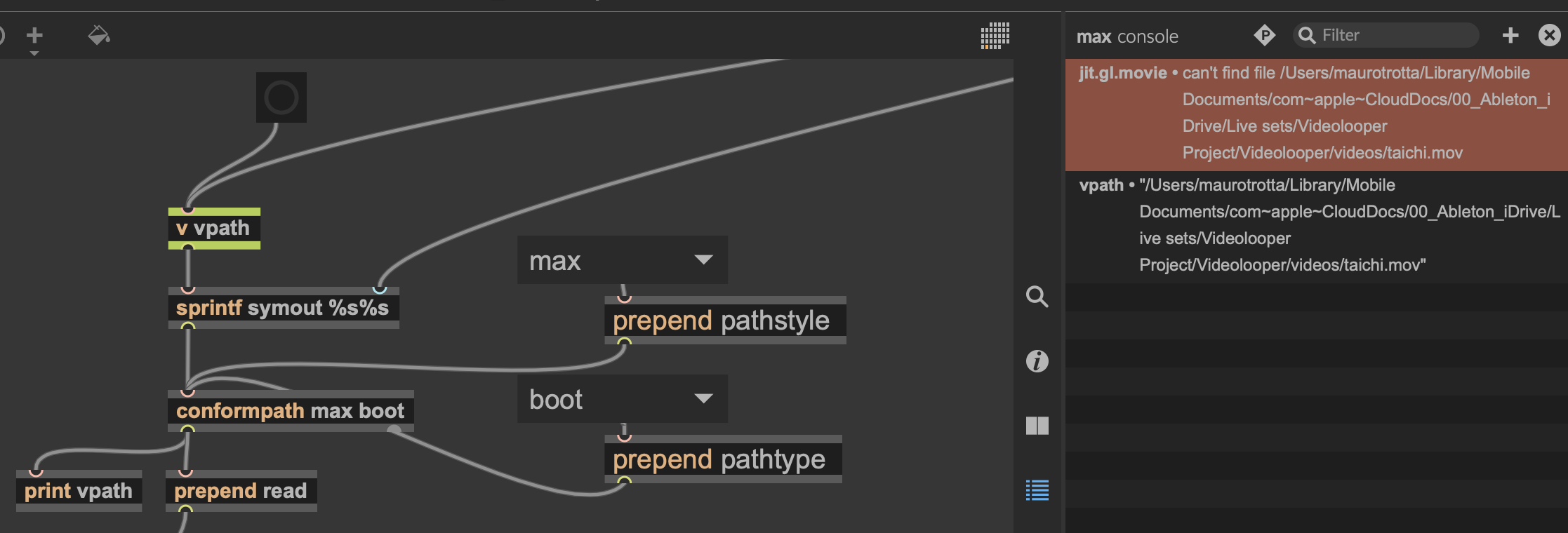
Thanks so much for the reply. Using confompath is definitely the object I need it. Now I am having an issue with the jit.gl.movie object finding the movie file. I already check that the filename is correct and that is in the right folder. I tried also all possible path style and type possible, but still jit doesn't find the file.
use dropfile to get absolute path to that video file
and see if it would load.
if not, then issue is caused by cloud file location/path

Given that path, there is a chance that Max doesn't have the required rights to read a file in that location. Try to put your file in a more common place (outside of Library) and see if it works.

On Mac
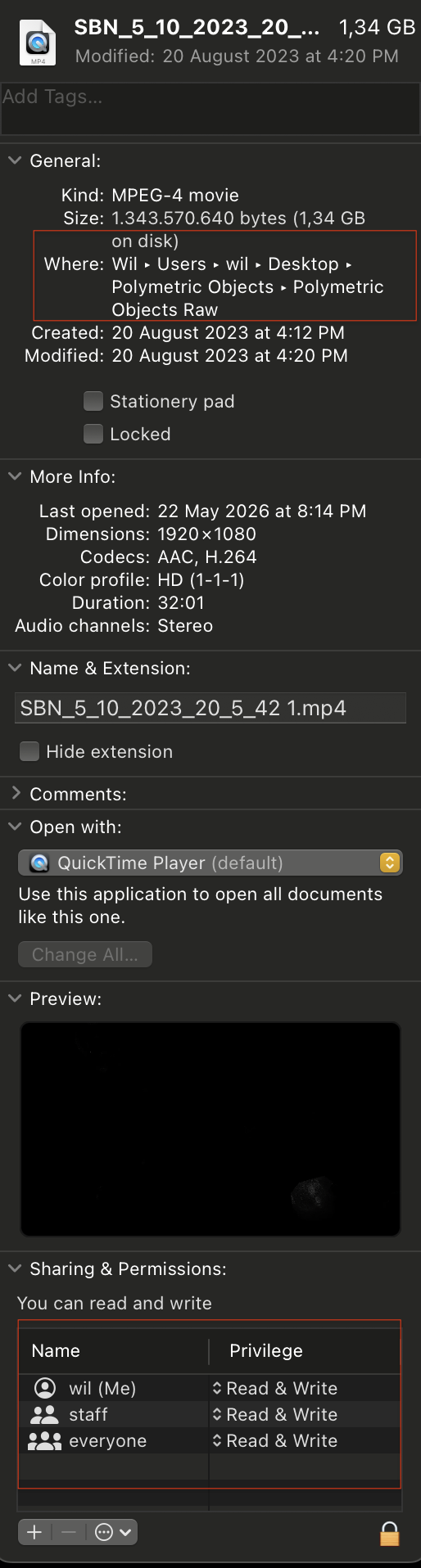
Find the file in the folder and right clik -> get info
You can find the path (bullet point arrow instead of slash)
and check permissions
recent Apple updated can cause havoc - all my web site work needed to be changed to "read and write" staff/everyone for localhost to find them inside Library/Webserver after updating to Taho
maybe similar issue here
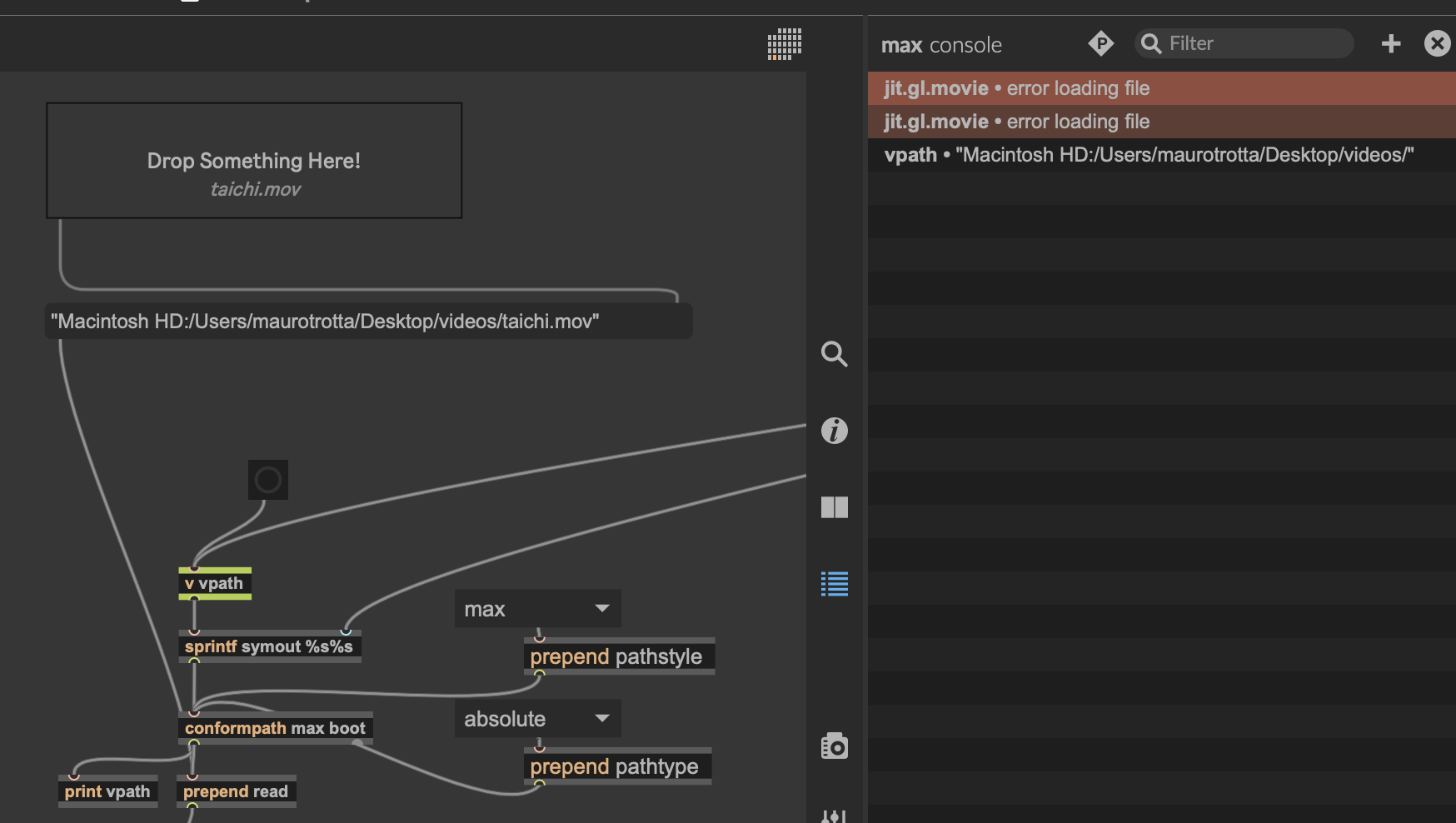
It only read the file when is dropped in live.drop and the path is sent to jit. Also works when the file is in the cloud or on the desktop. I wonder if the sprintf have something to do with it, because in the help section there is a note about using conformpath together with sprint about the use of blackslach character.
then capture both and compare.
mac creates no backslash paths.
You need no regexp or anything else to build that path.
but your console print shows only path to the folder, not the file ?
Are you trying to readfolder into polymovie ?
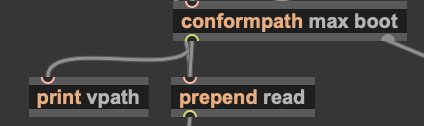

P.S.
can you explain in plain text what are you actualy trying to do ?
what for do you need sprintf symout %s%s ?
I just find out the issue was in the path I was sending to max was not the right one. Jit was looking for the movie clip in the folder where the .amxd was, and there was no folder with video files but in a level above. I simply move the .amxd to the level above folder and problem solved.
@source audio, just to reply to your question, I am trying to launch an empty midi clip in Live named exactly like a short movie file, located in a folder in the same location where the Max for Live device is. Because I want to have several videos, I got first the path of the folder where the videos are, and second the name of the playing slot clip, and for that I use sprintf symout %s%s, to combine the path of the folder with the name of file and send that to be read by jit.
I see, so you use this
combined with path and then launch video file (in case it exists)
named same as midi clip
then you need sprintf symout %s%s.mov
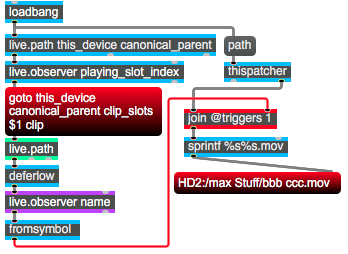
maybe there are other ways to scan that folder for video files
like to populate umenu
and then recall movie files using clip name only if video file with that name exists.
that would produce less "can't find ... " errors
Actually I did first something like what you described, but because it involved node.script and scripting, I kind of found it too far from my range. But it was working nice, first you could drop the files in the device and automatically a /videos folder in the Live project folder was created and copies of those files where created as well. Then they will populate the umenu and you could send them to jit from there, but my initial idea was to use the clips because you can have more control that way and it was way cooler. But the code was done with AI and I can´t really say I understand it hehe so I started doing it with the objects I understand. Eventually I will reverse engineer the script part and do it that way and include the clip launching part. Thanks for the comments, they really helps!
to use node script to start few videos is definitely inefficient.
also to have to copy videos to be able to use them.
all you need is to place videos that you need in that folder.
then pass folder path to umenu, set to autopopulate with found movie files.
that is all.
when you get clip name, pass it to umenu
and if found, video will play.
need help with that ?
I can figure out how to pass the folder path to umenu and set it to autopopulate, but what I think it would be cool is to drag and drop files into the M4live device from anywhere on your computer/cloud and that they get placed in that folder, so you could skip the step of leaving Live to place files in the video folder. I just want to do the workflow as smooth as I can. For that part would be nice some help :) At least a hint into what should I be looking at would help.
to drag and collect paths to files and store it into live set,
would need dropfile and place to store the paths
for example pattrstorage or dict.
but you need to somehow organise numbering of added files,
removing of non existing files, etc.
that`s why fixed folder and umenu autopopulate would be simpest solution.
I am away for the most of the day,
but when I get back I'll look what you decided.
and will help you to go that direction.
In the meantime you could take a look at umenu help,
as well as dict and patr stufff
I went with the autopopulate-umenu-option, but because I play the video files when I launch the clips with the same name that the files, the umenu becomes redundant. I can use it as a reference of what names are in the /videos folder, and that's good. About the other possible method, of dropping files into the device and saving the paths, I find it a bit risky because let´s say I am in other computer and there was one of the files that was saved locally, then it doesn't work. I think I need to think more about how the device can work, I am just sharing my thoughts about it. When everything is more clear I will definitely come back
If you insert umenu between your play command and video player,
you will avoid errors if clip name has no match as video file.
Your other problem:
if you get -2 output from live.observer
but it does not successfully trigger stop message , then maybe defer it's output.
If I got it right, you mean to insert umenu after the clip is launched, then it should receive all the path to the video file, and if it match with the one in the already populated umenu, then send to jit to be read, is that what you mean? If yes, then I wonder how can umenu check that his content match with the incoming one? I check the messages umenu can receive but don't see any that would fit to that.
And about the live.observer, I add a defer and then deferlow after sel-2, and none of them stop the playing movie. I check if the stop message receive the bang and it does. I tried connecting playing_slot_index and another fired_slot index into a onebang that later goes into the stop message, but it didn't work either. I have the feeling I could go on and on trying different objects but it seems the issue is somewhere else.
Your problems could be solved much easier if you upload your code.
what I meant was that a clip can match no video file at all.
so you form your path by absolute path to your device's location, like
HD2://MyProjects/
and add clip name + extension, for example Track-1.mov
HD2://MyProjects/Track-1.mov
if you pass that to absolutepath it will output it , otherwise the message notfound.
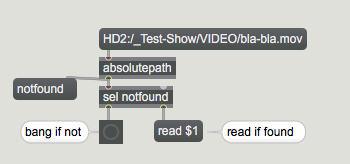
if you pass that path directly to video player, it will error about not being able to find the file
in case no video with such name exists at that path.
here is example showing umenu populated with video files,
it displays only file names, but outputs full path if one
recalls one item using exact symbol.
which woud be your clip name
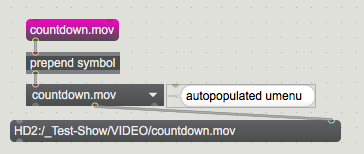
here is simple patch doing what you described, in Live 11
starts, stops, no problem, no matter if stop came from clip itself or from master track.
but NOT from Live transport, because that does not change clip play status
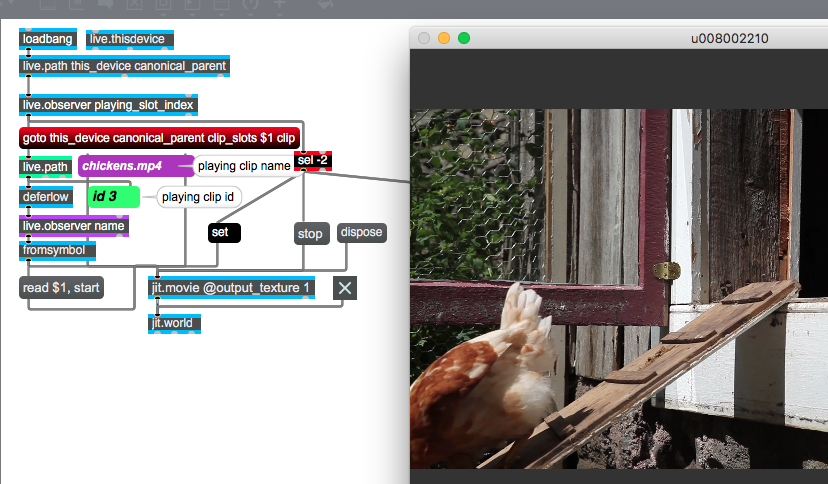
I am using the absolutepath object to detect if a file is found or not, that I find very useful, but combining the umenu and clip name approach is still confusing for me and can´t tell if it makes sense.
About stopping the movie file, I tried what you mentioned but still not working for me. What does the set message is for in the diagram you sent? In the patch I send you, you should see encapsulated the "clip tracker name", and there I guess might be the issue because every time a clip is playing, the live.observer sends a bang that trigger messages into live.object in order to get the path to that clip, so I think after all clips stops and I get the -2, still the path is sent to jit and keeps playing. I tried to place a gate object before absolute path to stop sending the path, but no luck.
As first your clip name detection has too many objects
and is wrong anyway.
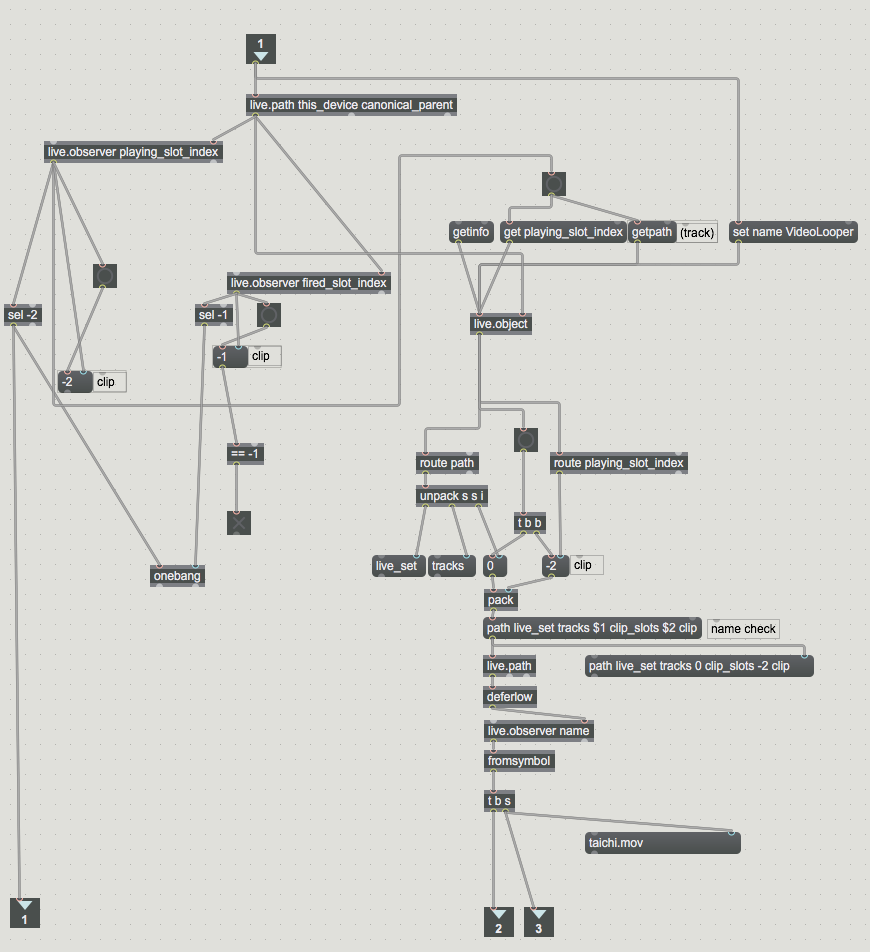
Why not as simple as in my original patch ?
get rid of all objects that are not really used.
also that node script patch
You can add later more functions if needed.
if you for example once get path to video folder,
why insert same thing again into umenu populate subpatch ?
About umenu - I posted that example so that you can see how to use it in case you need it.
absolutepath is enough to bypass non existing video files.
But if you place umenu in there, then no need for absolute path !
one or the other.
One has to learn to be efficient when patching stuff,
in first place if Live is involved.
that set message is used only to clear comment object showing currently playing clip name.
About video stuff in your patch, can't say much, I don't use Max 9 and jit.gl objects.
Making the clip name detection patch simpler solve the stoping movie clip issue. Now I want to work more in the jit objects I am using, because my laptops suddenly turns hotter than usual and is probably something to do with the video processing. Your comments have help me develop this much better, thanks a lot for that!