
Urgent: Stable 8-hour AV installation – stereo audio + two separate video outputs (beginner)

Hi everyone,
I’m fairly new to Max and trying to set up an audiovisual installation that I actually need to have running by this Saturday, so I’m a bit pressed for time. I’ve been trying to figure things out on my own but keep running into issues, so I thought I’d ask here.
What I’m trying to do is pretty straightforward in theory: I need to play back one stereo audio file and two separate video files at the same time, with each video going to its own projector. All three files are the same length (around 30min and heavy).
I’m on a MacBook Pro M3 Max running the latest version of Max 9. I’ve tried a few different approaches already but nothing has worked reliably so far – either the video routing to two separate displays doesn’t behave the way I expect, or things just start getting messy over time.
I guess my main questions are: what’s the best way to send two independent video streams to two projectors – two jit.world objects, two jit.window objects, something else entirely? Is jit.movie the right choice for playing back long video over that long a duration, or is there something better suited? And are there any general tips for keeping things stable over 8 hours – things like file formats, settings, .... ?
Any advice would be hugely appreciated! Thank you!

you could post a bit more infos about what you tried.
if you don't need tight sync between 3 files all is easy.
I guess you use video resolution that fits the projectors.
and not 120 frames per second if 30 would do.
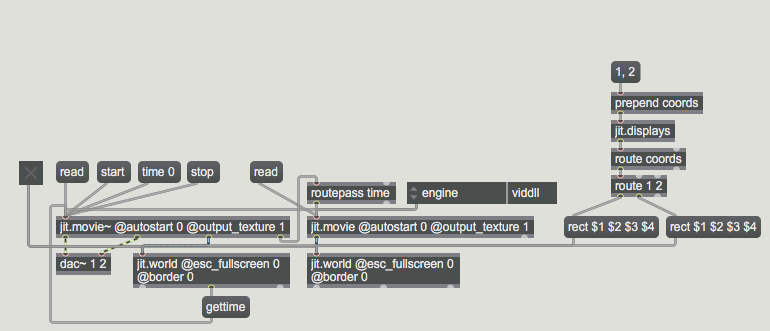
I would use jit.displays to target coordinates of projectors and
use borderless jit.world for 2 videos.
audio... nothing special about it, or ?
I don't know what best video engine in max9/m3 macbooks is, don't own any.
video guys might chime in ...
audio is nothing special, just stereo wav at 48khz. video should be .mov at 24fps if i remember correctly.
could you specify what you mean by borderless jit.world?
and in general, do you have any tips on how to keep startup, looping and sync simple? as I said.. i'm fairly new to this, so any hints are welcome.
thanks for the reply!
https://cycling74.com/forums/stable-8-hour-av-installation-stereo-audio-two-separate-video-outputs-beginner#reply-69bbb69b33cdba3b086d3faa

here's an example with comments:
for "must run this Saturday" you still provise less infos then I'd prefer to know.
If you got projectors configured right, means
you can address them with each video player all ok,
otherwise post that you need help with it.
playback options:
1- you merge one video and audio track and play them with jit.movie~
and sync 2nd video to 1st one
example:
2- you keep audio and 2 videos separated, use audio as master
and slave 2 videos from audio player's position.
example with 1 video, just add 2nd one
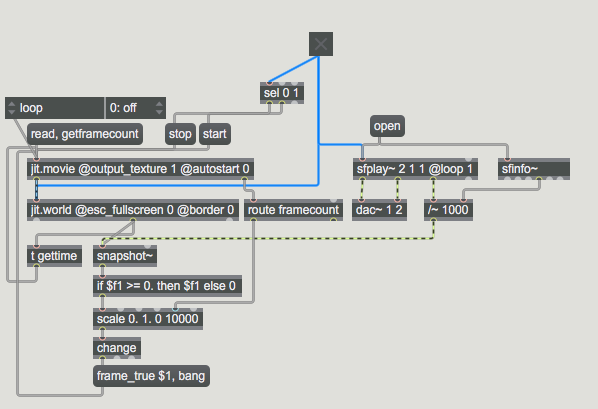
........
You also need to set all other relevant parameters for video playback
P.S.
if you don't need tight sync, then just run all 3 files in loop.
that would ease cpu/gpu load